Launch day feels like the finish line, and it is the starting line. Real users behave differently from test users, real data exposes edge cases, real traffic reveals performance limits, and real feedback shows which of your assumptions were right. Businesses that plan for what happens after launch get compounding returns from their software; those that do not often watch a promising product wither. This article describes what to expect and how to plan for life after go-live.

Launch day itself
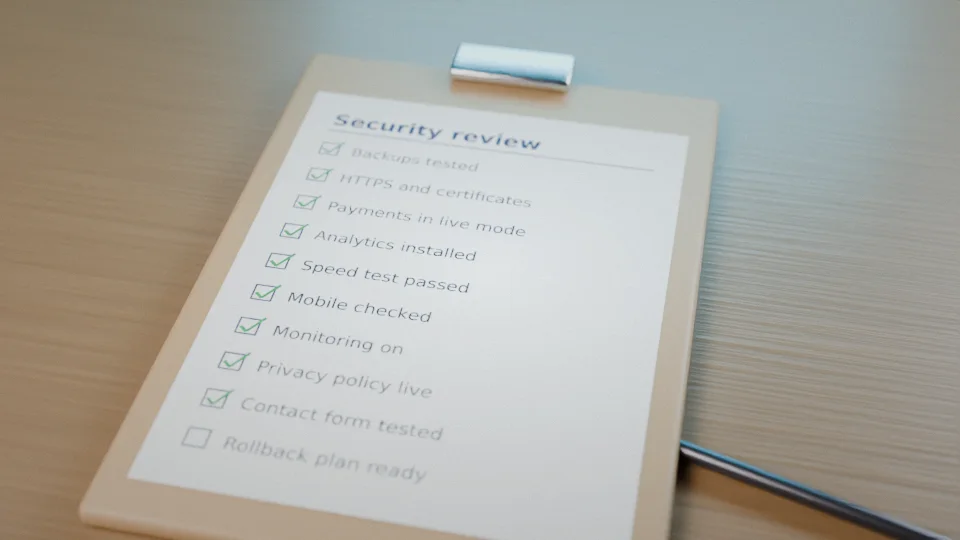
A well-run launch is calm. Before it, we complete final testing and a security and performance check (our security audit guide, Core Web Vitals); confirm backups are running and a restore has been tested (our backup guide); verify DNS, certificates and email authentication (our DNS and SSL article); prepare monitoring and alerts (monitoring); and write a rollback plan. Deployment uses the techniques in our zero-downtime deployment guide. After release we verify key journeys in production, such as sign-up, payment and the main workflows, and watch dashboards closely. Sometimes a soft launch to a limited group precedes the full announcement, using flags as in our feature flags guide.
The first week: hypercare
The first days are the most likely time for unexpected issues: a browser combination nobody tested, a data pattern nobody anticipated, a burst of traffic. We provide heightened attention: daily checks of errors, performance, payments and email delivery; rapid response to defects with fixes released quickly; and a channel for your team to report problems. Support staff on your side need a simple way to escalate, and answers to common questions prepared in advance. Track the issues raised; patterns reveal usability problems as much as bugs.
Days 8 to 30: stabilise and learn
Once the initial turbulence settles, we prioritise remaining defects, tune performance based on real usage (database optimisation, caching), and refine onboarding, since early user drop-off usually points to friction. Warranty periods, typically defined in the contract (see our hiring guide), cover defects in the delivered scope. Meanwhile analytics accumulate: which features are used, where people abandon, how long tasks take, which pages are slow. Complement numbers with conversations: speak to a few users about what they love and what confuses them.
Fix, improve, or add? The three kinds of work
- Fixing what is broken: bugs, errors, performance problems. Highest priority, especially anything affecting money or security.
- Improving what exists: smoother flows, clearer wording, faster pages, better defaults. Often the best return on investment.
- Adding new features: only when evidence shows they will move a metric or unlock a segment. New features add long-term maintenance cost, so each should earn its place.
The improvement loop
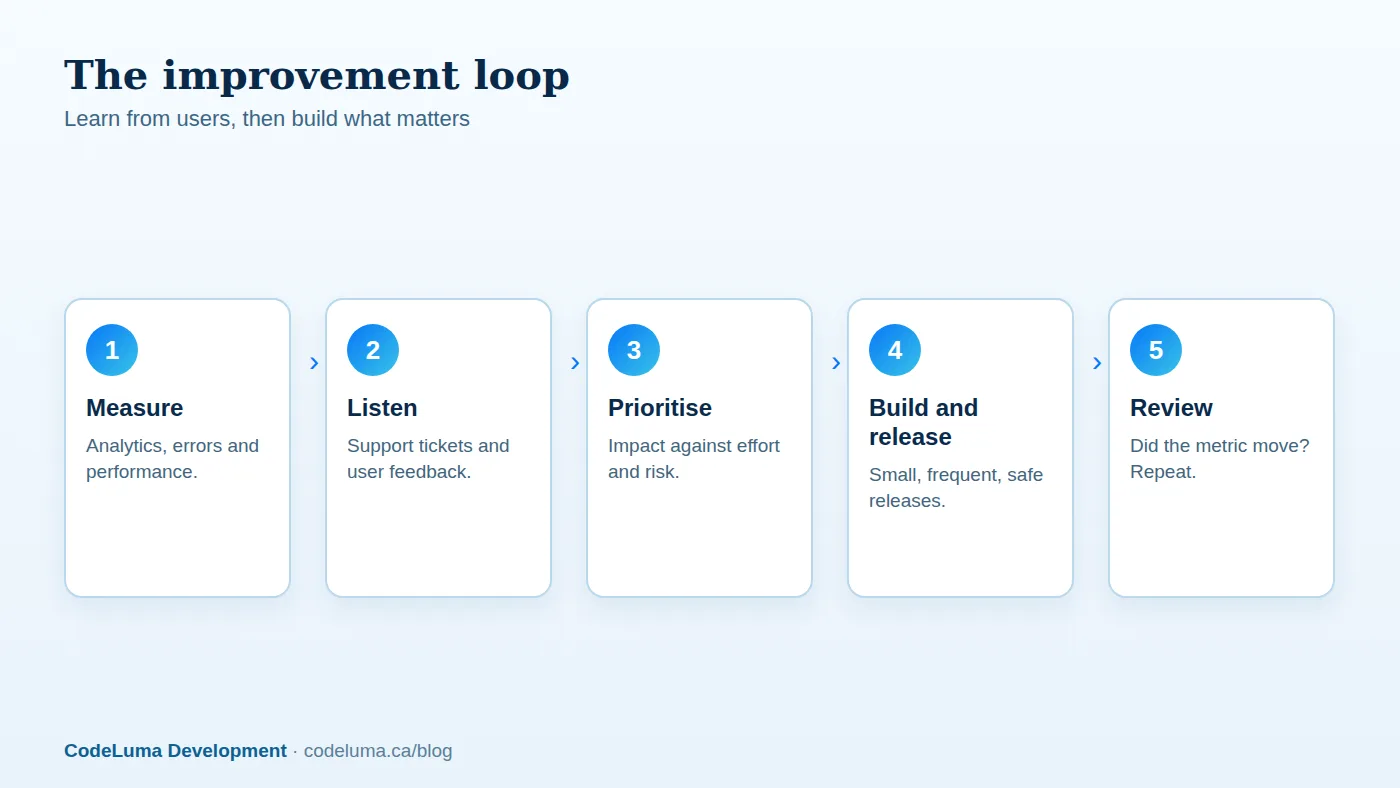
Successful products iterate. Measure what happens, listen to users, prioritise by impact against effort and risk, ship small changes frequently, and check whether the metric moved. Keep a visible backlog and hold a short review every month or two with your technical partner; see our communication article. Use experiments and staged rollouts for risky changes. Conversion-focused iteration is covered in our conversion optimisation guide, and search improvements in our AI search article.
Ongoing maintenance: the non-negotiable part
Alongside new work, software needs regular care: security patches, dependency and framework updates, certificate and domain renewals, backup verification, capacity checks, and monitoring with real people responding. This is what a maintenance plan provides; see our article on the value of a retainer. Skipping it is false economy: the deferred work accumulates as risk and eventually as an expensive emergency upgrade or a security incident. See also our web vulnerabilities article.
Support for your users
Decide how users get help: in-app guidance, a help centre, email or chat, and who answers. Set expectations for response times. Route bug reports to the development team with the context needed to reproduce them (browser, steps, screenshots, account). Track common questions and use them to improve the product and documentation. Notification and status communications matter during incidents; see our notification article.

Growth planning
As usage grows, technical and business questions appear together. Technically: is the architecture ready for ten times the load (scalable architecture, high availability, traffic spikes), are costs under control (our cloud cost guide), and are we ready for larger customers who will ask about security, audit logs (audit logging) and data handling (privacy law overview)? Commercially: how do pricing, plans and packaging evolve (subscription billing), what integrations would unlock new segments (integrations), is there a case for a mobile or offline experience (PWAs), or AI-powered features (generative AI)? A roadmap reviewed quarterly keeps the answers deliberate.
Budgeting for life after launch
Plan for three ongoing costs: hosting and services (infrastructure, email, monitoring, third-party licences), maintenance and support (patching, monitoring, bug fixing, a defined allowance of hours) and improvement work (new features and optimisations from your roadmap). As a rough rule of thumb, annual maintenance and support often falls in the range of fifteen to twenty percent of the original build cost, with improvement work on top depending on ambition; treat that as a starting point and revisit it based on your application's complexity and criticality. Options for structuring these engagements are in our article on pricing models.
Handover and continuity
Whatever the arrangement, you should hold the keys: code repositories, hosting, domains and accounts in your name, current documentation, and a record of decisions. That makes it possible to bring in another team or hire in-house at any time without disruption; see what to look for when hiring. Good partners make themselves replaceable through documentation, and stay because they add value.
Common post-launch mistakes
- Disbanding the team the day the site goes live.
- Having no monitoring, so users discover the outages first.
- Ignoring analytics and feedback, then building features by opinion.
- Postponing updates until they become a crisis.
- Adding features endlessly without retiring unused ones.
- No budget for ongoing work.
Software is a living asset. Plan for its care from the start. Our maintenance plans and support services cover the ongoing side, our hosting service provides the monitored infrastructure, and our software team continues to iterate with you. Talk to us about a post-launch plan before you launch.
Put this into practice with CodeLuma
CodeLuma stays with you after launch with monitoring, fast fixes and a steady improvement roadmap, so the first release becomes the foundation for growth rather than a one-off delivery.
- Custom software development - tailored systems, integrations and internal tools.
- Maintenance and support plans - updates, monitoring and ongoing improvement.
- CodeLuma support - help from a real team when you need it.
- Managed hosting - monitored, backed-up, Canadian-friendly hosting.
Start a conversation. Tell us about your project and we will reply with practical next steps, or browse all CodeLuma services. CodeLuma Development Inc. is based in Nova Scotia and works with teams across Canada and remotely.