Everything fails eventually: disks, servers, network links, software releases, even entire data centres. High availability (HA) is the discipline of designing systems so that individual failures do not become outages, or at least become very short ones. It is not about preventing failure but about expecting it and responding automatically. This guide explains how to set the right availability goal, where to add redundancy, and how to verify that failover really works.
Decide how much availability you need
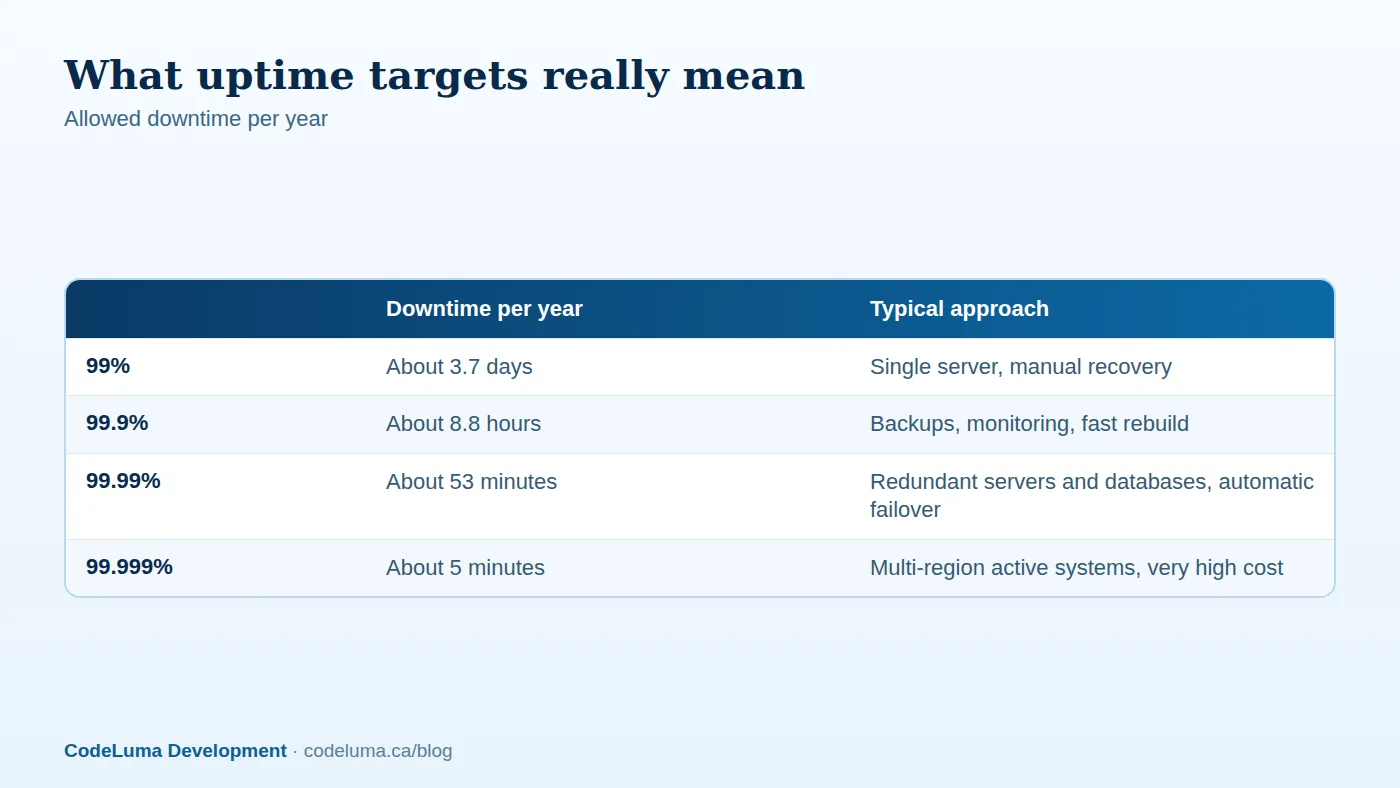
Start with the business, not the technology. What does an hour of downtime cost in lost revenue, staff time, contractual penalties and reputation? Does it matter at 3 a.m. on Sunday as much as at noon on Monday? Availability targets are usually expressed as percentages, and the table above shows what they permit. A brochure website tolerates far more downtime than a payment system or a clinic scheduling platform. Define two numbers together: the recovery time objective (RTO), how quickly service must return, and the recovery point objective (RPO), how much recent data you can afford to lose. These drive design and cost, and we discuss them further in our backup and recovery guide. Be wary of promising "five nines" unless you can fund and operate the architecture required.

Find and remove single points of failure
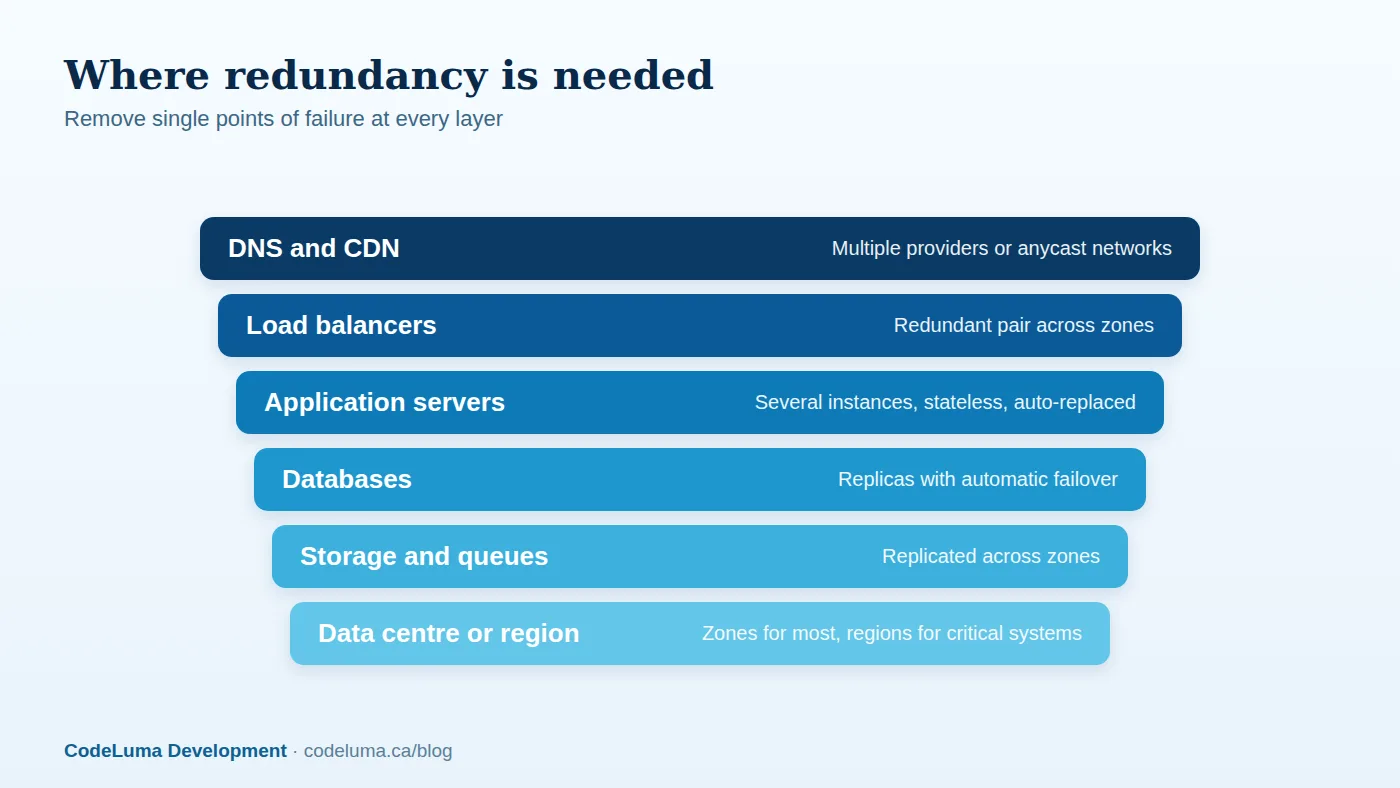
Walk through the request path from a user's browser to your data and ask at each step: what happens if this fails? Typical single points include one server, one database, one load balancer, one DNS provider, one availability zone, one third-party API, a single person who knows how to fix things, and a single manual deployment procedure. Address the most likely and most damaging first. Redundancy at only one layer just moves the weakness elsewhere.
Application tier: stateless and replaceable
Run several identical application instances behind a load balancer. Design them to be stateless: sessions in a shared store, uploads in object storage, configuration from the environment, so any instance can serve any request and failed ones can be replaced automatically. Containers and autoscaling groups make this straightforward; see our Docker article and our scalable architecture guide. Health checks let the load balancer stop sending traffic to unhealthy instances, and rolling deployments update them without downtime, as in our zero-downtime deployment guide.
Data tier: the hard part
Stateless servers are easy to multiply; data is not. Options include:
- Primary with replicas and automatic failover. Writes go to one primary, copied to one or more replicas; if the primary fails, a replica is promoted. Managed database services handle this well. Understand replication lag and what happens to the last few transactions.
- Synchronous versus asynchronous replication. Synchronous replication avoids data loss but adds latency and can reduce availability if the replica is unreachable; asynchronous is faster but can lose recent writes in a failover.
- Multi-primary or distributed databases allow writes in several places, at the price of conflict handling and complexity.
- Caches and queues should be replicated too, and applications should tolerate their loss.
Replication is not a backup: a mistaken delete replicates instantly, so keep separate backups and test restores.
Availability zones and regions
Cloud providers divide regions into isolated availability zones. Spreading instances and databases across two or three zones protects against a single data centre failure at modest cost and is the sensible default for important systems. Multi-region designs protect against an entire region failing, but they multiply cost and complexity, particularly for data consistency, and are justified only for the most critical systems. A simpler alternative is a warm standby in another region: a scaled-down copy that can be promoted, with data replicated continuously. Compare the trade-offs in our hosting options article.
Edge, DNS and third parties
A content delivery network absorbs traffic and can continue to serve cached content when your origin is struggling; see our edge delivery article. Use resilient DNS with a good provider, and think carefully about dependencies such as payment gateways, email providers and authentication services. For each critical external dependency, decide what happens when it is down: queue and retry, show a friendly message, switch to a fallback provider, or degrade features. Our guide to integrating third-party services covers timeouts, retries and circuit breakers.
Graceful degradation
Full availability of every feature is not always required. Design the system to shed non-essential functionality under stress: serve read-only pages when the database is in failover, disable recommendations or search suggestions if the recommendation service is down, queue emails and reports, and show cached data with a "last updated" note. Timeouts, retries with backoff, circuit breakers and bulkheads stop one failing component from dragging everything with it. Rate limiting and load shedding protect the core during spikes; see our traffic spike playbook.

Deployments and human error
Many outages are self-inflicted: a bad release, a misconfiguration, an expired certificate, a mistaken command. Availability therefore depends on process as much as hardware: automated tests and pipelines (CI/CD), canary or blue-green releases with quick rollback, feature flags (our feature flags guide), infrastructure as code (IaC), change review, and tight control over production access. Do not overlook the mundane, such as certificates and DNS (our DNS and SSL article).
Monitor, alert and practise
Redundancy that is not monitored quietly erodes: a replica stops replicating, a standby server is misconfigured, and nobody knows until the primary fails. Monitor the health of every component, replication lag, capacity headroom and synthetic user journeys, and alert humans on symptoms customers would feel; see our monitoring guide. Then test failover deliberately: simulate the loss of an instance, a database primary or a zone in a staging environment, and periodically in production with care, using controlled chaos experiments. Rehearse the runbook and hold blameless post-incident reviews so each event improves the design.
What it costs
Redundancy roughly multiplies infrastructure cost for the protected components and adds engineering and operational effort. Moving from a single server to a multi-instance, multi-zone design with a managed replicated database may double hosting costs, but it often takes availability from about 99.5 percent to about 99.95 percent. Compare that against the cost of downtime, and apply the investment where it matters: the checkout, the login, the core database, not everything equally. Cost-control tactics are in our cloud bill guide.
A pragmatic roadmap
- Define availability, RTO and RPO for each system with the business.
- Add monitoring and automated backups, and test restores.
- Run at least two application instances behind a load balancer, in separate zones.
- Use a managed database with automatic failover and read replicas.
- Automate deployments with health checks and rollback.
- Add graceful degradation for third-party dependencies.
- Test failover regularly, and only then consider multi-region.
The cheapest outage is the one you rehearsed. Our hosting team designs and runs redundant infrastructure to a target agreed with you, and our maintenance plans include the monitoring and failover testing that keep it honest.
Put this into practice with CodeLuma
CodeLuma designs and operates redundant, monitored architectures matched to your uptime needs and budget, so a failed server, database or data centre is an event your customers never notice.
- Managed hosting - monitored, backed-up, Canadian-friendly hosting.
- Custom software development - tailored systems, integrations and internal tools.
- Maintenance and support plans - updates, monitoring and ongoing improvement.
Start a conversation. Tell us about your project and we will reply with practical next steps, or browse all CodeLuma services. CodeLuma Development Inc. is a Canadian company that works with teams in Windsor, Essex, London, Toronto, Mississauga and across Ontario, throughout Canada and remotely.