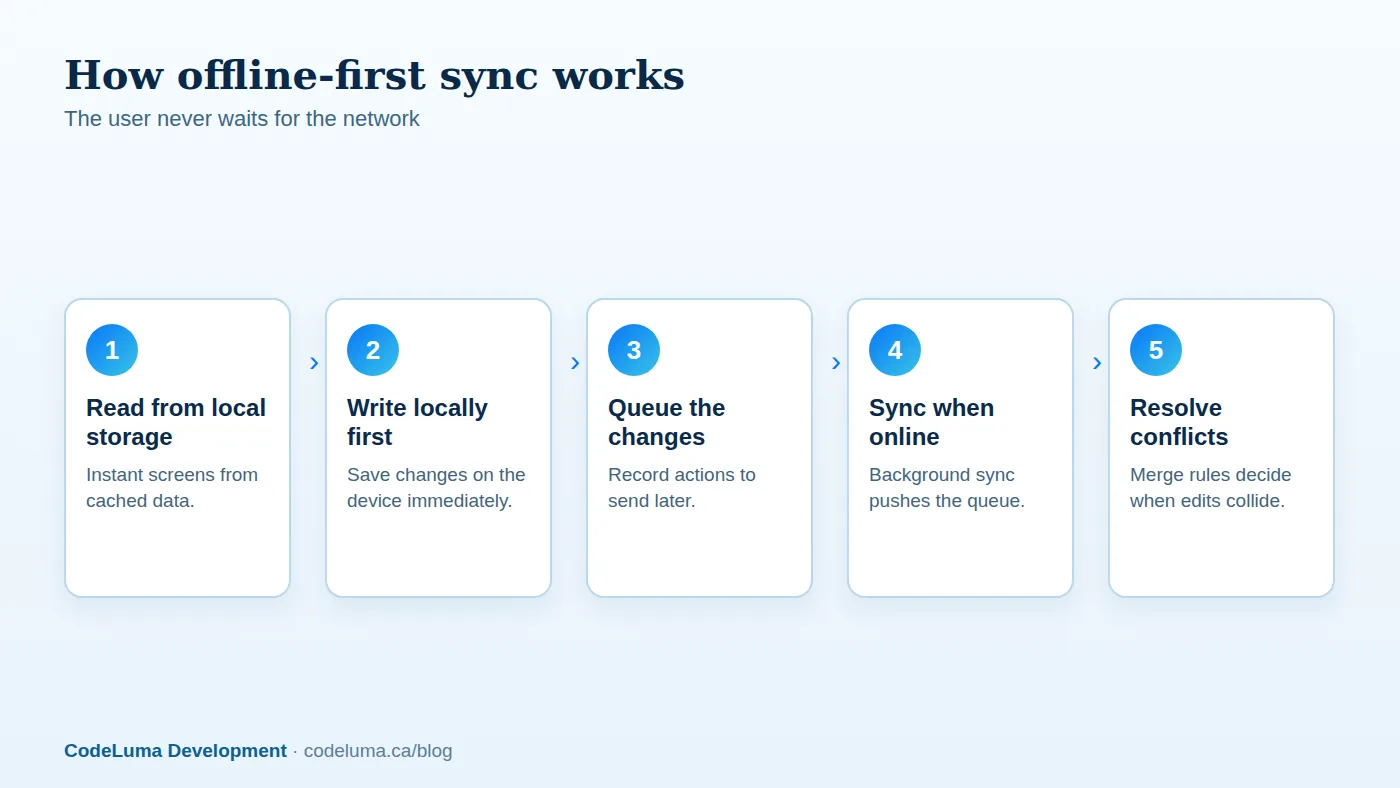
Field teams, such as inspectors, technicians, delivery drivers, surveyors and healthcare workers, work in basements, rural areas, warehouses and remote sites where connectivity is patchy or absent. Software that shows a spinner or loses a half-filled form when the signal drops costs time, data and goodwill. Offline-first design flips the assumption: the app works locally by default and synchronises when connectivity returns. Progressive web apps (PWAs) make this possible using web technology, without building and distributing separate native apps.
What a PWA is
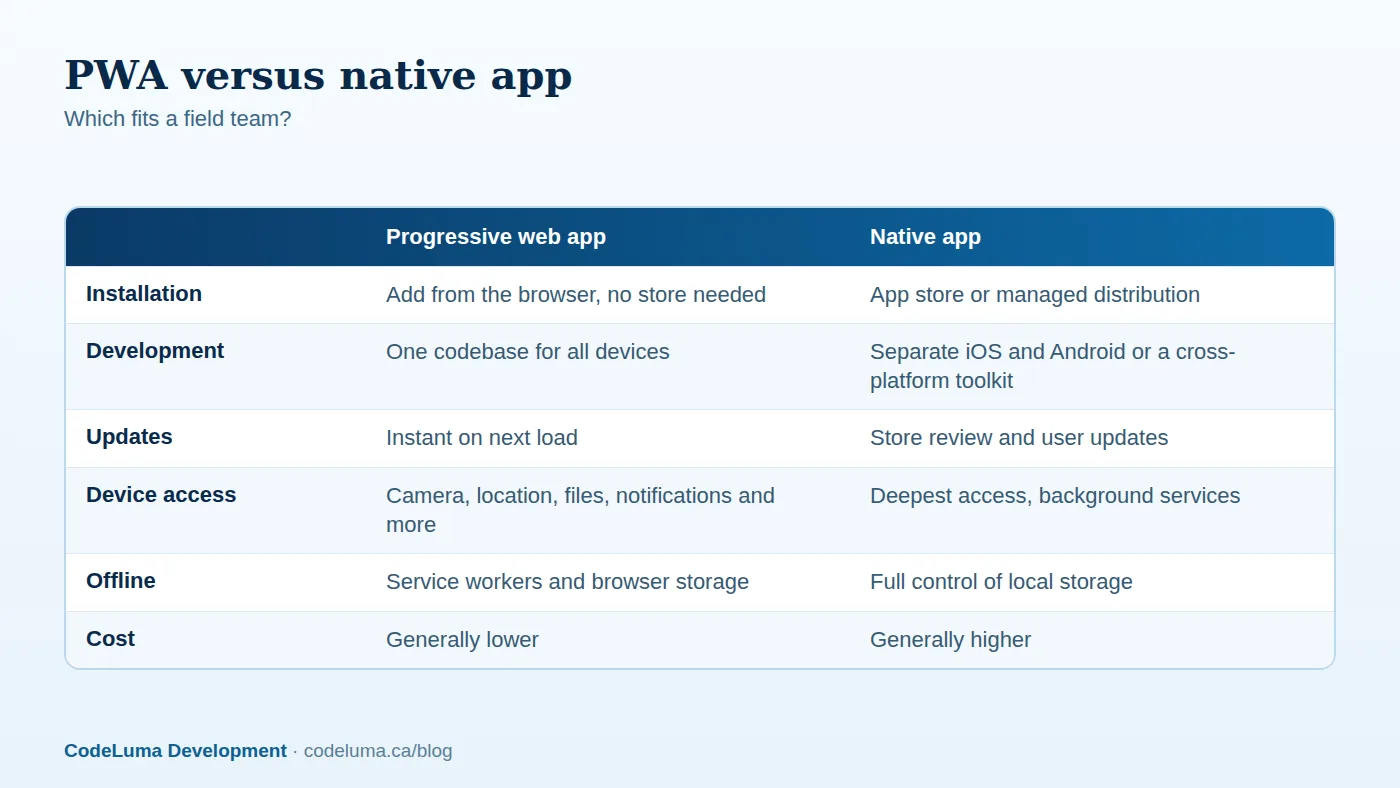
A progressive web app is a website built with modern browser capabilities so that it behaves like an installed application. Its core ingredients are a web app manifest (name, icons, colours and display mode so it can be added to the home screen and launched full-screen), a service worker (a script that sits between the app and the network, caching resources, serving them offline and handling background work), HTTPS, and a responsive design. Users open a URL, tap "install" or "add to home screen," and thereafter launch it like any other app. There is no store approval and updates arrive as soon as the user next connects.
Why field teams benefit
- Works without signal. Job lists, forms, checklists, maps of assigned sites and reference documents remain available; new records are captured and saved on the device.
- Faster. Screens load from local cache instantly, even on weak connections.
- No data loss. Work saved locally survives dropped connections and app restarts.
- Easy rollout. Share a link, no app-store accounts and no managed-device gymnastics, though managed distribution is still possible.
- One codebase for phones, tablets and laptops, across Android, iOS and desktop.
- Immediate updates and fixes, important when procedures or forms change frequently.
The building blocks of offline capability
Service worker caching. Cache the application shell (HTML, scripts, styles, icons) so the app opens offline. Choose strategies per resource: cache-first for static assets, network-first with fallback for data that should be fresh, and stale-while-revalidate for content that can be slightly old. Version caches and clean up old ones on update.
Local data storage. Use IndexedDB, the browser's structured database, for records, and a wrapper library to simplify it. Store job data, forms in progress, reference lists and queued changes. Photos and files can be stored as blobs, mindful of device storage limits, and browsers may evict data under pressure, so request persistent storage and sync promptly.
Write queue and background sync. Record each user action as an operation in a queue with a unique identifier, and replay it to the server when connectivity returns. The Background Sync capability lets the service worker do this even after the app is closed, where supported; provide a manual "sync now" and a fallback that syncs when the app is next opened, because support varies across browsers and iOS.
Reliable APIs. Design server endpoints to be idempotent, so a retried request cannot create duplicates: clients send a unique operation ID and the server ignores repeats. See our API design article and our integration guide.
Conflict resolution
When two people edit the same record offline, changes will collide. Decide the rules per data type: last write wins for low-stakes fields; field-level merging when different fields changed; append-only for logs and notes; or flag conflicts for a human when the stakes are high. Store version numbers or timestamps with records, show users what changed and let them choose, and keep audit history (audit log guide). Design workflows to minimise conflicts: assign jobs to individuals, lock records during check-out, or use append-only forms.
User experience for unreliable connections
- Show connection and sync status clearly: "Offline, 3 changes waiting," "Synced 2 minutes ago."
- Never block on the network for actions that can be saved locally.
- Give clear, actionable error messages when something needs connectivity, such as uploading large photos over cellular data.
- Pre-download what a shift needs, such as tomorrow's jobs, so the day starts with everything on the device.
- Design for gloves, sunlight and one-handed use: large targets, high contrast and simple flows.
- Keep photos compressed before upload; see our file upload guide.

Device features PWAs can use
Modern browsers expose the camera and barcode scanning, geolocation, file access, push notifications on supported platforms, speech input, and Bluetooth or NFC on some devices. Capabilities differ by browser and operating system, especially on iOS, so test on the actual devices your team uses. If you need deep hardware access or continuous background location tracking, a native or hybrid wrapper may be required; we sometimes ship a PWA inside an app-store wrapper to get both benefits. See our access-control guide for sign-in patterns that survive offline periods.
Security for offline apps
Data stored on a device can be lost or stolen. Minimise what is stored, encrypt sensitive fields where practical, require authentication and short session lifetimes with safe re-authentication, support remote sign-out and data wipe on next connection, and avoid storing secrets locally. Serve everything over HTTPS and keep the service worker under strict control, as a compromised worker is powerful. Follow the guidance in our security audit article and our web vulnerabilities guide, and consider privacy obligations for locally cached personal data (privacy law guide).
Testing offline behaviour
Test the awkward cases: launching offline, losing connectivity mid-form, syncing after days offline, two devices editing the same record, storage full, expired login while offline, and upgrading the service worker while offline data is queued. Browser developer tools simulate offline and slow networks, and automated tests can exercise sync logic; add them to your pipeline (CI/CD). Measure performance with real devices on real networks; see our front-end performance guide.
When to choose a PWA
A PWA is a strong fit for forms, checklists, inspections, work orders, inventory, delivery and CRM-style tools, and for teams on mixed devices where app-store distribution is a burden. Choose native when you need constant background operation, advanced hardware integration or platform-specific features that browsers lack. Many organisations start with a PWA, validate the workflow and only later decide whether native is needed; that fits the lean approach in our MVP guide.
Our app development and software teams build offline-first PWAs and apps for field operations, and our maintenance plans keep sync, devices and browsers compatible as platforms evolve.
Put this into practice with CodeLuma
CodeLuma builds offline-capable progressive web apps for field teams, with reliable sync and conflict handling, installable on any device without app-store friction.
- Custom software development - tailored systems, integrations and internal tools.
- Mobile and app development - iOS, Android and progressive web apps.
- Website and web application development - fast, accessible, search-friendly builds.
- Maintenance and support plans - updates, monitoring and ongoing improvement.
Start a conversation. Tell us about your project and we will reply with practical next steps, or browse all CodeLuma services. CodeLuma Development Inc. is a Canadian company that works with teams in Windsor, Essex, London, Toronto, Mississauga and across Ontario, throughout Canada and remotely.


