Cloud bills have a way of growing quietly. A test environment left running, a database sized for a launch that never came, storage that only ever grows, data transfer charges nobody anticipated. Many organisations discover that a large share of their cloud spending, often a quarter or more, buys nothing useful. The good news is that most of that waste can be removed without touching performance or reliability, if you approach it methodically. This guide describes the practical steps, using AWS terminology in places but applying equally to other providers.
Start with visibility
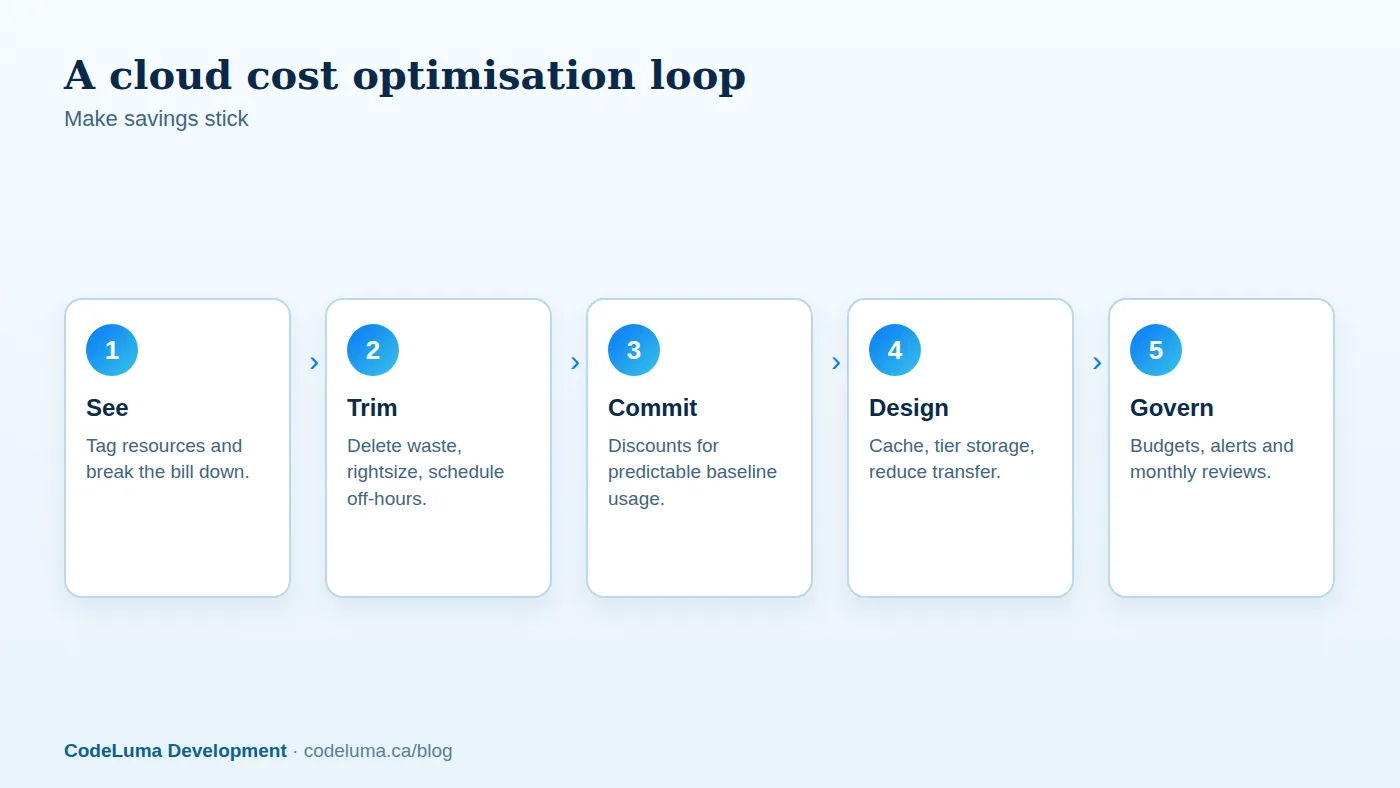
You cannot optimise what you cannot see. Begin by breaking down the bill: by service, account, environment, project and team. Enable the provider's cost analysis tools, turn on detailed billing reports and adopt a consistent tagging scheme, such as environment, application, owner and cost centre, enforced automatically when resources are created. Untagged spend is unowned spend. Review the top ten line items and ask the awkward questions: what is this, who uses it, is it needed and is it the right size? Set budgets and alerts so surprises are caught in days, not at month-end. Making infrastructure reproducible with code, as described in our infrastructure as code guide, makes tagging and clean-up systematic.

Eliminate waste
The fastest savings usually come from deleting or shutting down things that are not used:
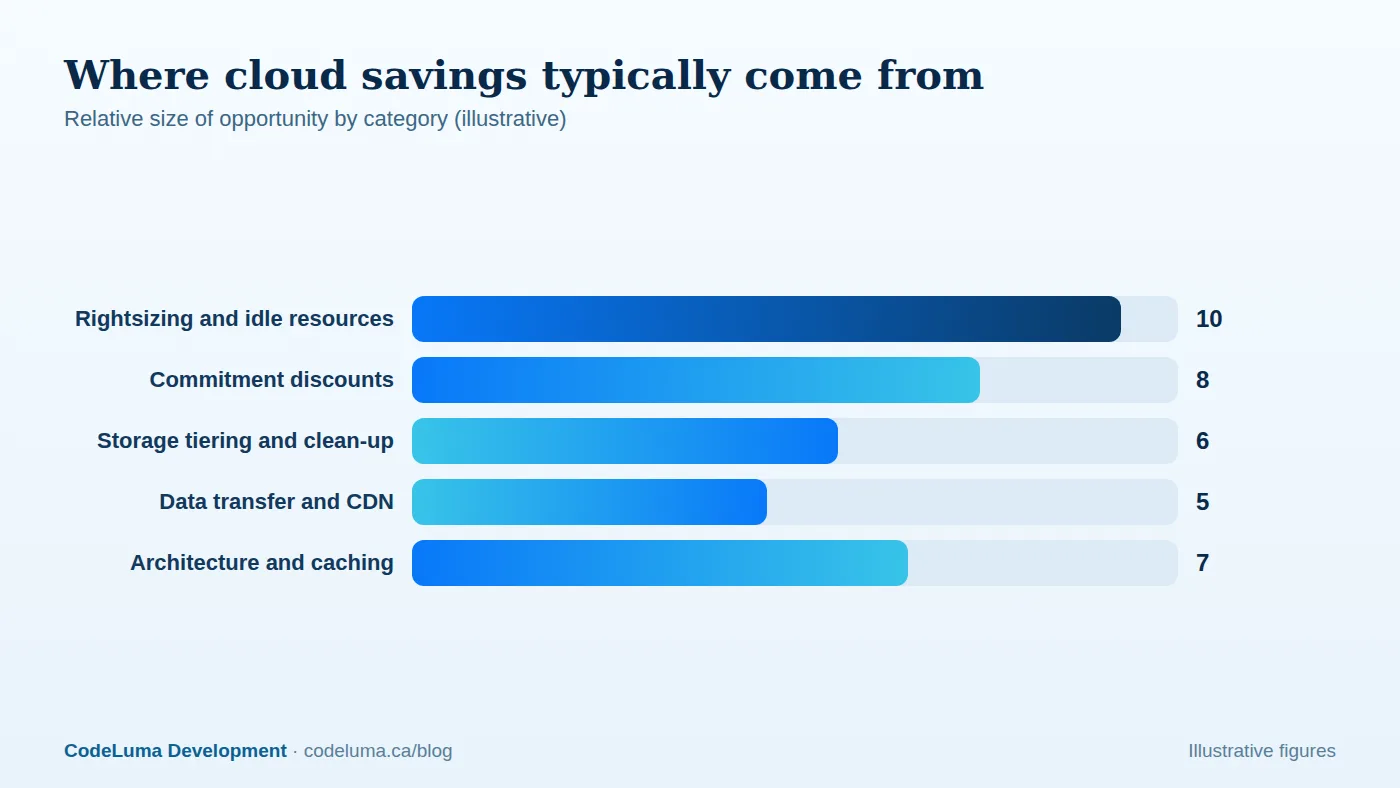
- Idle and orphaned resources: unattached volumes, old snapshots, unused elastic IP addresses, idle load balancers, forgotten test databases and stopped instances that still incur storage charges.
- Non-production environments running around the clock. Development and staging environments rarely need to run at night or on weekends. Scheduling them off outside working hours can cut their compute cost by roughly two thirds.
- Old data and backups retained beyond any requirement, and log volumes stored indefinitely at expensive tiers.
- Duplicated environments created for projects long since finished.
Right-size what remains
Many instances and databases are provisioned generously "just in case" and never reviewed. Look at actual utilisation over several weeks: CPU, memory, network and disk. If a server averages ten percent CPU with modest peaks, a smaller size or a different instance family will do the same job for less. Newer instance generations are often cheaper per unit of performance, and processor architectures optimised for cost efficiency can reduce compute spend further for compatible workloads. Resize carefully: change one thing at a time, test performance, and keep a way to roll back. Databases deserve special attention since they are expensive: check provisioned capacity, read replicas that are not used, and storage over-allocation.
Use autoscaling and better architecture
Paying for peak capacity all day is wasteful for spiky workloads. Autoscaling adds and removes instances with demand, keeping a modest baseline and scaling up only when needed. Serverless or container-based platforms that bill by actual use can suit intermittent workloads such as scheduled jobs and low-traffic APIs. Reduce the work your servers must do: caching, CDNs and efficient queries lower the compute required, often delivering both savings and speed. Our guides on caching with Redis and CDNs, database query optimisation and scalable architecture show the techniques. Sometimes a modest re-architecture, such as moving background work to cheaper batch capacity, saves more than any pricing trick.
Use commitment discounts wisely
Providers offer substantial discounts in exchange for committing to a level of usage for one or three years, through reserved capacity or savings plans. They suit the steady baseline of your workload, the part that runs constantly. Do not commit for usage you might change: first right-size and remove waste, then commit for the stable remainder. Start conservatively, covering perhaps half to two thirds of your baseline, and review regularly. Spot or preemptible instances, which use spare provider capacity at large discounts but can be interrupted, are excellent for fault-tolerant batch jobs, build agents and stateless workers, and unsuitable for anything that cannot tolerate interruption.
Optimise storage
- Tier storage by access pattern. Move infrequently accessed objects to cheaper classes automatically with lifecycle rules, and archive or delete data you must keep but rarely read.
- Clean up. Delete incomplete multipart uploads, old versions, obsolete snapshots and temp files. See our file upload article for lifecycle practices.
- Choose the right block storage type and size, and avoid paying for high-performance provisioned capacity you do not use.
- Compress and deduplicate logs, backups and media where possible, and set sensible log retention.
Tame data transfer
Network charges are a frequent surprise. Traffic leaving the cloud to the internet, moving between regions, or crossing availability zones is billed, and chatty architectures can rack up large bills. Use a CDN to serve content from the edge at lower cost, compress responses, keep services that talk a lot in the same zone or region, use private endpoints to avoid paying for traffic through NAT gateways, and cache data close to consumers. Review where your egress is going before assuming compute is the problem. Our note on edge delivery describes the benefits.

Watch the managed-service premium
Managed services save engineering time but carry a premium, and some usage-priced services, such as NAT gateways, logging, monitoring and serverless invocations, scale in ways that surprise. Review the costs of observability tools and log ingestion, which can rival compute in busy systems. Be selective about what you log and retain, and sample high-volume telemetry. Compare managed services with self-hosted alternatives only after counting the staff time for operating them.
Consider whether you are on the right platform
Sometimes the biggest saving is a different hosting model. A steady, modest application may cost far less on a simpler platform or managed hosting than on a full cloud stack designed for far larger needs; see our comparison of hosting options. Conversely, an application constrained by expensive licences or inefficient architecture may justify modernisation. Do the maths on total cost of ownership, including people, not only the invoice.
Build a governance habit
- Monthly review of the bill with owners of major cost centres.
- Budgets and anomaly alerts for every account and project.
- Cost estimates in design reviews for new features and services.
- Automated policies that prevent expensive resource types or untagged resources.
- Regular checks that savings persist, since costs creep back.
Protect performance and reliability
Cost cutting should never quietly remove safety margins. Keep backups, redundancy and monitoring appropriate to your recovery objectives; see our backup and recovery guide and our high availability guide. Test after each change, roll out gradually and watch key metrics. The goal is efficiency, not fragility.
A one-week starting plan
- Day 1: enable detailed billing and tags; list the top spend items.
- Day 2: find and remove idle and orphaned resources.
- Day 3: schedule off-hours shutdown of non-production environments.
- Day 4: review database and instance utilisation and plan rightsizing.
- Day 5: set budgets and alerts, and evaluate commitment discounts for the stable baseline.
Our hosting team performs cost reviews and implements the changes safely, and our maintenance plans include periodic checks so savings are kept rather than lost again.
Put this into practice with CodeLuma
CodeLuma reviews your cloud or hosting bill, finds the waste, and implements savings without compromising performance or reliability, often paying for the review in the first month.
- Managed hosting - monitored, backed-up, Canadian-friendly hosting.
- Custom software development - tailored systems, integrations and internal tools.
- Maintenance and support plans - updates, monitoring and ongoing improvement.
Start a conversation. Tell us about your project and we will reply with practical next steps, or browse all CodeLuma services. CodeLuma Development Inc. is a Canadian company that works with teams in Windsor, Essex, London, Toronto, Mississauga and across Ontario, throughout Canada and remotely.