Walk through almost any small or mid-sized business and you will find someone copying information from one screen into another. Orders from the website typed into accounting software. Leads from a form pasted into the CRM. Inventory updated in a spreadsheet after a delivery. Timesheets re-entered into invoicing. The work feels small each time, but it adds up to hours every week, invites typing errors and delays information reaching the people who need it. API integrations let systems talk to each other directly. This guide explains how to find the opportunities, estimate the value and implement integrations that last.
What an API integration is
An API, or application programming interface, is a defined way for software to request data or actions from other software. Most modern business tools, from accounting and CRM systems to payment platforms, shipping carriers and marketing tools, offer APIs. An integration is a small piece of software that uses those APIs to move data automatically: when an order is placed, create the invoice; when a lead arrives, add the contact and notify sales; when stock changes, update the store. The integration runs whenever the event occurs, at any hour, without anyone touching a keyboard.

Find the manual work
Ask your team, "what do you copy from one place to another?" and "what report do you build by hand every week?" Common places to look:
- Sales and orders: from website, marketplaces and phone orders into ERP or accounting.
- Customer data: between CRM, support, marketing and billing tools.
- Inventory and purchasing: between suppliers, warehouse and store.
- Finance: payment reconciliation, invoice generation, expense entry, payroll exports.
- Operations: scheduling, job costing, field service records.
- Reporting: dashboards assembled from several exports.
Look also at error logs and complaints: duplicated records, wrong prices, outdated stock and late invoices often trace back to manual steps.
Calculate the real cost
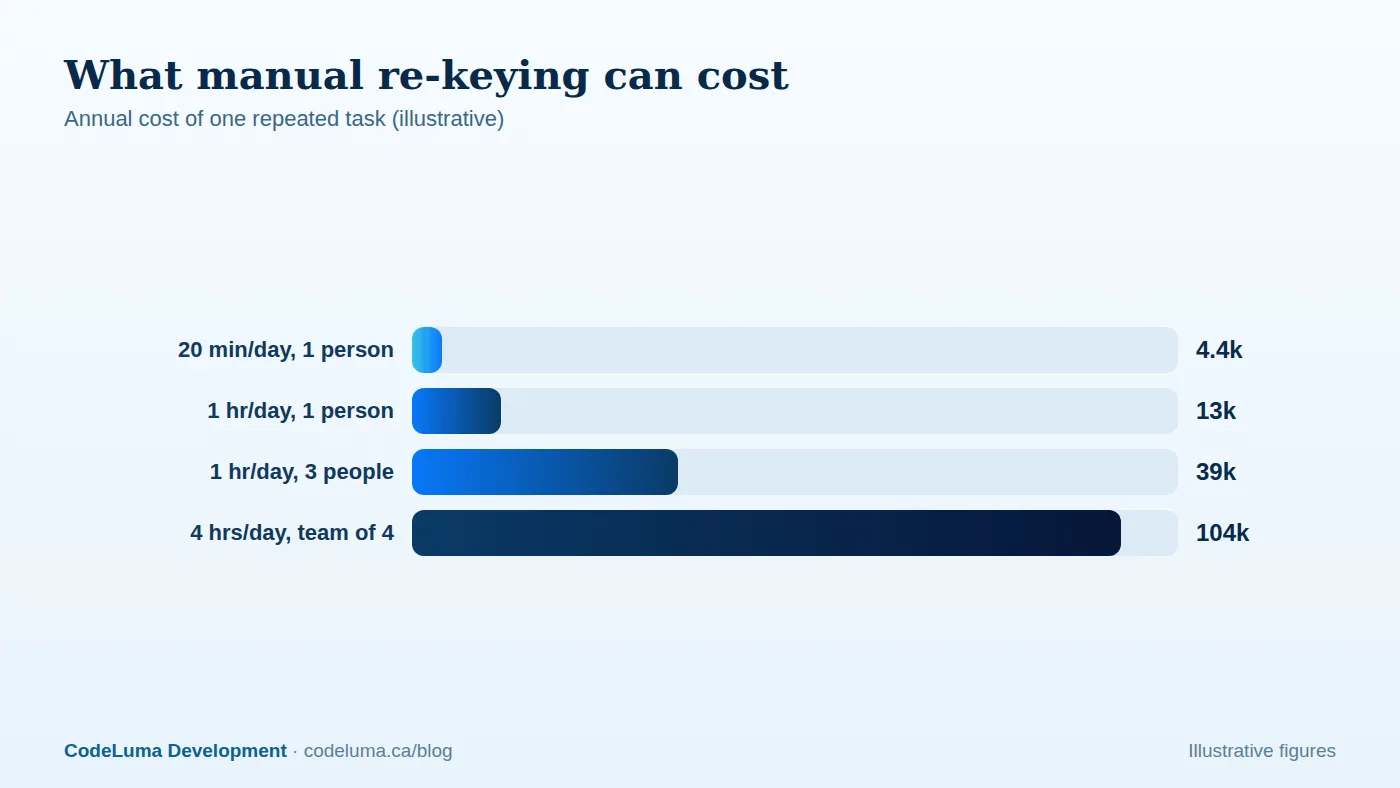
Estimate the time per occurrence, the frequency and the loaded hourly cost of the people doing it. A task taking twenty minutes a day costs roughly two hundred hours a year, which at a loaded cost of fifty dollars an hour is around ten thousand dollars annually. Add the cost of errors: refunds, rework, delayed cash collection, unhappy customers, and the opportunity cost of skilled staff doing clerical work. Include delays: if leads sit in an inbox for a day, some go to competitors. These numbers usually justify integration projects much faster than people expect.
Choose the right approach
There is a spectrum of options:
- Native integrations and marketplace connectors. Many tools already connect to popular partners. Use them when they cover your needs; they are cheap and supported.
- No-code automation platforms. Good for simple, low-volume workflows between well-known apps. Watch per-task pricing, limits and the difficulty of handling errors and complex logic; see our comparison with custom workers.
- Custom integrations. Purpose-built code using the systems' APIs, with proper error handling, monitoring and business logic. It is the right choice for high volume, unusual rules, systems without good connectors, or where reliability and control matter.
- Middleware or an integration layer. When several systems must exchange data, a central layer prevents a tangle of point-to-point links. See our guide to middleware for legacy systems.
Map the data before you build
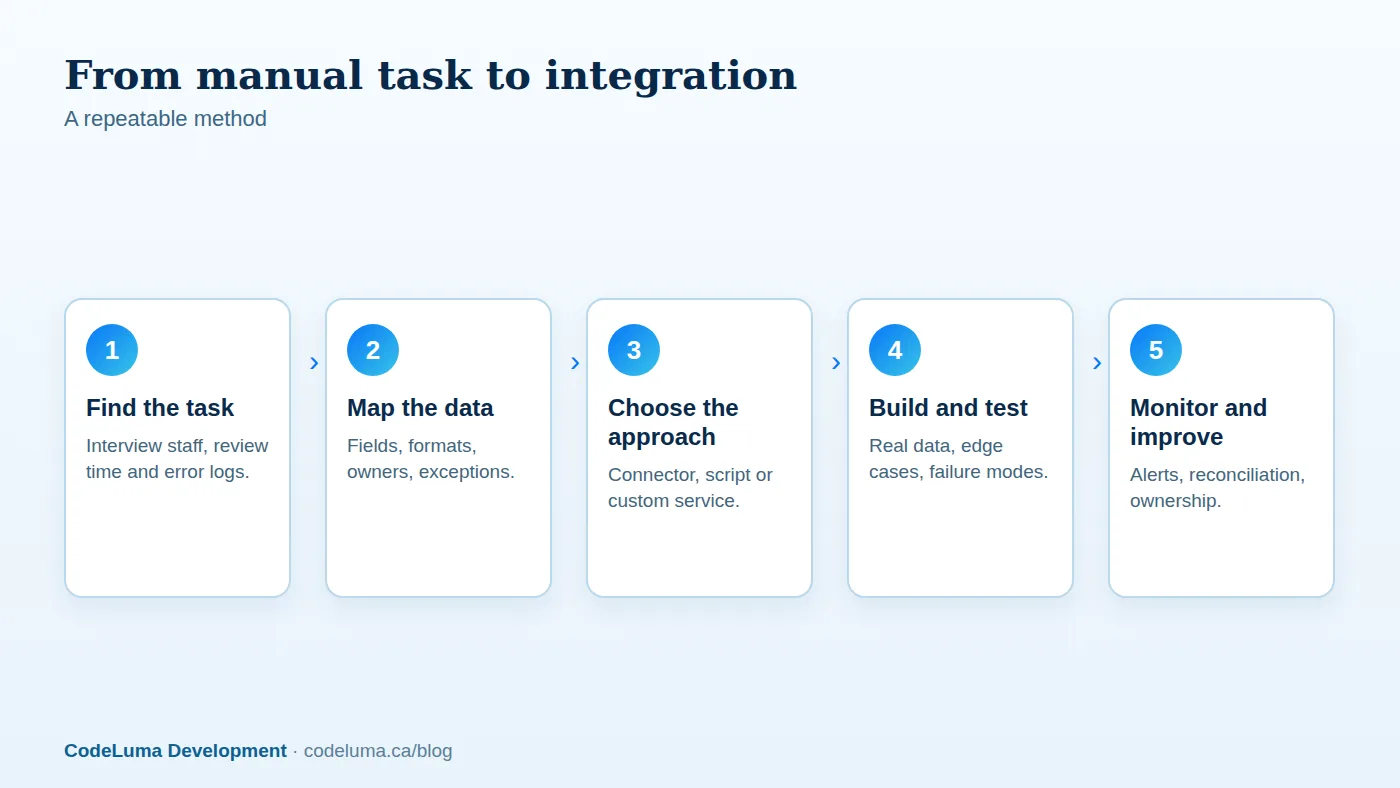
Most integration problems are data problems. For each flow, document which system is the source of truth for each field, the format and validation rules, how records are matched between systems (customer email, external ID, order number), what happens when data is missing or invalid, and how updates and deletions propagate. Decide how to handle duplicates and conflicts. Write examples of real records, including awkward ones, and use them for testing. This upfront mapping is where expertise saves the most rework.

Design for failure
APIs time out, rate limit and change. A production-quality integration therefore includes:
- Queues so no event is lost if a system is temporarily unavailable.
- Retries with backoff, and idempotency so retries do not create duplicates.
- Validation and clear error messages, with a place for staff to review and fix rejected records.
- Logging of every action for troubleshooting and audit.
- Alerts when failures accumulate or nothing arrives for an unusually long time.
- Reconciliation that compares totals between systems to detect drift.
Our article on handling third-party API outages goes deeper into these patterns.
Protect data and access
Integrations hold credentials with real power. Use dedicated service accounts with the minimum permissions, store secrets in a vault, rotate keys, and log access. Encrypt data in transit, send only the fields required, and review privacy obligations before syncing personal data to new systems. Document what data goes where, which also helps with privacy requests and audits.
Roll out safely
Start with a read-only phase to compare what the integration would do against what staff actually do. Then run it on a subset, keep manual checks for a period, and switch fully once results match. Train the team on how to monitor the integration and what to do when it flags a problem. Make sure someone owns it; an unowned integration decays as APIs and business rules change.
Realistic outcomes
Typical benefits include hours saved every week, faster processing from order to invoice, fewer errors, better data visibility and the ability to scale without adding administrative headcount. Just as important, staff who are freed from repetitive entry can spend time on work that needs judgement and relationships. Start with the single most painful, well-understood workflow, prove the value, and expand. If you are ready to look for your own opportunities, an integration review with our software team will identify the highest-return automations and give you a costed plan.
Put this into practice with CodeLuma
CodeLuma finds the manual data entry hiding in your business and replaces it with reliable, monitored integrations between the tools you already use, so your team spends time on customers instead of copy and paste.
- Custom software development - tailored systems, integrations and internal tools.
- Website and web application development - fast, accessible, search-friendly builds.
- Maintenance and support plans - updates, monitoring and ongoing improvement.
Start a conversation. Tell us about your project and we will reply with practical next steps, or browse all CodeLuma services. CodeLuma Development Inc. is a Canadian company that works with teams in Windsor, Essex, London, Toronto, Mississauga and across Ontario, throughout Canada and remotely.