The worst time for your application to fail is the moment you spend the most money to attract attention. A television mention, an influencer campaign, a product drop or a big email send can multiply traffic tenfold within minutes. Marketing celebrates the surge; engineering dreads it. With planning, the two can share the celebration. This playbook covers how to prepare an application to stay online and usable when traffic spikes.
Start with numbers, not fear
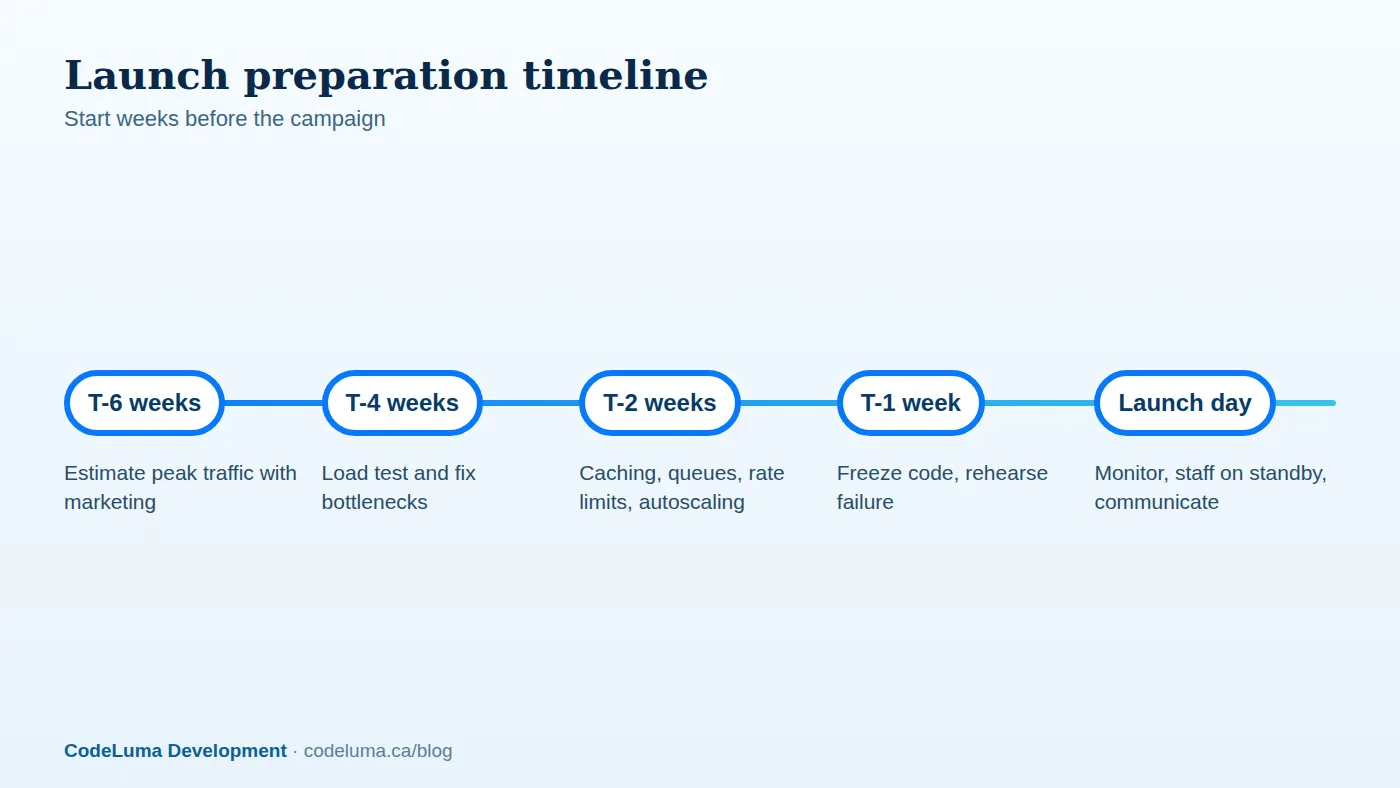
Ask marketing for realistic estimates: how many people will be reached, what click-through rate to expect, when the peak will occur and how sharp it will be. A campaign that sends one large email at 9 a.m. produces a very different curve from one that trickles out through the day. Convert reach into requests per second on your critical paths: the landing page, sign-up, login and checkout. Add a safety margin of two to three times. This becomes your target capacity, and the basis for your load test.

Find the weakest link
Every system has a first thing that breaks. Typical culprits include the database (connection limits, slow queries, locks), a single-threaded or memory-hungry application server, a third-party API with a low rate limit, a payment or email provider quota, file storage uploads and background workers that fall behind. Load testing exposes them before customers do. We describe the general patterns in our article on scalable architecture.
Load test realistically
- Model real user journeys, not just repeated requests to the home page: browse, search, sign up, add to cart, check out.
- Ramp gradually, then hold at target load, then push beyond it to find the breaking point.
- Use production-like data and infrastructure, ideally a staging environment sized like production.
- Watch everything: response time percentiles, error rates, CPU, memory, database connections and slow queries, queue depth.
- Fix, then retest. Repeat until the system handles the target with headroom.
Warn any third parties before testing against their services, and use sandbox modes for payments and email to avoid real charges and messages.
Reduce the load you must handle
- Serve the landing pages from a CDN. Campaign landing pages are usually static; cache them aggressively so the origin barely notices the spike.
- Cache public data such as catalogues and content with sensible lifetimes, using stale-while-revalidate to avoid stampedes.
- Move slow work to queues: confirmation emails, PDF generation, analytics events and integrations.
- Precompute expensive results ahead of the launch.
- Optimise the top few queries that dominate database time.
Scale what needs scaling
Keep application servers stateless so you can add instances quickly. Configure autoscaling with a minimum that already covers the expected baseline, because scaling takes time and a sudden spike can outrun it. Pre-warm capacity before a scheduled event rather than relying on reactive scaling alone. Scale the database thoughtfully: increase its size, add read replicas for reporting and heavy reads, and use connection pooling. Confirm the quotas and rate limits of every third-party service, and request increases in advance.
Protect the system with rate limits and queues
When demand exceeds capacity, protect the core. Rate limit per user and per IP, especially on expensive endpoints. For extremely hot launches, such as limited product drops, use a virtual waiting room that admits visitors at a rate the system can handle; a polite "you are in line" page is far better than errors. Put sign-ups and orders onto a queue so bursts are absorbed and processed at a steady rate, with immediate acknowledgement to the user.

Degrade gracefully
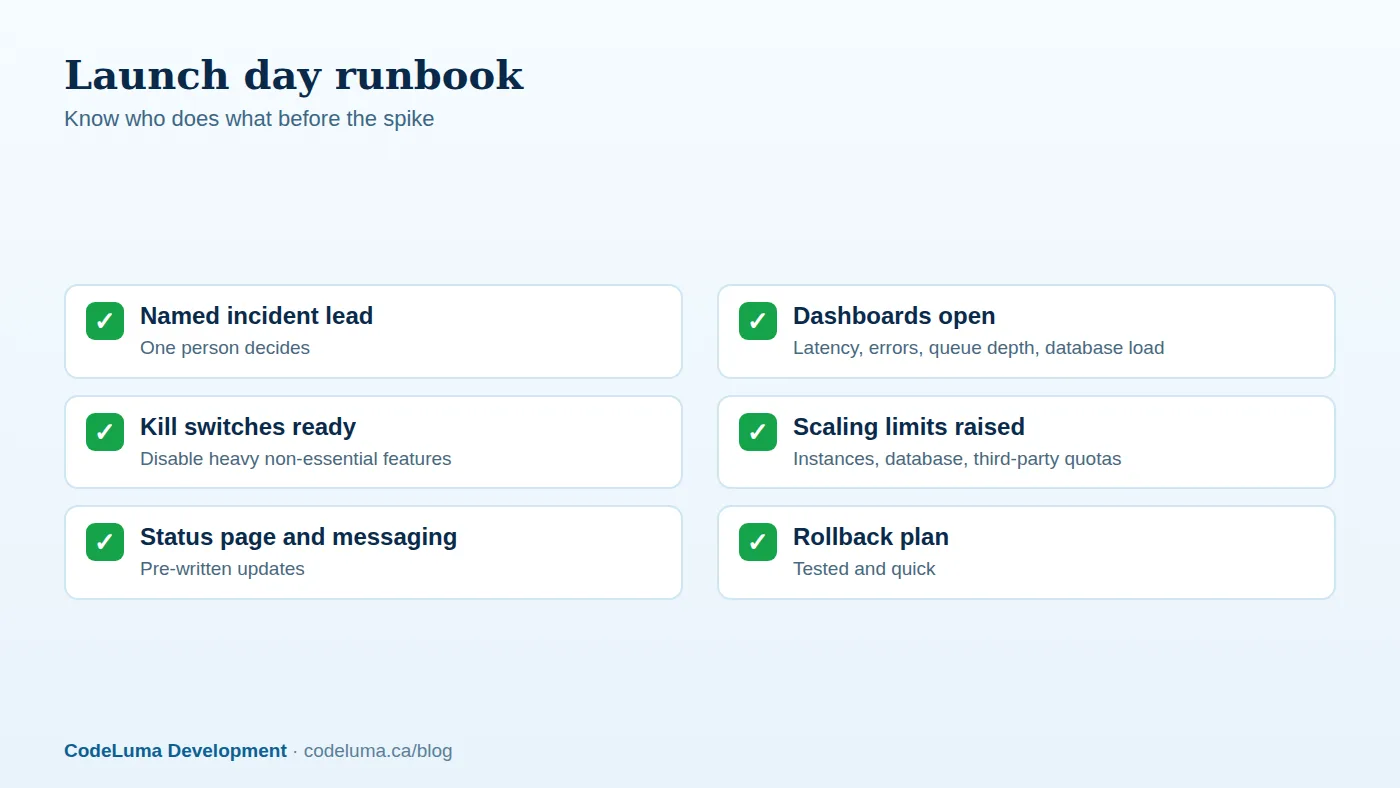
Decide in advance which features can be switched off to preserve the critical path: recommendations, live counters, heavy search filters, third-party widgets, personalised content. Implement feature flags so you can disable them instantly, and rehearse doing so. It is far better to run a leaner experience than to fail completely. Prepare static fallback pages for extreme cases.
Monitor and communicate
Dashboards should show what matters at a glance: request rate, latency percentiles, error rate, saturation of CPU, memory and database connections, queue lengths, and business metrics such as orders per minute. Configure alerts with sensible thresholds and route them to a named person. Prepare a status page and pre-written messages for customers and social channels so communication does not depend on improvisation. Keep marketing and engineering in a shared channel during the launch so the campaign can be paused if needed.
Rehearse failure
Run a game day a week before: switch off a cache, fail over a database replica, exhaust a rate limit, and see what happens. Practise the rollback. Confirm backups are current and restorable. Freeze non-essential code changes in the days before the launch to avoid last-minute surprises.
After the spike
Do a short review: what held, what broke, what customers experienced and what it cost. Convert lessons into improvements. Scale down deliberately and keep the useful optimisations. The next campaign will be bigger, and the second launch is much easier when the first one taught you where the limits are. For ongoing peace of mind, a maintenance and monitoring plan keeps performance, capacity and alerts under review between launches.
Put this into practice with CodeLuma
CodeLuma prepares apps and sites for big launches with load testing, caching, autoscaling and a launch-day runbook, and can stay on standby while your campaign goes live.
- Custom software development - tailored systems, integrations and internal tools.
- Managed hosting - monitored, backed-up, Canadian-friendly hosting.
- Maintenance and support plans - updates, monitoring and ongoing improvement.
Start a conversation. Tell us about your project and we will reply with practical next steps, or browse all CodeLuma services. CodeLuma Development Inc. is a Canadian company that works with teams in Windsor, Essex, London, Toronto, Mississauga and across Ontario, throughout Canada and remotely.