Most small and mid-sized businesses do not think about security until something goes wrong: a defaced website, a customer database posted online, ransomware on a server, a payment processor asking awkward questions. By then the cost, in money, time and reputation, is far higher than prevention would have been. A regular security audit is the routine check-up that finds problems while they are still cheap to fix. This guide explains what an audit covers, why it matters, and how to get the most from one.
Why regular audits matter
Your systems are not static. New code ships, staff come and go, software versions age, cloud settings drift, integrations are added and attackers develop new techniques. A configuration that was safe last year may be exposed today. Automated attacks scan the internet constantly for known vulnerabilities, so a forgotten test server or an unpatched plugin will be found quickly. Regular audits provide an independent, systematic look at your real exposure, and they produce evidence that customers, insurers, investors and regulators increasingly ask for.

Common reasons organisations commission an audit
- A customer or partner questionnaire requires evidence of security practices.
- Cyber insurance applications or renewals ask about controls.
- A payment processor or compliance regime, such as PCI-DSS, requires periodic testing; see our PCI-DSS overview.
- Before a launch, funding round or acquisition.
- After an incident or a near miss.
- Following a major architectural change or migration.
- Simply because it has been more than a year.
What an audit actually covers
The scope depends on your systems, but a thorough review of a web application and its environment usually examines:
- Application security. Authentication and session handling, authorisation and access control, input validation, injection and cross-site scripting risks, file upload handling, error handling, API security and business-logic flaws. See our guide to common web vulnerabilities.
- Dependencies. Libraries and frameworks with known vulnerabilities, outdated runtimes and abandoned packages.
- Infrastructure and configuration. Servers, containers and cloud accounts: open ports, exposed admin interfaces, weak TLS settings, over-permissive storage buckets and security groups, missing patches and default credentials.
- Secrets and access management. How keys and passwords are stored, who has access to what, use of multi-factor authentication, and offboarding practices; see our note on secrets.
- Data protection. Encryption in transit and at rest, backups, retention, and handling of personal and payment data.
- Logging and monitoring. Whether attacks would be detected and investigated.
- Operational practices. Deployment processes, change control, incident response, vendor management and staff awareness.
Scans, penetration tests and reviews
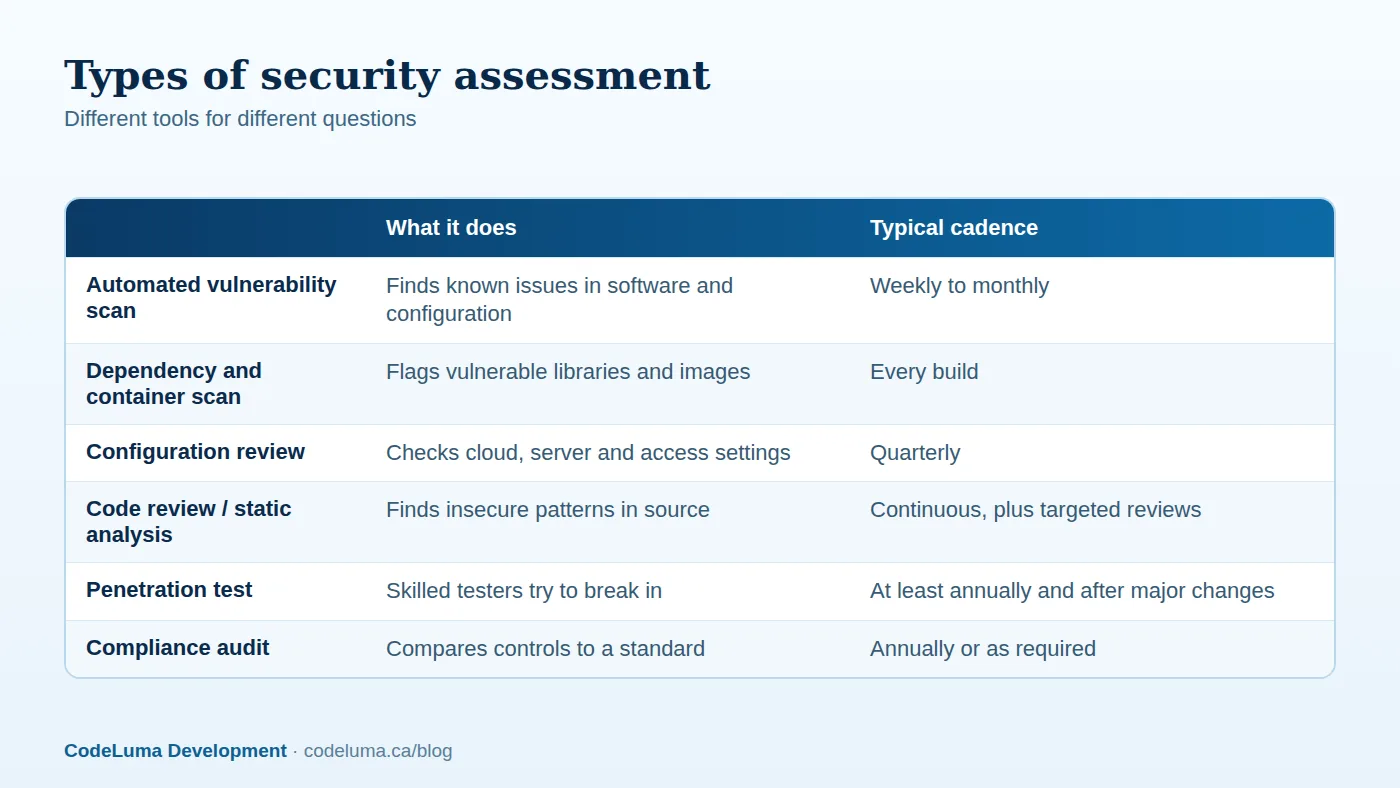
These terms are often confused. A vulnerability scan is automated and inexpensive; it finds known issues quickly but produces false positives and misses logic flaws. A penetration test is performed by skilled people who attempt to exploit weaknesses as an attacker would, chaining issues together and testing what scanners cannot, such as whether one customer can see another's data. A code review examines source code for insecure patterns and design flaws. A configuration review checks settings against best practice benchmarks. Combine them: continuous automated scanning in your build pipeline, plus expert testing at least annually and after significant changes.
How to prepare
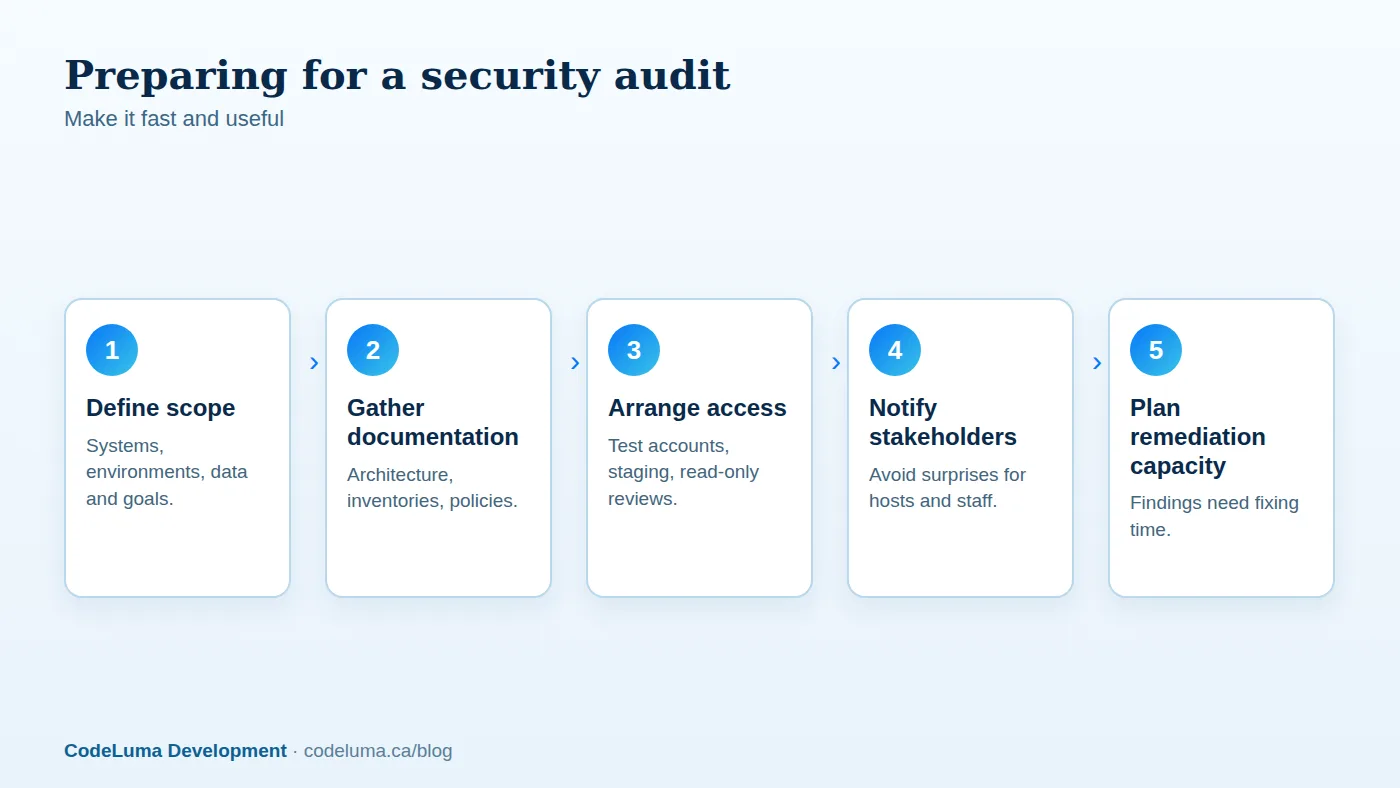
- Define the scope and goals. Which applications, environments and data are in scope? Are you aiming for compliance evidence, risk reduction or both?
- Inventory your assets. Domains and subdomains, servers, cloud accounts, third-party services, repositories and data stores. Forgotten assets are a top source of breaches.
- Collect documentation: architecture diagrams, network maps, data flow descriptions, existing policies, previous audit reports and incident history.
- Arrange access. Provide test accounts for each user role, a staging environment where testing can be intrusive, and read-only access for configuration review. Avoid testing destructive scenarios in production without safeguards.
- Brief your team and vendors. Notify your hosting provider if needed, and tell staff so they do not mistake testing for an attack, while keeping any detection exercises intentional.
- Back up first, and confirm you can restore. See our backup and disaster recovery guide.
- Reserve time to fix. An audit without remediation capacity is an expensive to-do list.
Reading the report
A good report is not a wall of scanner output. It should explain each finding in plain language, with the affected asset, evidence, the realistic impact and likelihood, a severity rating, and specific remediation steps. Look for an executive summary that a non-technical owner can understand, a prioritised list, and notes on positive findings. Ask questions: which issues could lead to a data breach, which are quick wins, and which need architectural changes? Beware of reports that rate everything as critical or nothing at all.
Turn findings into fixes
Triage findings by risk. Fix critical and high-severity issues immediately, especially those that expose customer data or allow remote takeover. Assign each finding an owner and a date, track them in your normal ticketing system and verify fixes with a retest. Address root causes: if injection flaws appear repeatedly, the answer is a safer data access pattern and developer training, not fixing one query at a time. Feed lessons into your development process: add checks to code review, automated tests for authorisation, and scanning in continuous integration. See our CI/CD article.
Do not forget the human factor
Many breaches begin with phishing, reused passwords and misplaced trust. Include awareness training, multi-factor authentication for every account that supports it, a password manager and clear procedures for reporting suspicious messages. Test your incident response with a tabletop exercise: who does what if customer data is exposed, and who do you need to notify? Understanding your obligations under privacy law matters here; see our overview of privacy compliance.
How often?
At a minimum, an independent assessment of your main web applications annually, and after major changes such as new authentication, payment features or a migration. Automated dependency and vulnerability scans should run continuously or at least weekly. Cloud configuration checks are best done automatically and reviewed quarterly. High-risk or regulated businesses will do more. Treat the schedule as part of your operating rhythm, not a one-time project.
Choosing an auditor
Look for demonstrated experience with your technology stack, clear methodology, sample reports, references, and professional conduct including confidentiality and rules of engagement. Independence matters: teams that built the system can review it, but a fresh perspective often finds more. Agree the scope, timing, communication channels for urgent findings and retesting terms in writing.
A sensible starting point
If you have never had a review, begin with a focused assessment of your most exposed and valuable system, typically the public website or application that handles customer data, combined with a configuration and dependency review. Fix what it finds, then build a rhythm. Our software team performs practical security reviews of applications and infrastructure and can help you remediate, while a maintenance plan keeps patches, scans and monitoring current between audits.
Put this into practice with CodeLuma
CodeLuma performs practical security reviews of websites and applications, covering code, configuration, dependencies and access, and delivers a prioritised remediation list you can act on, then helps you fix it.
- Custom software development - tailored systems, integrations and internal tools.
- Maintenance and support plans - updates, monitoring and ongoing improvement.
- Managed hosting - monitored, backed-up, Canadian-friendly hosting.
Start a conversation. Tell us about your project and we will reply with practical next steps, or browse all CodeLuma services. CodeLuma Development Inc. is a Canadian company that works with teams in Windsor, Essex, London, Toronto, Mississauga and across Ontario, throughout Canada and remotely.