There is an old joke that the two hardest problems in computer science are naming things, cache invalidation and off-by-one errors. Caching is hard to get exactly right, but the payoff is enormous: the fastest, cheapest request is the one that never touches your application code or database. Done well, caching turns a struggling site into a fast one, reduces hosting costs and helps you survive traffic spikes. Done badly, it shows customers stale prices or, worse, someone else's data. This guide explains how to layer caching safely.
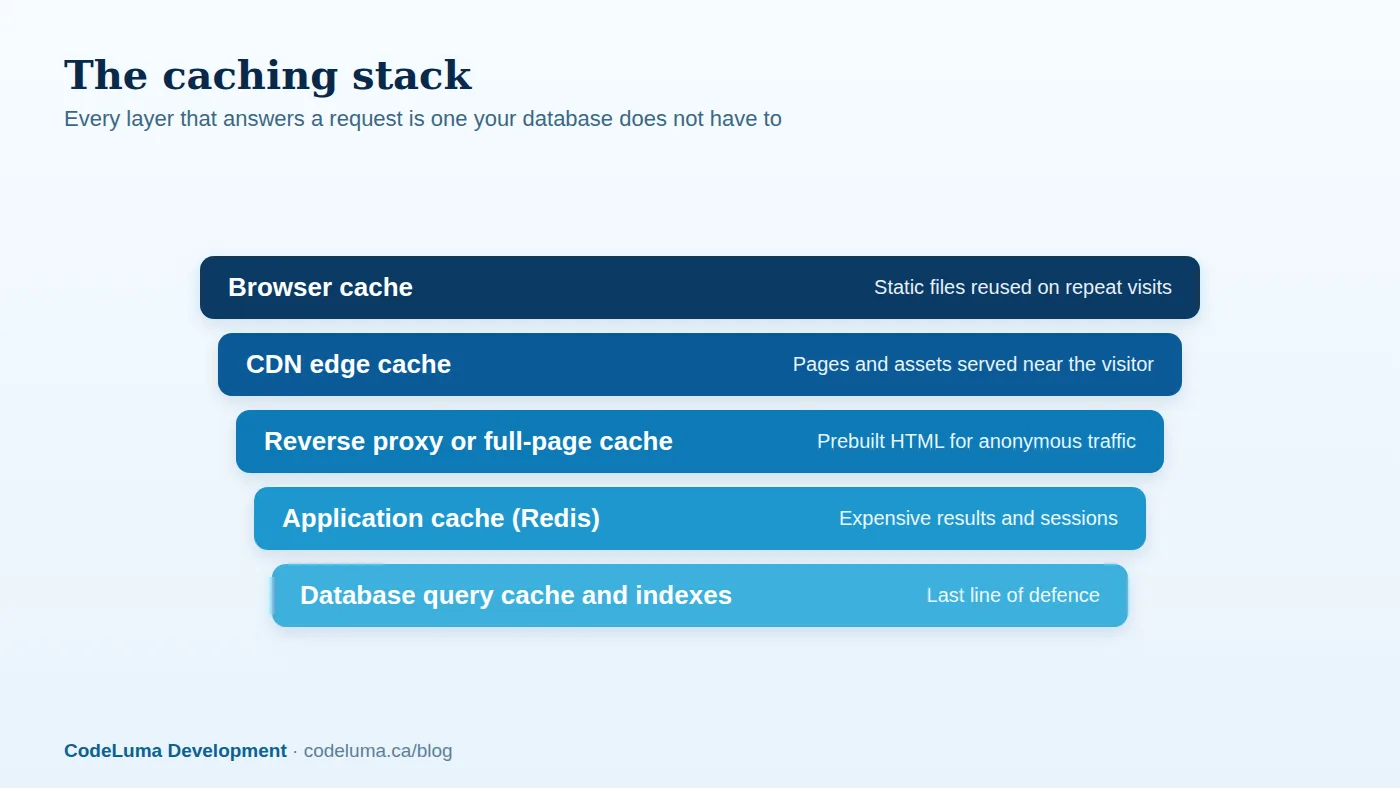
The layers of a caching strategy
Browser caching. With proper cache headers, a visitor's browser keeps static files such as images, scripts and stylesheets and reuses them on later pages and visits. Use long lifetimes and fingerprinted file names so a changed file gets a new URL and stale versions never appear.
CDN caching. A content delivery network stores copies of your assets, and often your pages, at locations around the world. Requests are answered from the nearest edge, cutting latency and shielding your servers. For mostly static or anonymous content, a CDN can serve the vast majority of traffic without touching your origin.
Full-page and reverse-proxy caching. A reverse proxy or your framework can store complete HTML pages for anonymous visitors, so a page that would take many database queries to build is served instantly. This is often the single largest speed-up for content-driven sites and stores' category pages.
Application caching with Redis. Redis is an in-memory data store that responds in fractions of a millisecond. It is ideal for caching the results of expensive queries and computations, sessions, rate-limit counters, feature flags and job queues. Instead of recalculating a leaderboard, a dashboard summary or a product recommendation list on every request, you compute it once and store it for a sensible period.
Database-level optimisation. Proper indexing, query design and, where available, query or buffer caches reduce the cost of the requests that do reach the database. Caching complements, but does not replace, good queries. We look at that in our database optimisation guide.

What to cache, and what not to
Good candidates are data that is read far more often than it changes and expensive to produce: product catalogues, category listings, navigation menus, computed reports, public profile pages, configuration, and results from slow third-party APIs. Poor candidates are highly personalised responses, anything containing private data, carts and checkout pages, and data that must always be exact, such as account balances and stock at the moment of purchase. When in doubt, cache the shared building blocks rather than the fully personalised page.
Design good cache keys
A cache key must uniquely identify the data it holds. If the response varies by language, currency, device type, user role or query parameters, those must be part of the key, or you will serve the wrong variant to the wrong person. Include a version or namespace in keys so you can invalidate a whole group at once by bumping the version. Never include user-specific data in a key that is shared across users, and never cache a response that reveals private information in a shared cache.
Invalidation: keeping data fresh
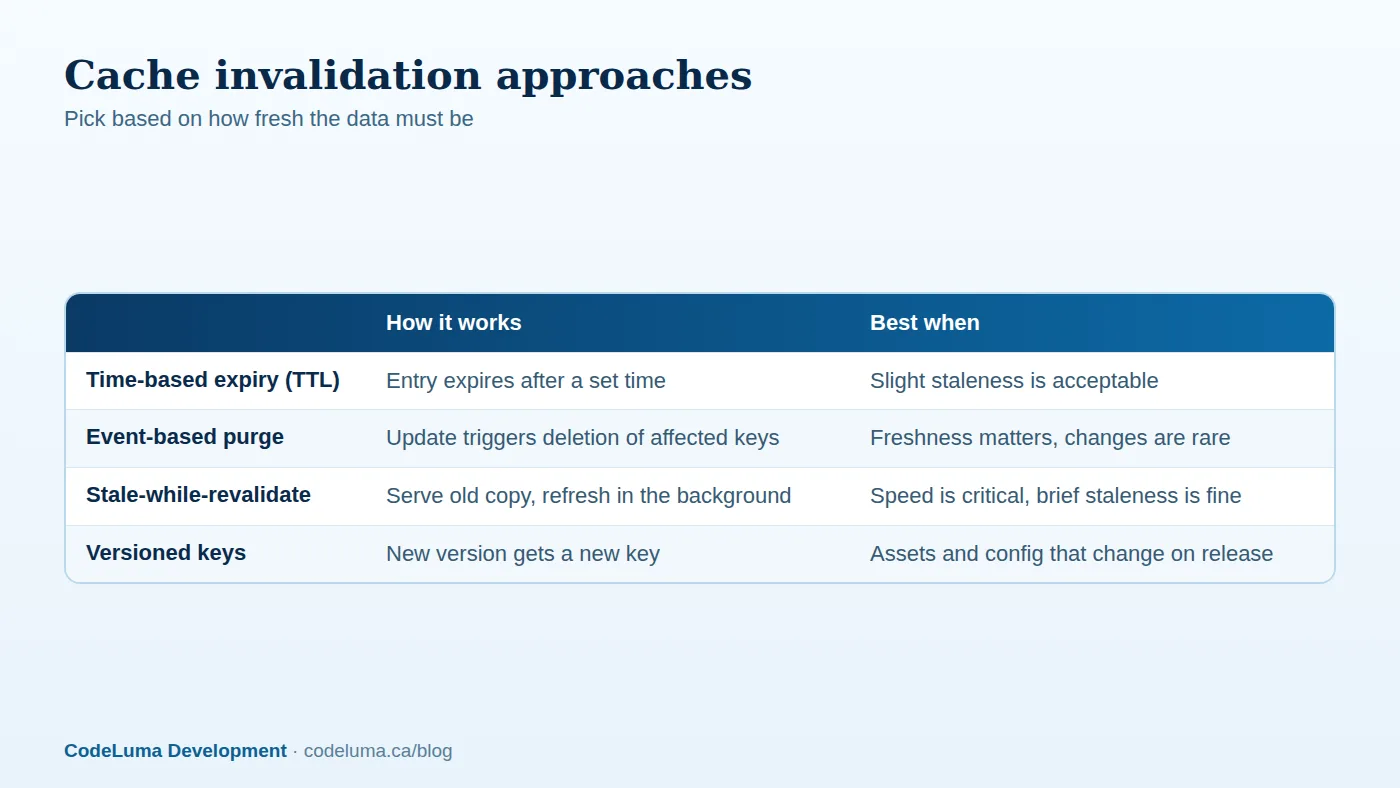
There are four common approaches, and most systems use a mix:
- Time to live (TTL). Entries expire after a set time. It is simple and robust, and acceptable when brief staleness is fine.
- Event-based purge. When data changes, delete or update the affected cache entries. It gives freshness but requires discipline about what depends on what.
- Stale-while-revalidate. Serve the existing copy immediately and refresh it in the background. Visitors always get a fast answer, and data is refreshed soon after it changes.
- Versioned keys or URLs. Changing the key changes the content, which sidesteps invalidation altogether. It is ideal for static assets.
Common pitfalls
- Cache stampede. When a popular entry expires, hundreds of requests may rebuild it at once and overload the database. Mitigate with locking so only one request rebuilds, with staggered expiry times, or with stale-while-revalidate.
- Serving private data from a shared cache. Mark responses that vary by user as private, and never let a CDN cache pages with personal information.
- Caching errors. A temporary failure cached for an hour becomes a long outage. Cache errors briefly or not at all.
- Unbounded memory. Set memory limits and eviction policies in Redis so it discards the least useful entries instead of failing.
- Treating the cache as a database. Anything in a cache should be reproducible. If losing it would lose data, it belongs in a real datastore.
- No fallback. If Redis is unavailable, the application should degrade gracefully, slower but working.

Using Redis well
Pick data structures that fit the job: strings for simple values, hashes for objects, sorted sets for leaderboards, and lists or streams for queues. Set a TTL on almost every key. Use pipelining or batch commands to reduce round trips. Monitor memory use, evictions, hit rate and latency. Secure the instance: require authentication, restrict network access to your application servers, and do not expose it to the public internet.
Working with a CDN
- Set correct Cache-Control headers on responses so the CDN knows what it may store and for how long.
- Vary or bypass the cache for logged-in users, carts and any personalised content.
- Use cache tags or surrogate keys, where supported, to purge related pages together when content changes.
- Serve images and fonts through the CDN with long lifetimes and fingerprinted names.
- Enable compression and modern protocols at the edge.
- Protect against attacks: a CDN with a web application firewall and rate limiting absorbs many hostile requests before they reach you.
Measure the results
Track the cache hit ratio at each layer, origin request counts, response times at the 50th and 95th percentiles, database load, and hosting cost. A CDN hit ratio well above ninety percent for static assets is common; page and application caches vary with content. If the hit rate is low, look for accidental cache-busting query strings, cookies that prevent caching, or lifetimes that are too short.
Where to start
If your site feels slow, begin with the cheapest wins: correct browser cache headers, a CDN for assets, and full-page caching for anonymous traffic. Then profile your slowest endpoints and add Redis caching where a small number of queries dominate. A managed hosting setup that includes a CDN, caching and monitoring saves you from having to assemble the pieces yourself.
Put this into practice with CodeLuma
CodeLuma designs caching layers that make sites faster and cheaper to run without ever serving customers the wrong data, then monitors hit rates so the gains stay real.
- Website and web application development - fast, accessible, search-friendly builds.
- Custom software development - tailored systems, integrations and internal tools.
- Managed hosting - monitored, backed-up, Canadian-friendly hosting.
Start a conversation. Tell us about your project and we will reply with practical next steps, or browse all CodeLuma services. CodeLuma Development Inc. is a Canadian company that works with teams in Windsor, Essex, London, Toronto, Mississauga and across Ontario, throughout Canada and remotely.