Every release carries risk: a new feature might contain a bug the tests missed, perform badly under real load, or simply confuse users. The traditional response is to test more, release rarely and hope. Feature flags offer a better answer: deploy code to production with the new feature switched off, then turn it on for a few people, watch what happens, and widen the audience or turn it off within seconds if something goes wrong. This guide explains how feature flags work and how to use them without creating a mess.
What a feature flag is
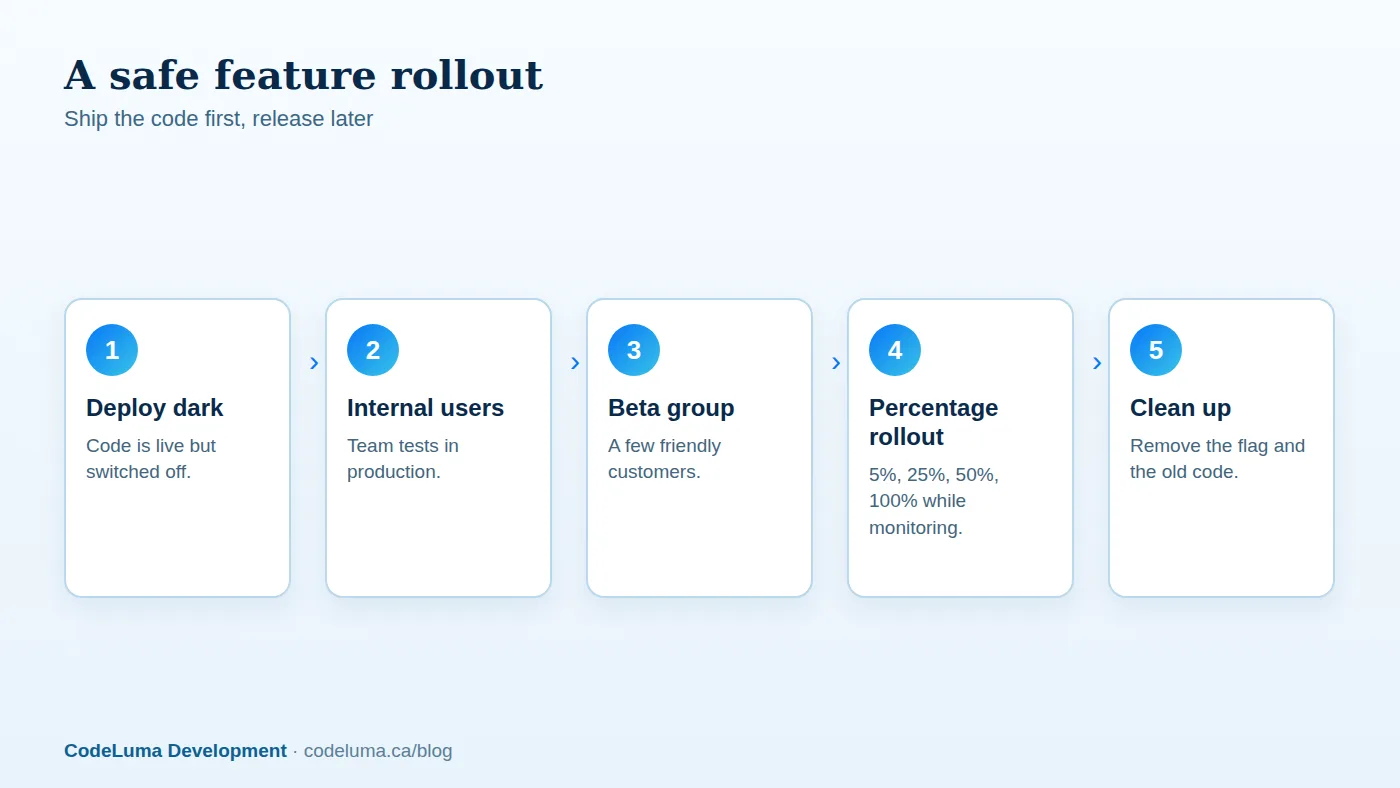
A feature flag (or feature toggle) is a conditional in your application whose outcome is controlled by configuration rather than code: if the flag "new-checkout" is on for this user, show the new checkout; otherwise show the old one. The configuration lives in a database, config service or dedicated flag platform and can change without redeploying. This decouples deployment (putting code on servers) from release (exposing behaviour to users), which is the key idea behind continuous delivery; see our CI/CD article.
Why it matters
- Lower risk: problems affect a few users, not everyone, and rollback is a switch rather than an emergency deployment.
- Faster delivery: unfinished work can merge to the main branch behind a flag, avoiding long-lived branches and painful merges.
- Testing in production: real data and real load reveal issues staging cannot.
- Business control: product and marketing decide when a feature launches, independent of engineering deploy schedules.
- Experimentation: compare versions with real users and decide with data.
- Entitlements: enable features by subscription plan, customer or region; see our subscription billing guide.
Types of flags
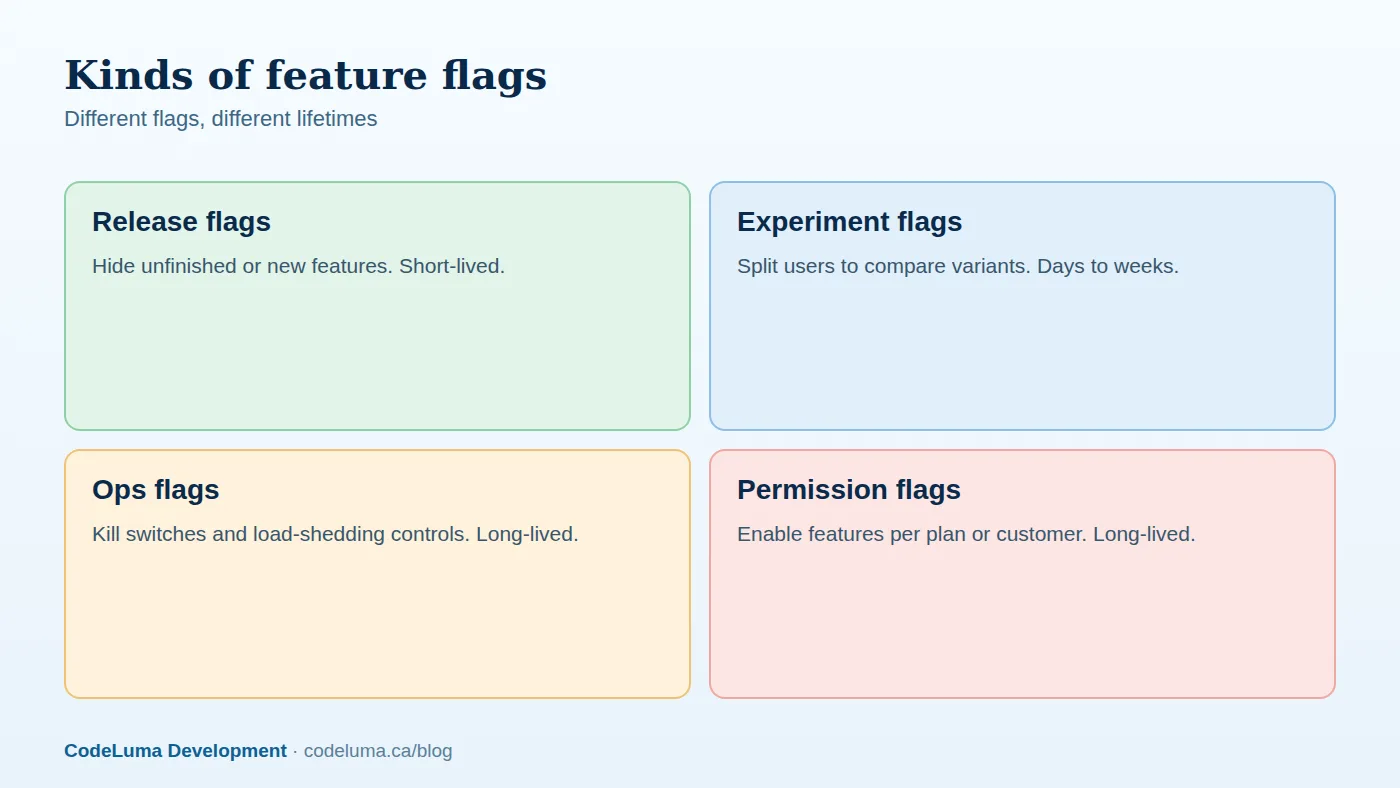
Release flags wrap new functionality during development and rollout; remove them once fully released. Experiment flags assign users to variants for A/B tests. Operational flags, or kill switches, let you disable expensive or risky components under stress, for example turning off recommendations or an external integration during an incident (our high-availability guide). Permission flags gate features by plan or customer and are effectively part of your product. Classify each flag when you create it, because release and experiment flags must be temporary.
Targeting and rollout strategies
- Internal first: employees and testers see the feature in production before anyone else.
- Beta groups: selected customers who agreed to preview features and give feedback.
- Percentage rollout: expose 1, 5, 25, 50 and then 100 percent of users, using a stable hash of the user identifier so each person gets a consistent experience.
- Attribute targeting: by plan, country, device, account age or any property you have.
- Canary tenants: in multi-client products, start with low-risk accounts; see our multi-client article.
- Scheduled releases: switch on at a specific time for a coordinated launch.
Running experiments properly
An A/B test compares a control with a variant on a defined metric, such as checkout completion. Decide the metric, the sample size and the duration before you start; randomise properly; avoid peeking and stopping the moment a result looks good; and beware of running many overlapping tests that interfere with each other. Statistical significance matters, and so does practical significance and guarding against harm to other metrics. The conversion-focused ideas in our conversion optimisation guide pair well with experiments.
Implementation options
- Simple configuration flags in environment variables or a config file. Fine for a few on/off switches, but changing them requires a deploy or restart.
- A flags table in your database with a small admin screen, cached for speed. Suits many small and mid-sized applications and gives per-user and per-account targeting.
- Open-source flag services that you host, providing targeting rules, SDKs and audit trails.
- Commercial flag platforms with rich targeting, experimentation, approvals and analytics, at a subscription cost.
Whatever you use, evaluate flags fast (locally, from cached rules, not with a network call on every check), provide a safe default if the flag service is unreachable, and keep the evaluation logic consistent between server and client. Never put secrets or sensitive rules in client-side flag payloads, and enforce permissions on the server; a hidden button is not a security control. See our web vulnerabilities article.
Design flags so code stays clean
- Keep the flag check at a high level, choosing between two implementations, instead of scattering conditionals everywhere.
- Name flags clearly with purpose and owner:
checkout_v2_release, nottest1. - Avoid nesting flags in complex combinations, which multiplies test cases.
- Design database changes to be backwards compatible so both code paths work while the flag is partial.
- Store the flag state in logs and error reports so debugging shows which variant a user saw.
The danger: flag debt
Old flags are a form of technical debt. Every flag doubles the paths through the code, complicates testing, and eventually nobody remembers what it does. Prevent this with discipline: record an owner and an expected removal date for every temporary flag, review the list regularly, delete the flag and the old code path promptly after a full rollout, and add tests or lint rules that warn about stale flags. A healthy system has a small number of long-lived flags and a steady turnover of short-lived ones.
Testing with flags
Test both states of critical flags in automated tests, and the transitions between them, such as a user who has data created under the new version when the flag is turned off. Include flag configurations in staging so QA can exercise combinations, and run smoke tests in production for newly enabled features. Be careful with database migrations that a rollback cannot undo; design forward-compatible schemas as described in our zero-downtime deployment guide.
Governance and safety
Control who can change flags, especially in production: use roles, approvals for high-impact flags, and an audit log recording who changed what and when (audit logging). Announce significant rollouts to support and customer success teams. Define the rollout checklist: monitoring dashboards, error and performance thresholds, and a named person to decide to roll back. Ties with monitoring are important; see our monitoring guide, and consider automatic rollback when error rates spike.
Feature flags and AI features
New AI-powered features benefit especially from staged rollouts, since quality, cost and behaviour vary with real usage. Use flags to route small percentages of traffic to a new prompt or model, compare quality and cost, and disable instantly if problems appear; see our generative AI integration guide.
Getting started
- Add a minimal flag system: a table, a cached lookup and an admin toggle.
- Wrap your next risky feature and release it to the team, then to a small group.
- Add a kill switch for your most fragile integration.
- Track flags with owners and removal dates.
- Move to a dedicated platform when targeting and experiments outgrow the simple approach.
Our software team builds feature flag and rollout controls into applications and pipelines, and our maintenance plans include flag audits so the system stays clean.
Put this into practice with CodeLuma
CodeLuma builds feature flag systems into applications so new features reach a few users first, can be switched off instantly, and never need a risky big-bang release.
- Custom software development - tailored systems, integrations and internal tools.
- Maintenance and support plans - updates, monitoring and ongoing improvement.
- Managed hosting - monitored, backed-up, Canadian-friendly hosting.
Start a conversation. Tell us about your project and we will reply with practical next steps, or browse all CodeLuma services. CodeLuma Development Inc. is a Canadian company that works with teams in Windsor, Essex, London, Toronto, Mississauga and across Ontario, throughout Canada and remotely.