Every application eventually needs to talk to its users when they are not looking at it: a payment failed, a document was signed, your driver is arriving, a colleague mentioned you. Notifications drive engagement and trust when they are timely and relevant, and destroy both when they are noisy, late or wrong. Building a notification system that scales, respects preferences and actually delivers requires more than calling an email API in a request handler. This guide covers the architecture and the product thinking behind notifications done right.
Start with the message, not the channel
Categorise your notifications. Transactional messages are required to complete or inform about something the user did: receipts, password resets, security alerts, shipping updates. Operational or activity notifications concern things happening in the product: mentions, assignments, comments, approvals. Marketing messages promote or nurture. Each category has different urgency, legal rules and user expectations, and should be separately controllable. Importantly, decide the purpose of each message and the action you want the recipient to take. If there is no useful action or information, do not send it.

Pick channels deliberately
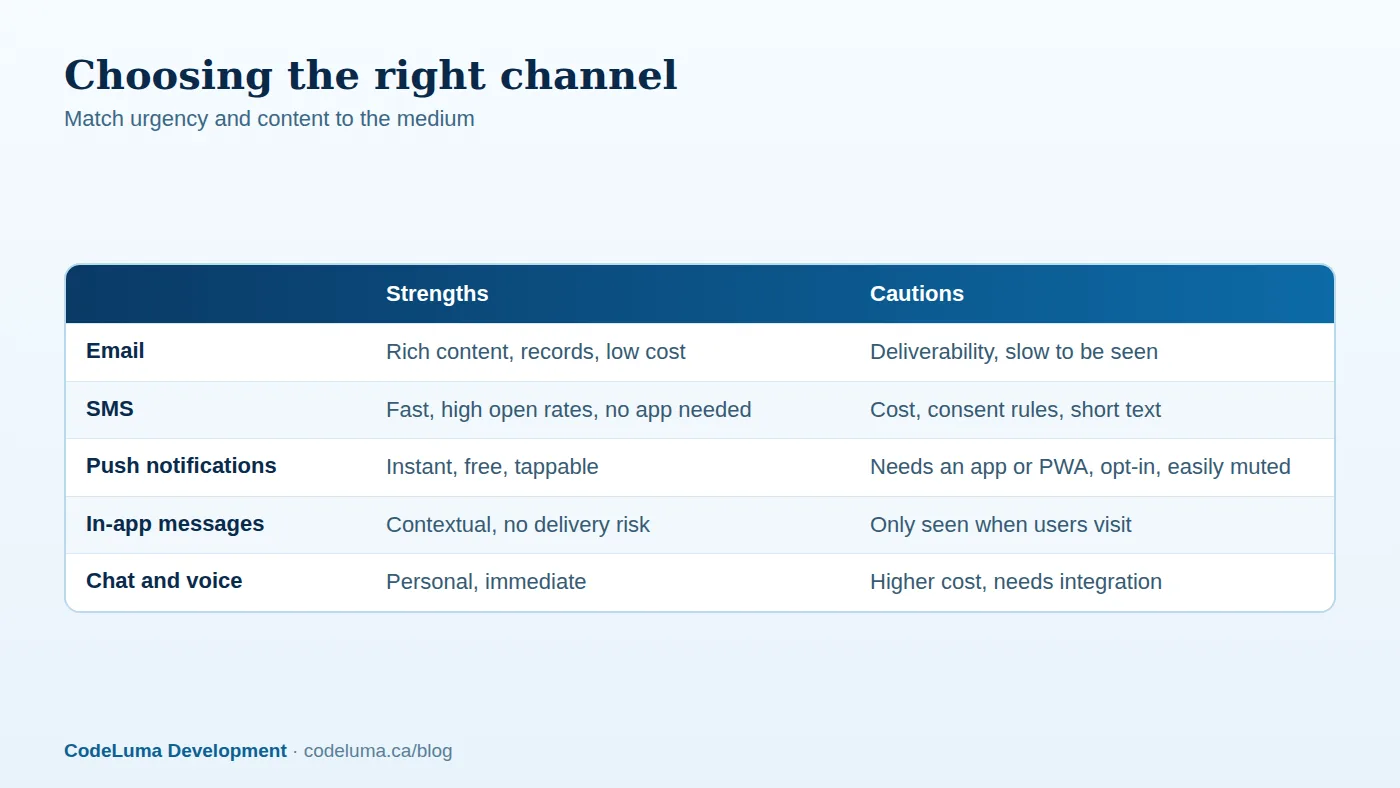
Email is universal and good for records and rich content, but slow to be noticed and subject to filtering. SMS is immediate and widely read, but costs money per message and is heavily regulated. Push notifications, from a mobile app or a web app, are free, instant and tappable, but require opt-in and can be muted. In-app notifications sit inside your product and are ideal for activity feeds and low-urgency updates. Chat integrations reach teams where they work. Let the type and urgency of the message determine the channel, and give users control. For critical alerts such as security events, consider multiple channels. If you are considering mobile delivery, our article on offline-first PWAs explains what web push can do without a native app.
Preferences and consent
Users must be able to choose what they receive and how. Build a preference centre with categories and channels, sensible defaults, frequency controls and a one-click unsubscribe for marketing. Store consent records: what was agreed, when and how. Respect quiet hours and time zones, especially for SMS and push. Laws such as Canada's CASL, the US TCPA and CAN-SPAM, and Europe's GDPR and ePrivacy rules impose requirements for consent, identification and opt-out, and penalties can be significant; seek legal advice for your markets. Always honour opt-outs immediately and across every system that can send messages; see our CRM and email integration article for consent synchronisation.
Architecture for scale and reliability
A robust design has a few key pieces:
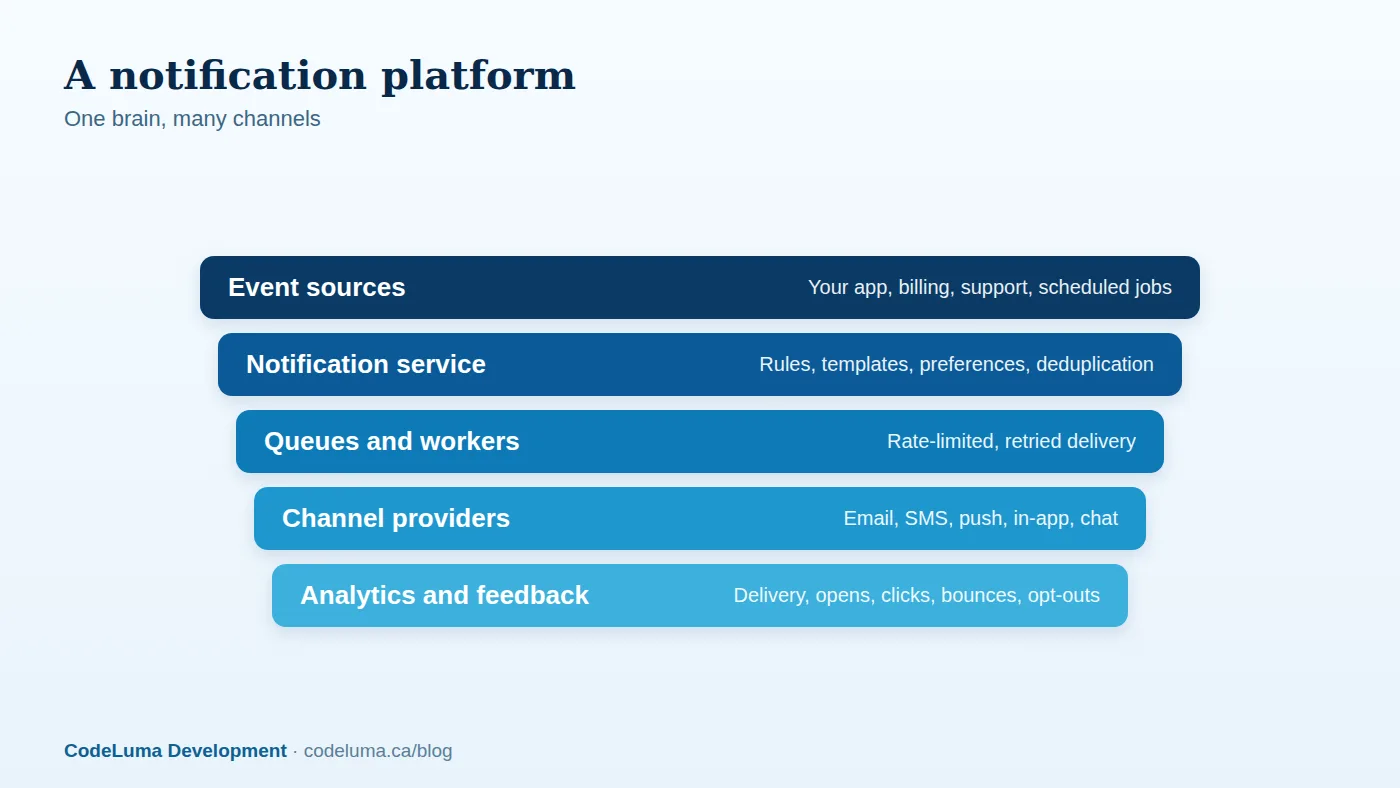
- A notification service that receives events or requests from your application and decides who to notify, about what, on which channels, applying preferences, rules and deduplication.
- Templates managed separately from code, with variables, localisation and previews, so content changes do not require deployments.
- Queues so sending never blocks user actions and bursts are absorbed. Separate queues by priority: a password reset should never wait behind a million marketing messages.
- Workers that render templates, call channel providers and record results, scaled independently per channel.
- Retries with backoff and idempotency, using a unique notification ID so a retry never sends duplicates.
- Provider abstraction and failover, so you can switch email or SMS providers, or fail over automatically when one has an outage. Patterns are described in our third-party outage article.
- Rate limiting and throttling per provider, per recipient and per channel, to respect provider limits and avoid overwhelming users.
- Webhook handling for delivery receipts, bounces, complaints and opt-outs from providers.
Follow the event-driven principles in our integration guide and keep notification logic out of the request path.
Deliverability is a discipline
- Email authentication: configure SPF, DKIM and DMARC for every sending domain, and use consistent from addresses.
- Separate streams: use different domains or IP pools for transactional and marketing messages so promotional problems never block critical ones.
- List hygiene: remove hard bounces immediately, suppress complaint sources, and prune inactive recipients.
- Content quality: avoid spammy patterns, provide plain-text alternatives and keep links clean.
- Warm-up and volume control: ramp up new domains and sudden volume increases gradually.
- SMS: register sender IDs and campaigns where required, and monitor carrier filtering.
- Push: handle expired and invalid tokens, and respect platform rules about frequency and content.
Reduce noise: batching, digests and smart timing
The fastest way to make users mute everything is to send too much. Aggregate related events into a digest, for example "five new comments on your project" once an hour instead of five separate emails. Collapse duplicate alerts, use debouncing so a rapid series of changes yields one message, and provide delivery windows. Let users choose immediate, digest or off per category. Escalate only when necessary: send the first reminder in-app, and use SMS only if it remains unread and is truly urgent. Personalise the timing by user time zone and past engagement where appropriate.
Design the content
Write clearly and briefly. Lead with what happened and what the user needs to do, and give a direct link or button to do it. Avoid vague subject lines. For SMS and push, every character counts. Localise language, dates and currency, and test rendering in major email clients and dark mode. Make notifications accessible with proper contrast, alt text and semantic structure. Include context so recipients recognise why they got it and how to change preferences.
Track and learn
Record each notification's lifecycle: created, queued, sent, delivered, opened, clicked, bounced, complained, unsubscribed. Use it to monitor deliverability, find broken templates, measure the impact on activation and retention, and spot fatigue signals such as rising opt-outs. Be careful with open tracking, which is less reliable due to privacy features, and rely more on clicks and downstream actions. Alert when delivery rates drop or queues back up. Apply the observability practices from our monitoring article.
Test the edge cases
- Provider outage and failover, including duplicate prevention.
- Very large bursts, such as everyone getting an alert at once.
- Users who changed time zones, languages or preferences recently.
- Bounced addresses, changed phone numbers and invalid push tokens.
- Unsubscribe and re-subscribe flows.
A well-designed notification system feels invisible when it works: people simply hear what they need to hear when they need to hear it. If you are building or fixing notifications, our software team can design the platform, integrate your providers and set up the monitoring, and our app developers can add push and in-app messaging to your mobile experience.
Put this into practice with CodeLuma
CodeLuma builds notification platforms that reach people on the right channel at the right time, with preferences, consent, delivery tracking and failover, so important messages actually arrive and unimportant ones stay quiet.
- Custom software development - tailored systems, integrations and internal tools.
- Website and web application development - fast, accessible, search-friendly builds.
- Mobile and app development - iOS, Android and progressive web apps.
Start a conversation. Tell us about your project and we will reply with practical next steps, or browse all CodeLuma services. CodeLuma Development Inc. is a Canadian company that works with teams in Windsor, Essex, London, Toronto, Mississauga and across Ontario, throughout Canada and remotely.