Every developer has heard, or said, the words "but it works on my machine." Differences in operating system versions, installed libraries, language runtimes and configuration cause bugs that appear only in some environments, waste hours and make deployments nerve-racking. Containers, and Docker in particular, address this by packaging an application together with everything it needs to run into a portable unit that behaves the same on a laptop, a test server or a production cluster. This guide explains what containers are, why they matter for businesses, and how to use them well.
What a container is
A container is an isolated process, or group of processes, that runs on a shared operating system kernel but sees its own filesystem, network and process space. It is built from an image: a layered, read-only snapshot containing the application code, its runtime, libraries and settings. Unlike a virtual machine, a container does not include a full guest operating system, so it is lightweight and starts in seconds. You can run many containers on one host, each isolated from the others, and move them between hosts without change.

Why containers help
- Consistency. The same image runs in development, testing and production, eliminating most environment-specific surprises.
- Speed and repeatability. Setting up a new environment or onboarding a developer becomes a single command rather than a day of installation.
- Isolation. Dependencies of one application do not conflict with another's; two apps needing different runtime versions coexist happily.
- Efficient resource use. More applications per server than with virtual machines.
- Easy scaling and recovery. Start more instances, or replace a failed one, quickly and automatically.
- Foundation for modern delivery. Containers fit naturally with automated pipelines, blue-green releases and rollbacks; see our zero-downtime deployment guide and our CI/CD article.
Writing a good Dockerfile
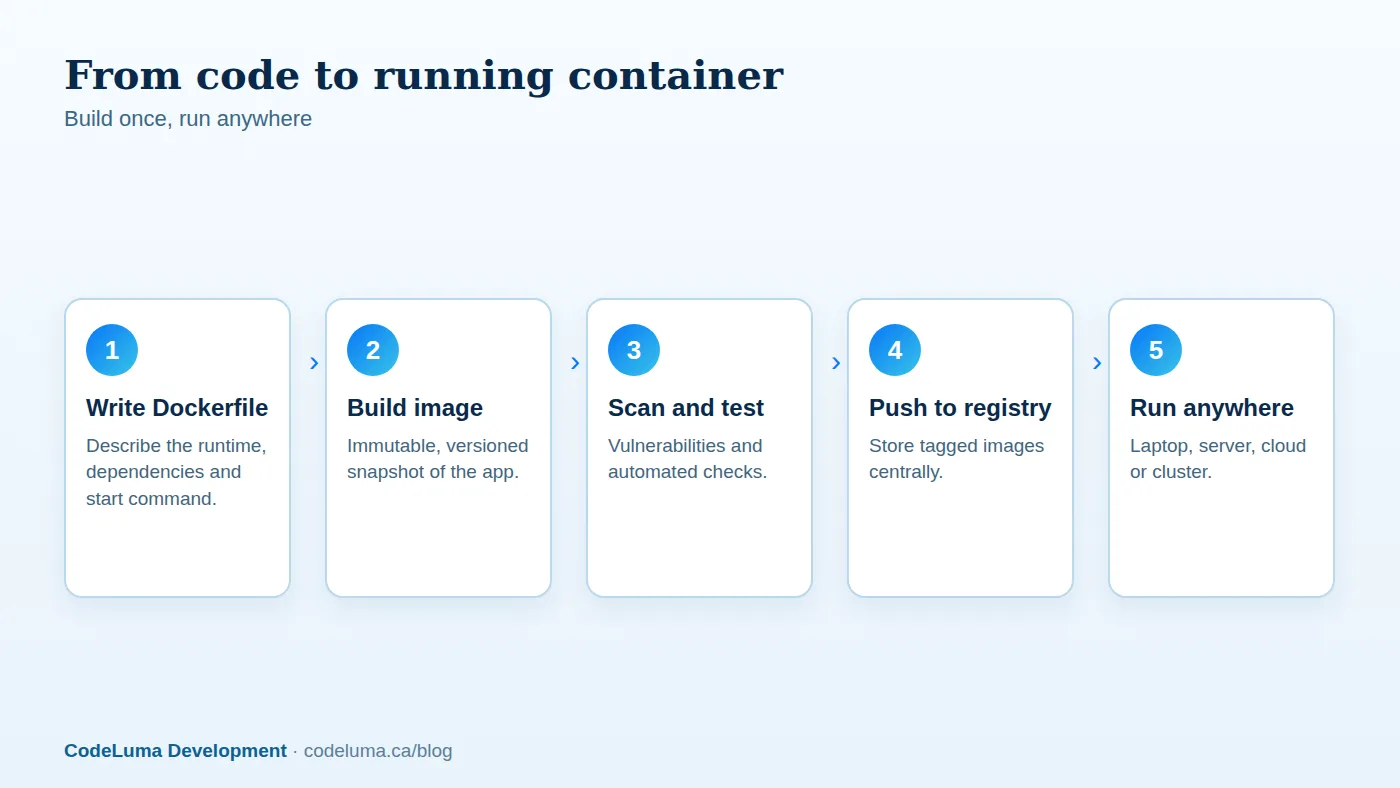
A Dockerfile is the recipe for an image. Some practical guidance:
- Choose a small, trusted base image, such as a slim or minimal variant of your language runtime from an official source. Fewer packages mean a smaller download and fewer vulnerabilities.
- Use multi-stage builds. Compile or build the application in one stage with all the build tools, then copy only the resulting artefacts into a clean final stage. The shipped image contains no compilers or source-code caches.
- Order instructions for layer caching. Copy dependency manifests and install dependencies before copying the application source, so rebuilds after code changes reuse the cached dependency layer and finish in seconds.
- Pin versions of base images and packages for reproducible builds, and update them deliberately.
- Run as a non-root user. If an attacker compromises the application, they should not be root inside the container.
- Keep secrets out of images. Anything baked into a layer can be extracted. Inject secrets at runtime instead; see our secrets guide.
- Use a .dockerignore file to exclude local files, version-control data, logs and credentials from the build context.
- Define one main process per container, and log to standard output so the platform can collect logs.
- Add a health check so orchestrators know when the container is ready and when it is unhealthy.

Local development with Compose
Most applications need more than one service: a web app, a database, a cache, a queue, perhaps a mail catcher. Docker Compose lets you describe them all in a single file and start the whole environment with one command. New developers clone the repository, run compose, and have a working system with seed data in minutes. Use named volumes for database data so it persists, mount source code into the container for fast reload during development, and mirror production versions of databases and services to catch compatibility issues early. Keep development-only settings separate from production ones.
Images, registries and tags
Built images are pushed to a registry, a storage service for images, from which servers pull them to run. Use private registries for your applications, with access controls. Tag images with immutable identifiers, such as the git commit hash or a semantic version, rather than relying on a mutable "latest" tag, so you always know exactly what is running and can roll back precisely. Retain enough previous versions for rollbacks, and clean up old ones to control storage cost.
Security for containers
- Scan images for known vulnerabilities in the base image and dependencies during the build and periodically afterwards, and rebuild when patches appear.
- Use minimal images and remove unneeded tools, such as shells and package managers, in production where practical.
- Drop privileges and capabilities, use read-only filesystems where possible and restrict resource usage.
- Isolate networks so containers can only reach what they need.
- Verify image provenance, using trusted sources and signing where supported.
- Patch the host and the container runtime; containers share the host kernel.
These measures fit into the broader practices in our security audit guide and our web vulnerabilities article.
State, data and configuration
Containers are ephemeral: anything written inside one is lost when it is replaced. Keep state outside: databases on managed services or dedicated volumes, uploaded files in object storage, sessions in a shared cache. Configuration comes from environment variables or mounted files, so the same image runs in every environment. Design applications as stateless where possible, which is also the key to scaling; see our scalable architecture guide.

Running containers in production
You have several options, in increasing order of power and complexity:
- A single host with Docker or Compose. Fine for small applications, with a process manager and monitoring. Simple, but limited in scale and resilience.
- Managed container platforms. Cloud services that run your containers and handle scaling, load balancing and health checks without you managing servers.
- Orchestration systems such as Kubernetes. Provide scheduling, self-healing, rolling updates and service discovery across clusters. They are extremely capable, and equally capable of consuming your team's time. Adopt them when you genuinely need multi-service scale and have the skills, or use a managed offering.
Match the option to your needs. Many businesses run very successfully on the first two. Our comparison of hosting models in cloud hosting options may help you choose.
Observability and operations
Centralise logs from containers, since local logs disappear with the container. Collect metrics for CPU, memory, restarts and request rates, and set alerts for crash loops and resource exhaustion. Set resource requests and limits so one container cannot starve others. Use health and readiness checks to drive automatic restarts and safe rollouts. See our monitoring article.
Common pitfalls
- Huge images built from full operating systems with build tools left inside.
- Secrets baked into layers or committed alongside Dockerfiles.
- Relying on the latest tag, then being unable to reproduce a build.
- Running as root and mounting sensitive host paths.
- Storing data inside containers without volumes or external storage.
- Adopting orchestration long before it is needed.
Getting started
Containerise one application: write a Dockerfile, create a Compose file for local development, add the build to your pipeline, scan the image and deploy it to a managed platform. You will quickly see the benefits in onboarding speed, environment parity and deployment confidence. Our software team containerises existing applications and builds new ones container-first, and our hosting options can run them with monitoring and backups included.
Put this into practice with CodeLuma
CodeLuma containerises applications so development, testing and production match exactly, with lean, scanned images and repeatable deployments that make releases and recovery routine.
- Custom software development - tailored systems, integrations and internal tools.
- Managed hosting - monitored, backed-up, Canadian-friendly hosting.
- Maintenance and support plans - updates, monitoring and ongoing improvement.
Start a conversation. Tell us about your project and we will reply with practical next steps, or browse all CodeLuma services. CodeLuma Development Inc. is based in Nova Scotia and works with teams across Canada and remotely.