Ask a team how often they release software and how they feel on release day, and you learn a lot about their engineering health. Teams that release monthly, with manual testing and late-night deployments, tend to dread the process. Teams that release many times a day, automatically, tend to find it uneventful. The difference is not talent; it is a continuous integration and continuous delivery (CI/CD) pipeline that automates the repetitive, error-prone work of building, testing and deploying. This guide explains what a good pipeline includes and how to introduce one.
What CI/CD means
Continuous integration (CI) is the practice of merging code changes into a shared main branch frequently, at least daily, with each change automatically built and tested. It surfaces integration problems within minutes rather than at the end of a long project. Continuous delivery extends this so that every change that passes the pipeline is releasable at any time, with deployment to production triggered by a button or automatically. Continuous deployment goes one step further by releasing every passing change automatically. Most business applications are well served by continuous delivery with an approval step, and can move toward full automation as confidence grows.

Why it matters for the business
- Faster delivery. Small changes ship quickly, so customers get improvements and fixes sooner.
- Fewer defects in production. Automated checks catch regressions before customers do.
- Lower risk. Small, frequent releases are easier to understand, test and reverse than large infrequent ones.
- Predictability. Release dates stop depending on heroics.
- Developer productivity and morale. Less time spent on manual testing and deployment, and less fear.
- Compliance and traceability. Every release has a record of what changed, who approved it and what checks passed.
The stages of a pipeline
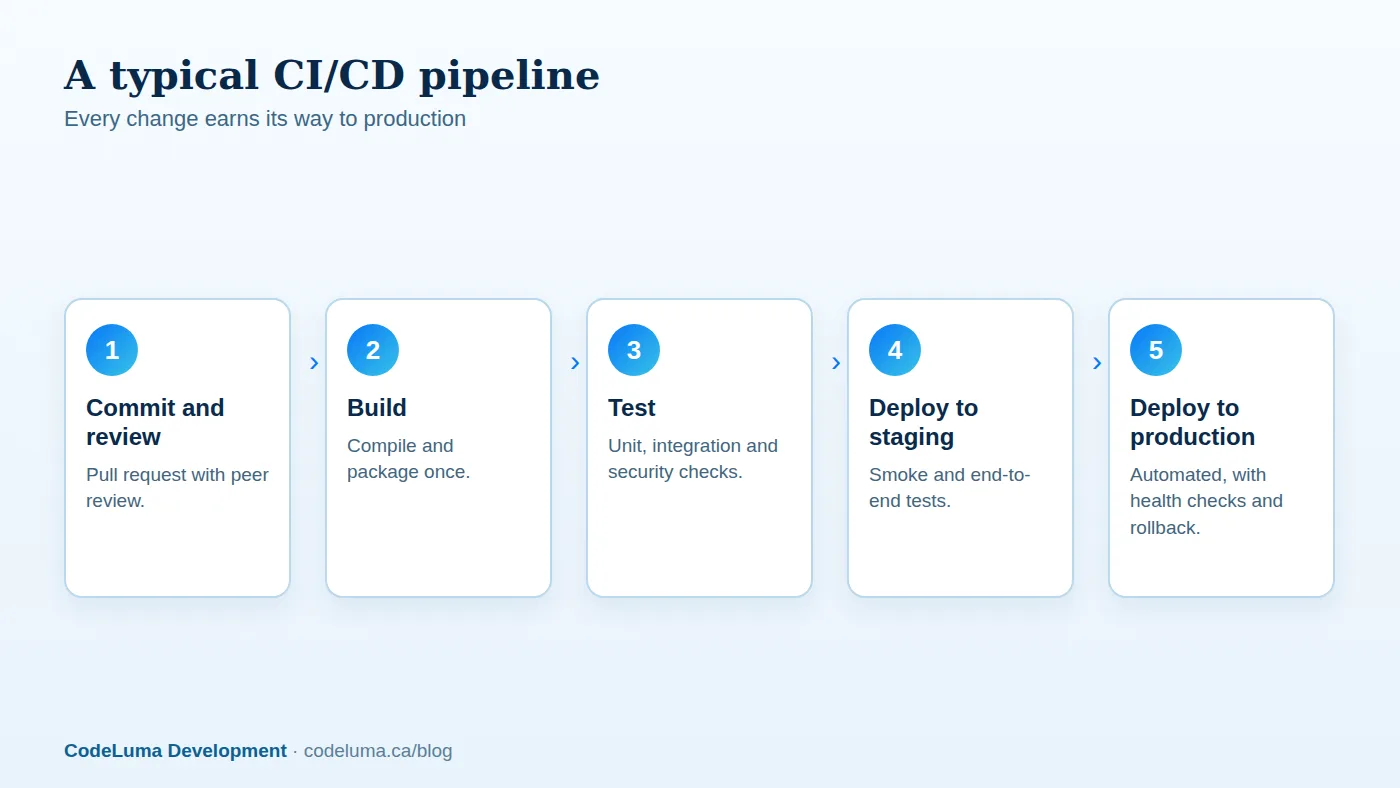
1. Source control and review. All code lives in version control. Changes arrive via pull requests reviewed by a teammate, with the pipeline running automatically on each one. Protect the main branch so nothing merges without passing checks and approval.
2. Build. Compile the code and package it into a deployable artefact, such as a container image, once. The same artefact then moves through all environments, so what you test is exactly what you deploy. See our Docker guide.
3. Automated tests. Run layers of tests, described below, in parallel to keep the pipeline fast.
4. Quality and security checks. Linting and formatting, static analysis for bugs and insecure patterns, dependency vulnerability scanning, secret scanning, licence checks and container image scanning. Catching a vulnerable library at build time is far cheaper than discovering it in production; see our web vulnerabilities article.
5. Deploy to staging. Release to an environment that mirrors production, run database migrations, and execute smoke tests and a small suite of end-to-end tests of critical journeys.
6. Deploy to production. Use a safe strategy: rolling, blue-green or canary releases, with automated health checks and automatic rollback on failure, as we describe in our zero-downtime deployment guide.
7. Verify and observe. Post-deployment checks, monitoring and alerts confirm the release is healthy, and markers on dashboards tie changes to behaviour; see our monitoring guide.
A sensible test strategy
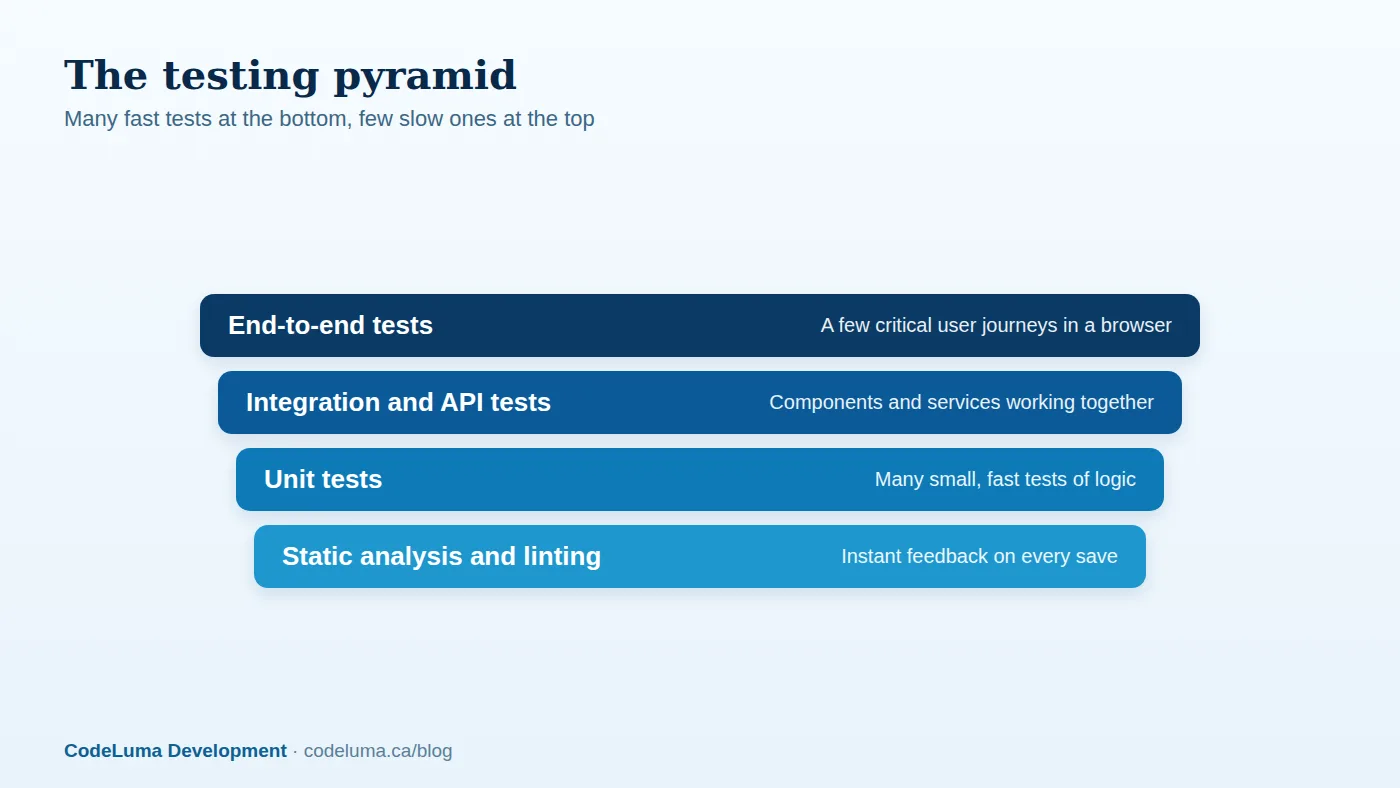
Automated testing is the engine of CI/CD, and it works best as a pyramid. At the base, a large number of unit tests check small pieces of logic quickly. Above them, integration and API tests verify that components, databases and services work together. At the top, a small number of end-to-end tests drive a real browser through the most important user journeys, such as sign-up, login and checkout. End-to-end tests are valuable but slow and prone to flakiness, so keep them few and focused. Add contract tests where services depend on each other's APIs, and performance and load tests on a schedule or before major launches; see our traffic spike playbook.
Keep the pipeline fast and trustworthy
Developers will bypass a slow or unreliable pipeline. Aim for feedback on a pull request within about ten minutes. Techniques include running tests in parallel, caching dependencies and build outputs, running only the tests affected by a change where safe, and splitting slow suites into a fast set on every commit and a fuller set on merge or nightly. Treat flaky tests as bugs: quarantine and fix them, because a pipeline that fails randomly teaches people to ignore failures. Make failures easy to diagnose with clear logs, artefacts and screenshots.
Manage environments and configuration
Provision environments consistently using infrastructure as code, as described in our IaC article, so staging matches production. Keep configuration and secrets out of the code and inject them per environment; see our secrets guide. Consider ephemeral preview environments for each pull request, which let product owners and testers try changes before merging. Manage database migrations as part of the pipeline, and design them to be backwards-compatible.
Approvals, compliance and control
Automation does not mean losing control. You can require manual approval before production, restrict who can deploy, enforce required checks and reviews, and keep audit trails of every deployment. For regulated environments, the pipeline becomes evidence: it shows that every change was reviewed, tested and scanned. Use feature flags to separate deployment from release, so code can ship safely while business teams decide when to switch features on; see our feature flags article.
Measure delivery performance
The industry research on software delivery highlights four useful metrics: deployment frequency, lead time for changes from commit to production, change failure rate, and time to restore service. Track them; they show whether investment in the pipeline is paying off, and highlight bottlenecks. Improving them usually correlates with better business outcomes. Watch for gaming, and use the metrics for learning, not for ranking individuals.
Introducing CI/CD to an existing team
- Start with continuous integration: automate the build and the tests you already have on every pull request.
- Add quick wins: linting, formatting and dependency scanning.
- Grow test coverage where it matters, beginning with the riskiest and most frequently changed code, and add a smoke test for critical flows.
- Automate deployment to staging, then to production with approval.
- Shrink batch sizes, releasing smaller changes more often.
- Add safe release strategies and monitoring, then consider automated rollback and progressive delivery.
Expect cultural work too: agreeing that a broken main branch is everyone's priority, that tests are part of the definition of done, and that releasing is routine. If your releases are slow and stressful, a pipeline is the highest-leverage fix. Our software team sets up and improves CI/CD for client applications, and can host and operate the resulting environments through our hosting and maintenance services.
Put this into practice with CodeLuma
CodeLuma builds CI/CD pipelines that test, scan and deploy every change automatically, so releases are frequent, safe and boring, and bugs are caught minutes after they are written rather than weeks after release.
- Custom software development - tailored systems, integrations and internal tools.
- Managed hosting - monitored, backed-up, Canadian-friendly hosting.
- Maintenance and support plans - updates, monitoring and ongoing improvement.
Start a conversation. Tell us about your project and we will reply with practical next steps, or browse all CodeLuma services. CodeLuma Development Inc. is a Canadian company that works with teams in Windsor, Essex, London, Toronto, Mississauga and across Ontario, throughout Canada and remotely.