Two technology trends are reshaping how business software gets made. Low-code and no-code platforms promise that non-programmers can assemble applications from visual blocks. AI coding assistants promise that programmers can write, test and explain code many times faster. Both are real, both are useful, and both are surrounded by hype and by oversimplified predictions that developers will be replaced or that anyone can now build anything. The reality, for business owners deciding how to build their next system, is more interesting and more practical. This article separates what works from what does not.
Low-code and no-code: what they are
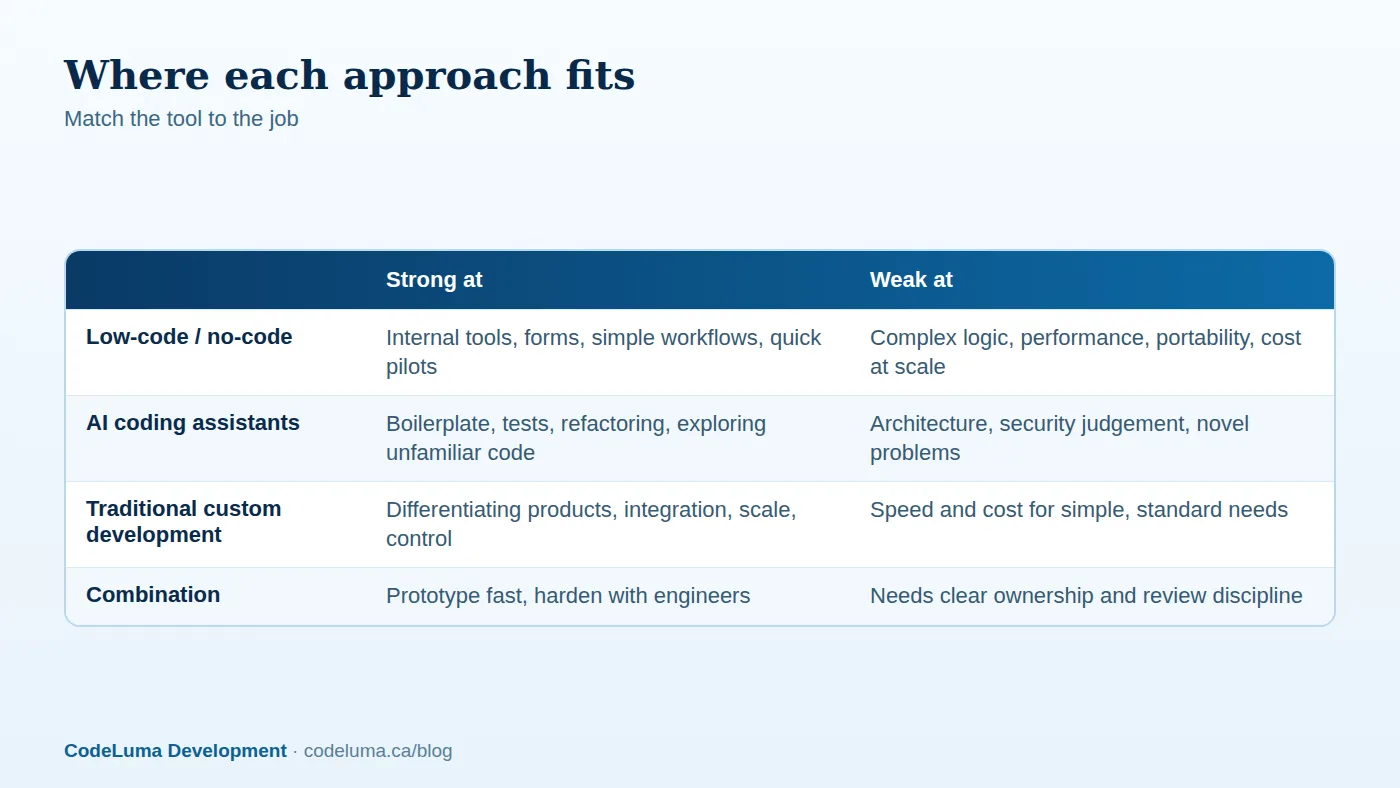
Low-code platforms let you build applications by configuring pre-built components, forms, data tables, workflows and integrations through a visual interface, with optional custom code for special cases. No-code tools go further by avoiding code entirely. They have matured into dependable options for internal tools, approval workflows, simple portals, data collection forms and prototypes. The appeal is speed and lower initial cost, and the fact that business staff can often build and adjust things without a development queue.

Where low-code shines
- Internal tools used by dozens of people: request forms, trackers, simple dashboards and approval flows.
- Prototypes and pilots to test whether a process is worth automating, in days rather than months; see our MVP guide.
- Standard workflows that map neatly onto the platform's building blocks.
- Connecting existing systems with pre-built connectors, for light automation; see our integration guide.
Where low-code struggles
- Complex business logic that does not fit the platform's model ends up as tangled workarounds.
- Performance and scale. Platforms can become slow with large data volumes or many concurrent users.
- Cost growth. Per-user or per-record pricing that seemed cheap for ten users can become expensive at a thousand.
- Lock-in. Your application lives inside the vendor's ecosystem. Exporting the logic to another system may mean rebuilding it, and the vendor controls pricing, features and continuity.
- Security and governance. Citizen-built apps can spread sensitive data across untracked tools; access control, audit trails and compliance need central oversight; see our audit logging article.
- Customer-facing polish. Branded, high-performance, differentiated public products are rarely a good fit.
Our guidance on when to move away from lightweight tools is in our spreadsheet migration article.
AI coding assistants: what they are
AI assistants embedded in editors and command lines can complete code, generate functions and tests from descriptions, explain unfamiliar code, suggest refactorings, draft documentation and even carry out multi-step changes across a codebase under supervision. Used well, they remove drudgery: boilerplate, repetitive transformations, first drafts of tests, and the hours spent reading documentation.
What they do well
- Boilerplate and glue code: forms, data mappings, CRUD endpoints, configuration.
- Tests: generating unit tests and edge cases, which improves coverage; see our CI/CD article.
- Refactoring and migration: renaming, restructuring and upgrading libraries across many files.
- Explaining and exploring: summarising an unfamiliar module, tracing a bug, comparing approaches.
- Prototyping: getting a working sketch quickly to test an idea.
What they do poorly
- Architecture and trade-offs. Choosing the right data model, boundaries and technologies requires understanding the business and its future, which the assistant lacks; compare our scalable architecture guide.
- Security judgement. Generated code can contain vulnerabilities, outdated patterns and invented package names; see our web vulnerabilities article.
- Consistency across a large codebase: it may reinvent utilities instead of reusing yours, or subtly diverge from conventions.
- Confident errors. Plausible but wrong code, wrong API usage and hallucinated functions, for the same reasons described in our prompt engineering article.
- Understanding what the business really needs, which is the hardest and most valuable part of software.
The risks businesses should understand
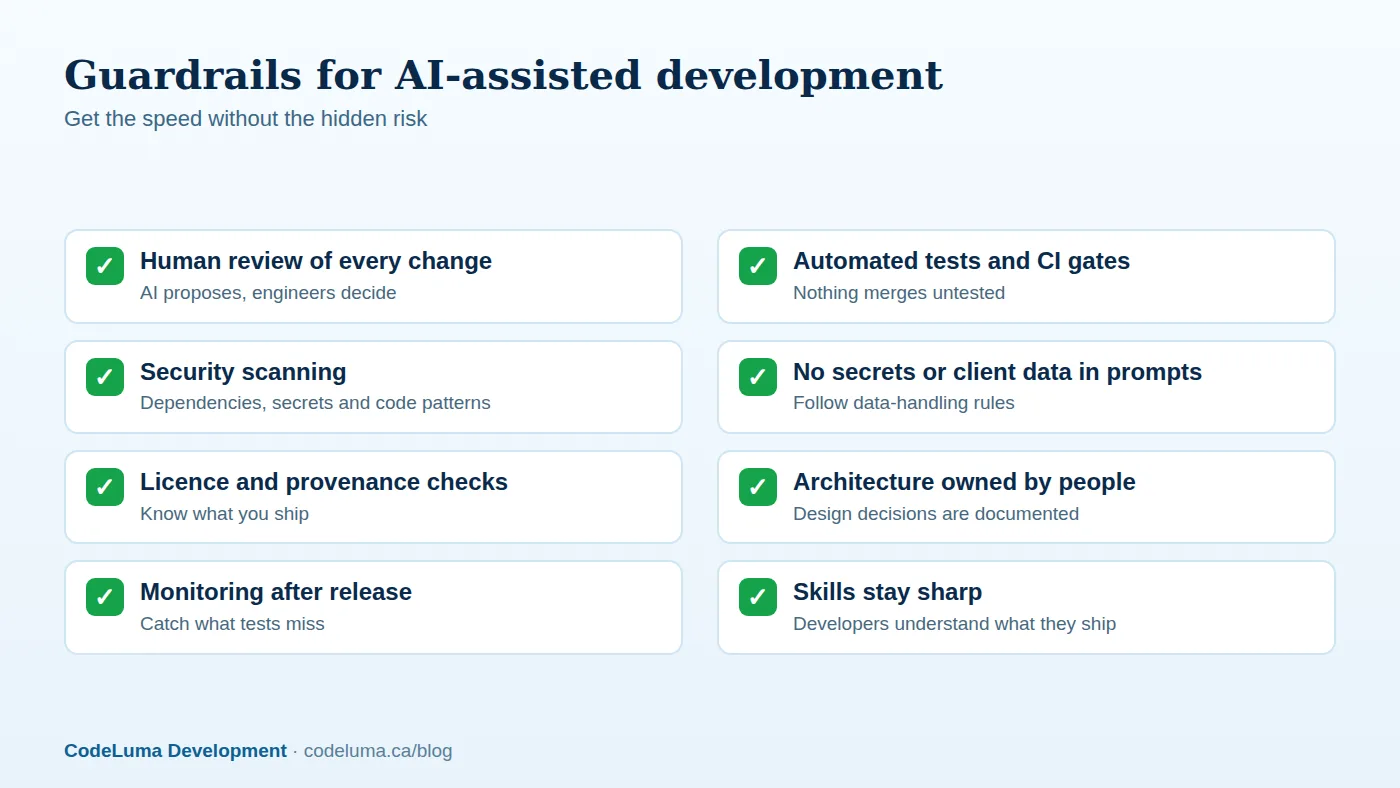
Quality debt. Code produced quickly but not understood by anyone becomes a liability. If nobody on the team can explain how the system works, every future change is slow and risky. Security exposure. Pasting proprietary code, customer data or credentials into tools without proper data terms can leak them; generated code can also introduce vulnerabilities. Licence and provenance. Know your tool's terms about output ownership and how it handles code with restrictive licences. Overconfidence. The ease of generating code tempts teams to skip design, review and testing, which is exactly when problems compound. Skills erosion. Developers who stop understanding fundamentals cannot debug the failures that AI cannot. These risks are manageable with process, as the checklist above shows, but ignoring them is expensive.

What is genuinely changing
- Prototyping is cheaper. Testing ideas with working software before committing is easier, which improves decisions.
- Small teams can do more. A few engineers with good tools can maintain systems that once needed larger teams.
- The value moves up the stack. Understanding the problem, designing systems, reviewing code, ensuring security and operating reliably matter more; typing speed matters less.
- Maintenance and modernisation get easier: analysing legacy code, writing tests around it and migrating frameworks are tasks where assistants help significantly; see our legacy modernisation case study.
- AI becomes a product feature, not only a development tool; see our guide to adding generative AI features.
What is not changing
Software still needs to be understood, secured, deployed, monitored, maintained and evolved. Requirements still need to be discovered through conversations with real users. Integrations still fail in surprising ways. Data still needs careful modelling. The total cost of a system is dominated by its lifetime of change, not its first draft, so faster first drafts help but do not remove the need for engineering discipline, as we describe in our maintenance retainer article.
How to decide as a business owner
- Simple internal process, few users, low risk: try low-code, keeping an eye on costs and data governance.
- Prototype or pilot: use any fast method, AI-assisted or low-code, explicitly as a learning tool, and plan to rebuild what proves valuable.
- Core product, customer-facing system, sensitive data or complex logic: invest in professionally engineered custom software, built with AI assistance under review.
- Existing system needing modernisation: use AI tooling to analyse and add tests first, then change incrementally.
Questions to ask any developer or agency about AI
- How do you use AI tools, and what review process applies to generated code?
- How do you protect our code and data when using them?
- Who owns the output, and how do you handle licensing?
- What tests and security scans run on every change?
- If speed improves, how is that reflected in timelines and pricing? See how we estimate projects.
Also compare answers with the red flags in our article on hiring red flags. The tools are powerful, and they reward teams that pair them with discipline. Our software team uses AI-assisted development inside a review, testing and security process, passing the efficiency on to clients, and our maintenance plans keep the results dependable long after launch.
Put this into practice with CodeLuma
CodeLuma uses modern AI-assisted tooling internally to build faster, with experienced engineers reviewing, testing and securing everything, so you get speed without inheriting hidden risk.
- Custom software development - tailored systems, integrations and internal tools.
- Website and web application development - fast, accessible, search-friendly builds.
- Maintenance and support plans - updates, monitoring and ongoing improvement.
Start a conversation. Tell us about your project and we will reply with practical next steps, or browse all CodeLuma services. CodeLuma Development Inc. is a Canadian company that works with teams in Windsor, Essex, London, Toronto, Mississauga and across Ontario, throughout Canada and remotely.