Video and audio are no longer specialist features. Online courses, telehealth, customer support calls, product demos, podcasts, community platforms and internal training all depend on media that starts quickly and plays smoothly on any device. But media is also one of the easiest ways to create a slow, expensive and insecure application if handled naively: a large file in a page, an unprotected download link, a server melting under a few hundred concurrent viewers. This guide explains how to do it properly.
Understand the two big families
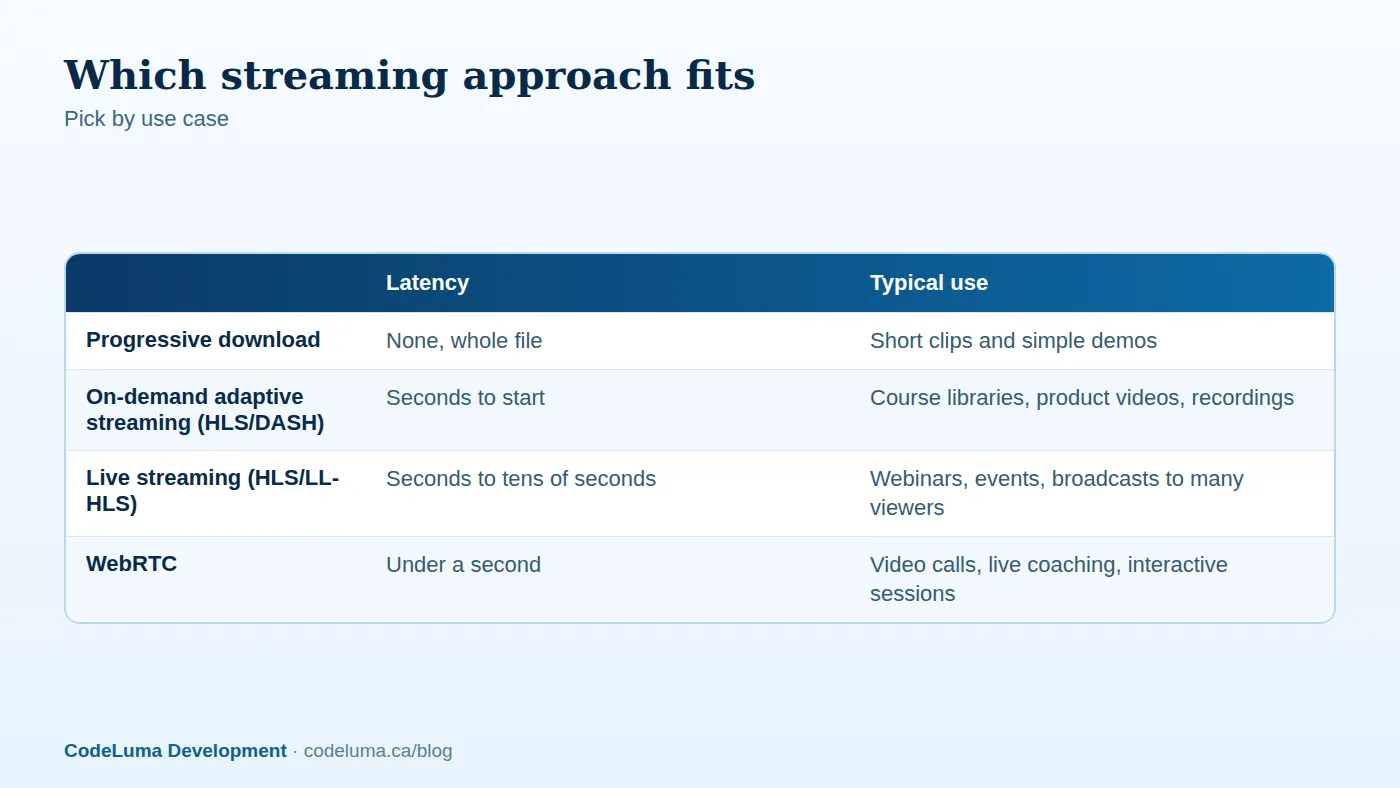
Streaming of recorded media (on-demand) and live or interactive media have very different architectures. On-demand content is prepared in advance and delivered by content delivery networks, which scales cheaply. Live and interactive content must be captured, processed and delivered in real time, which is more demanding, and real-time conversation with sub-second latency needs peer-to-peer or media-server technology such as WebRTC, similar to the patterns in our real-time collaboration article.

On-demand video: the pipeline
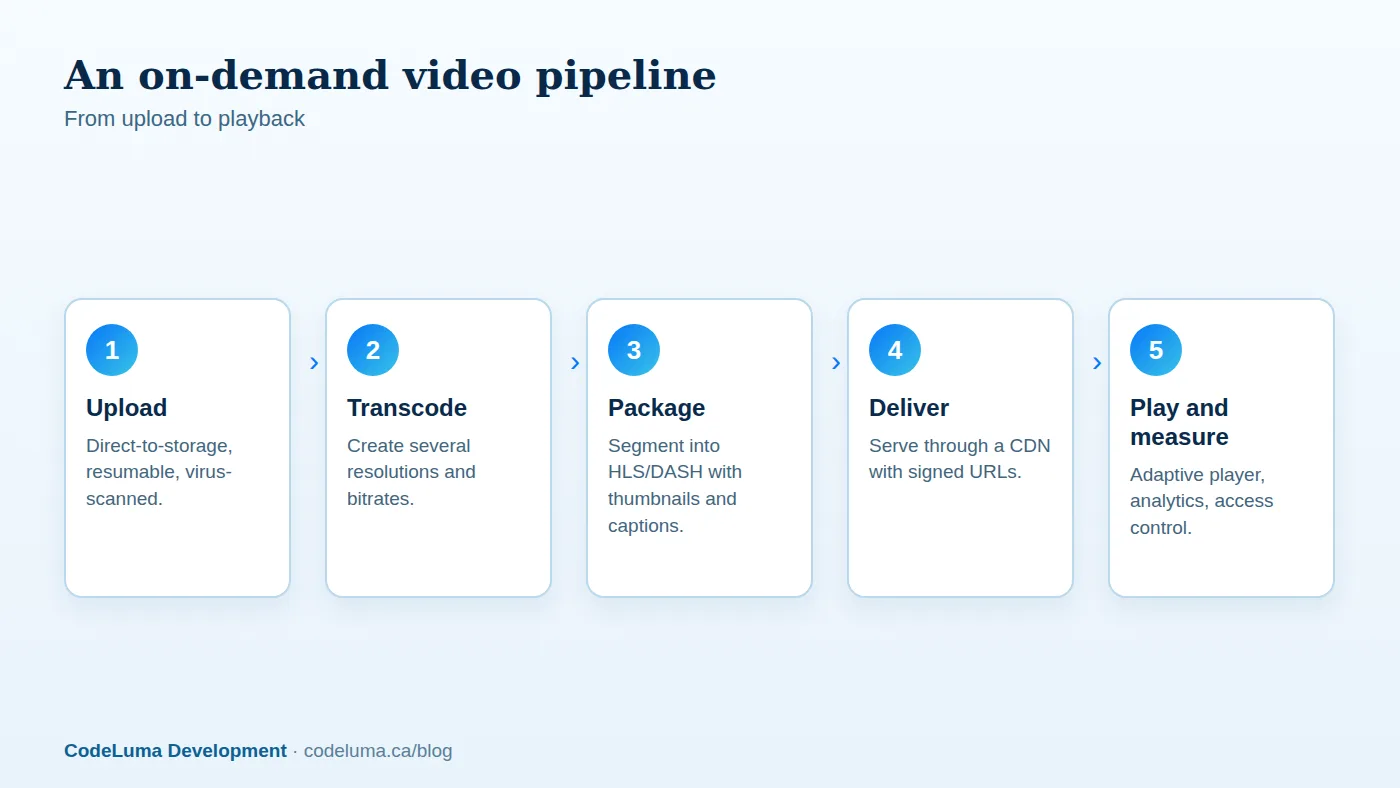
Serving a single large file works for a tiny demo but not for real audiences: viewers on slow connections buffer endlessly, and phones waste data on resolutions they cannot display. Modern platforms use adaptive bitrate streaming with formats such as HLS and MPEG-DASH. The process:
- Upload. Let users upload directly to object storage with resumable, chunked uploads rather than through your application server; scan and validate the files. See our file upload guide.
- Transcode. Convert the source into several renditions, for example 240p through 1080p, using efficient codecs. Transcoding is CPU-intensive, so run it in background workers or a managed transcoding service; see our background jobs guide.
- Package. Split each rendition into short segments with a manifest so players can switch quality mid-stream. Generate thumbnails, preview sprites and captions at the same time.
- Deliver. Serve segments through a CDN, so viewers fetch from nearby caches and your origin sees little traffic; see our edge delivery article.
- Play. Use a mature player that handles adaptive switching, captions, keyboard controls and picture-in-picture, and collect playback analytics.
Audio and podcasts
Audio is lighter but follows similar principles: encode to efficient formats with several bitrates, store in object storage, deliver via CDN, and provide waveforms, chapters and transcripts. For podcast-style products, generate RSS feeds correctly and support resumable playback across devices. Speech-to-text now makes automatic transcripts, search inside recordings and summaries practical; see our guide to generative AI features for how to add those responsibly.
Live streaming
For one-to-many broadcasts such as webinars and events, the typical flow is: a broadcaster sends a stream to an ingest endpoint (using protocols such as RTMP or SRT), the platform transcodes it into multiple renditions, and viewers receive it via HLS with latencies from a few seconds (low-latency modes) to around thirty. Chat, polls and questions can ride on a WebSocket layer. Record the stream automatically for on-demand replay. Plan for spikes when an event starts, and test at your expected audience size; see our traffic spike playbook.
Video calls and interactive sessions
WebRTC enables browser-to-browser or browser-to-server audio and video with very low latency, without plugins. Small calls can be peer-to-peer, but groups need a media server (an SFU) that forwards streams efficiently, plus TURN servers to relay traffic for users behind restrictive networks. Building this yourself is demanding: echo cancellation, bandwidth adaptation, device selection, screen sharing and recording all need care. Most businesses are better served by an established communications platform and its SDKs, embedded into their own interface, with their own authentication and branding.
Access control and protection
Paid or private content needs protection. Use short-lived signed URLs or tokens generated after you check the user's entitlement, so links cannot be shared indefinitely; restrict by domain where possible; keep the storage private with access only through the CDN; and consider watermarking for premium content. Full digital rights management (DRM) encrypts content and controls playback in supported browsers and devices, and it adds cost and complexity, so use it only when licensing or business needs require it. Be honest about limits: anything a viewer can watch, a determined person can capture. Log access, as in our audit logging article, and enforce tenant isolation for multi-client products (white-label article).
Performance and playback quality
- Fast start: short first segments, a lower starting rendition, preconnect to the CDN and poster images.
- Efficient codecs and sensible bitrates, balancing quality and bandwidth cost. Offer modern codecs where devices support them, with widely compatible fallbacks.
- Lazy-load players below the fold and avoid autoplay with sound. Media embedded carelessly can wreck page speed; see our front-end performance guide.
- Handle mobile networks: adaptive switching, data-saver options and resume from last position.
- Monitor quality of experience: startup time, rebuffering rate, errors and average bitrate; see our monitoring guide.

Accessibility
Provide captions for all spoken content, transcripts for audio, audio descriptions where visuals carry meaning, keyboard-accessible controls, visible focus and reduced-motion respect. Captions also help viewers in noisy or silent environments and improve search. Automated captioning is a helpful start, with human review for important content. Accessibility is often a legal requirement as well; check the rules that apply to you.
Costs to plan for
Media costs come from storage (all renditions of every video), transcoding (per minute of content), delivery bandwidth (usually the largest, and it scales with viewing), and, for live and calls, real-time infrastructure. Control them by encoding sensibly, deleting unused renditions and originals per policy, using CDN caching effectively, applying lifecycle rules for old content (our cloud cost guide), and setting quotas on uploads. Model costs per viewing hour before launching a product whose economics depend on video.
Build or buy
Video infrastructure platforms provide upload, transcoding, packaging, delivery, players and analytics behind an API, letting you add professional video in days. They cost more per unit than a well-tuned custom pipeline but save large engineering and operations effort, and they are the right choice for most products. Build your own when volume is very high, costs dominate, you have special processing needs (such as custom overlays, compliance recording or on-premises requirements) or media is your core product. Whichever you choose, keep an abstraction layer so you can change vendors; the reasoning parallels our model strategy article.
Legal and privacy considerations
Recording calls and storing video of people raises consent, retention and privacy obligations that vary by jurisdiction; see our privacy law overview. Respect copyright for content you host, provide reporting and removal processes for user-generated content, and moderate uploads where necessary. This is general information, not legal advice.
Common mistakes
- Serving a single large MP4 to everyone from the application server.
- Uploading videos through the app server instead of direct to storage.
- Public storage URLs that leak paid content.
- No captions, no transcripts and no keyboard support.
- Underestimating bandwidth costs and live-event spikes.
- Building a video-call stack from scratch for a routine need.
Start with the smallest media feature that serves your users, on a managed pipeline, and measure before customising. Our software team integrates video, audio, live sessions and calls into custom web applications, and our hosting and maintenance services keep delivery fast, secure and affordable.
Put this into practice with CodeLuma
CodeLuma integrates video and audio into web applications, from secure on-demand libraries to live sessions and calls, using managed services where they save money and custom pipelines where they matter.
- Custom software development - tailored systems, integrations and internal tools.
- Website and web application development - fast, accessible, search-friendly builds.
- Managed hosting - monitored, backed-up, Canadian-friendly hosting.
- Maintenance and support plans - updates, monitoring and ongoing improvement.
Start a conversation. Tell us about your project and we will reply with practical next steps, or browse all CodeLuma services. CodeLuma Development Inc. is a Canadian company that works with teams in Windsor, Essex, London, Toronto, Mississauga and across Ontario, throughout Canada and remotely.