Letting users upload files sounds trivial: an input, a button, a save to disk. Then real usage arrives. Customers send 4 GB videos from phones on flaky connections. A hundred people upload at once and the application server melts. Someone uploads a disguised script, or a family photo with GPS coordinates that you then publish. Storage costs balloon. Robust file handling is a discipline of its own. This guide describes a modern architecture for uploading and serving large media files reliably and securely.
Why proxying uploads through your server does not scale
In the traditional design, the browser sends the file to your application server, which stores it locally or forwards it to storage. This ties up server processes and memory for the duration of every upload, limits maximum file size through timeouts and request limits, uses your bandwidth twice, and makes scaling awkward because files live on one machine. Under load, uploads compete with normal page requests. The alternative is to let the client send files directly to cloud object storage while your server only handles the small control messages.

The direct-to-cloud pattern
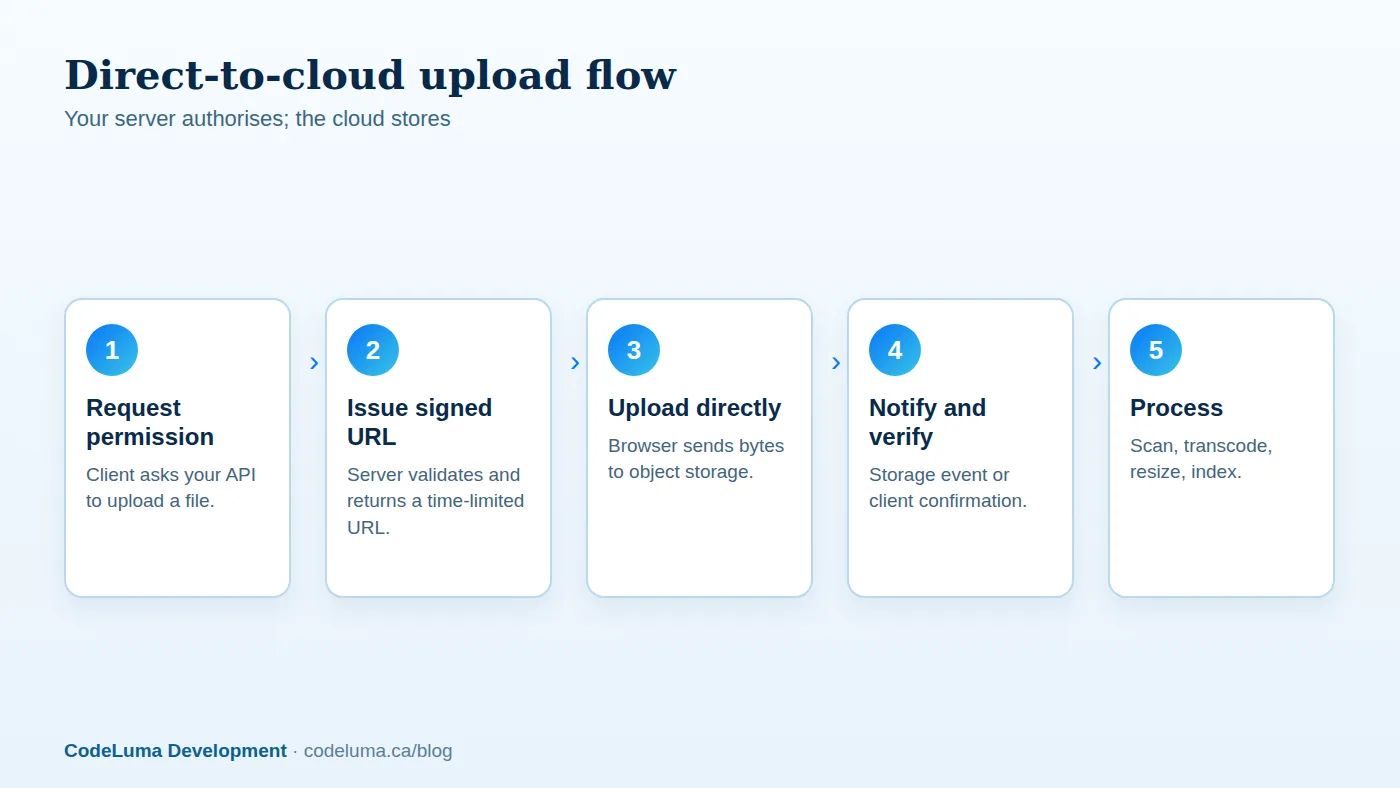
- The client tells your API it wants to upload a file, with its name, size and type.
- Your server checks the user's permission, validates limits and constraints, creates a database record in a "pending" state, and returns a pre-signed URL or upload token that authorises a single upload to a specific storage location for a short time.
- The client uploads the file directly to object storage using that URL.
- When the upload completes, storage emits an event, or the client confirms, and your server marks the file as uploaded and triggers processing.
Your servers never carry the bytes, so capacity is effectively bounded by the storage service, and you can accept very large files. Restrict the signed URL to the exact key, method, maximum size and content type, and expire it quickly.
Handle big files with multipart and resumable uploads
Large files and unreliable networks call for chunking. Multipart uploads split a file into parts uploaded in parallel and retried individually; if one part fails, only it is re-sent. Resumable protocols let an interrupted upload continue from where it stopped, even after the browser is closed and reopened, which is essential for mobile users and long videos. Show progress, allow pause and cancel, and clean up abandoned incomplete uploads automatically with lifecycle rules so they do not accumulate cost.
Validate and treat every file as hostile
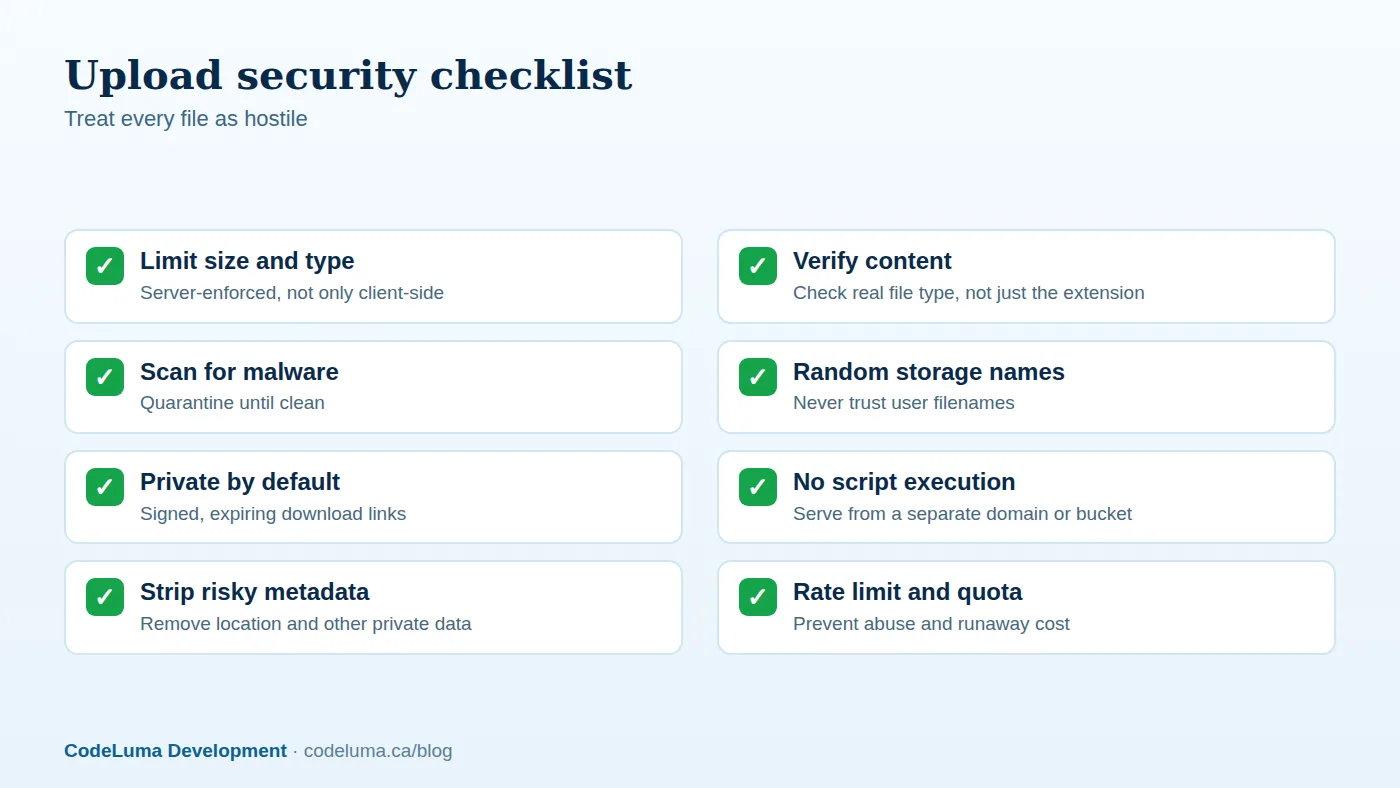
Client-side checks improve usability but provide no security. Enforce constraints on the server side:
- Size and type limits, per feature and per plan.
- Content verification. Inspect the file's actual signature rather than trusting the extension or declared type, since an attacker can rename anything.
- Malware scanning. Quarantine new files in a separate location, scan them, and only release clean files. This is especially important when other users can download the content.
- Safe filenames. Generate random storage keys; keep the original name as metadata only, and sanitise it when displayed or used in download headers, to prevent path traversal and injection.
- Images and documents: re-encode images to strip embedded payloads and metadata; be careful with formats that can contain active content, such as SVG and PDF.
- Quota and rate limits per user and tenant to prevent abuse and control cost.
Serve files safely
Store files in private buckets by default. Deliver them via short-lived signed URLs after checking the requester's permissions, or through a CDN configured with signed access. Serve user-generated content from a separate domain to prevent uploaded content from interacting with your application's cookies and scripts. Set the correct content types and force download for types that could execute in the browser. Enable range requests for video seeking, and use a CDN for speed and cost. The caching principles from our caching guide apply, with care to avoid publicly caching private files.
Build a processing pipeline
Most uploads need work after arrival: generating thumbnails and multiple sizes, converting formats, extracting metadata, transcoding video to streaming formats, generating previews and text extraction for search. Do this asynchronously with background workers triggered by storage events or a queue, never in the upload request. Store derived files alongside the original with clear naming, update the database when each stage completes, show meaningful states to users, such as "processing," and handle failures with retries and alerts. For images, our advice in image optimisation strategies applies. For video, a managed transcoding service is often wiser than running your own.
Model files in your database
A file record should include a unique ID, owner and tenant, the storage key and bucket, the original filename, size, content type, checksum, status (pending, uploaded, scanning, ready, failed, deleted), timestamps, and links to the entities that use it. Reference files by ID in your application, not by URL. Record who uploaded and who accessed sensitive files. Design for deletion: soft-delete first, then physically remove after a retention period, including derived copies and backups where required by privacy law. Tenancy matters: keys and access checks must be scoped per tenant, as described in our article on multi-tenant architecture.

Control costs
- Use lifecycle policies to move older or rarely accessed files to cheaper storage classes and delete temporary files.
- Serve through a CDN and set caching headers to reduce egress charges.
- Compress and transcode to sensible sizes; do not store multiple enormous variants without need.
- Set user quotas and monitor storage growth by tenant.
- Delete abandoned uploads and orphaned files with periodic reconciliation between the database and storage.
Reliability and monitoring
Track upload success rates by client type, failure reasons, average and 95th-percentile upload time, processing queue depth and time to ready, scan detections, storage growth and errors in download requests. Alert on spikes and stuck items. Provide clear user messages and easy retry. Test on slow and interrupted connections, on mobile browsers and with large files, because behaviour differs from the office network. See our monitoring guide.
Privacy and compliance
Uploaded files often contain personal data, from ID documents to photos and medical records. Encrypt at rest and in transit, restrict access, apply retention rules, log access to sensitive files, and respect regional storage requirements. Remove location metadata from images unless needed. See our privacy overview.
Start with the right foundations
If you handle only small documents at low volume, a simpler approach may be adequate. As soon as files grow large, numerous or sensitive, adopt direct-to-cloud uploads, validation and scanning, and asynchronous processing from the start; they are much easier to build in than to retrofit. Our software team designs upload and media pipelines that scale, and our hosting setup can include storage, CDN and monitoring configured for your workload.
Put this into practice with CodeLuma
CodeLuma builds upload systems that handle large media reliably: direct-to-cloud transfers, resumable uploads, scanning and processing pipelines, and secure delivery, without overloading your servers.
- Custom software development - tailored systems, integrations and internal tools.
- Website and web application development - fast, accessible, search-friendly builds.
- Managed hosting - monitored, backed-up, Canadian-friendly hosting.
Start a conversation. Tell us about your project and we will reply with practical next steps, or browse all CodeLuma services. CodeLuma Development Inc. is a Canadian company that works with teams in Windsor, Essex, London, Toronto, Mississauga and across Ontario, throughout Canada and remotely.