No-code automation tools have made it possible for anyone to connect apps and automate tasks: when a form is submitted, add a row to a spreadsheet and send a Slack message; when a deal closes, create an invoice. For many small tasks they are perfect. As automations multiply and become critical to how the business runs, though, some teams hit limits: rising per-task bills, tangled multi-step flows, silent failures and no way to test changes. At that point the choice is between other no-code platforms and custom workers written in code, commonly in Node.js or similar runtimes. This guide helps you decide.
Where no-code automation excels
- Speed. A useful automation can be built in minutes by a non-developer, which is unbeatable for experiments and one-off needs.
- Broad connector libraries. Thousands of prebuilt integrations handle authentication and API quirks for you.
- Low starting cost. Free and low-tier plans cover light usage.
- Empowering the business. Operations and marketing teams can fix their own problems without waiting for developers.
For notifications, simple data copying, lead routing and other low-stakes tasks, these tools are often the right answer.

Where the cracks appear
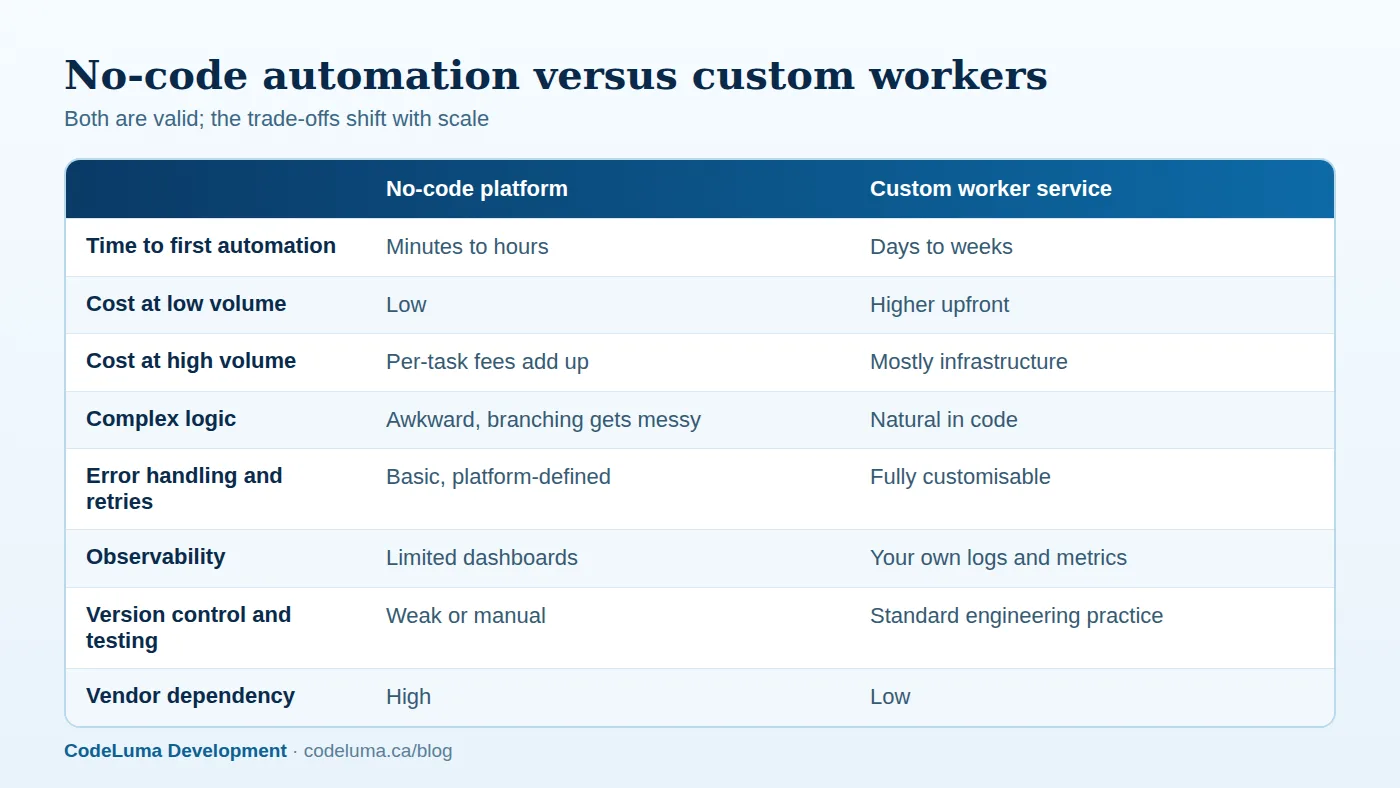
Cost that scales with success. Many platforms charge per task or per step executed. A multi-step workflow triggered thousands of times a month can generate a surprising bill, and every additional step multiplies it.
Complex logic. Branching, loops, data transformation, deduplication and error compensation become hard to build and impossible to read in visual editors. Nobody can review the logic, and changes are risky.
Error handling and reliability. When a step fails, the platform's options may be limited to a retry and an email. You may lack control over retries, ordering, idempotency and dead-letter handling, so duplicates and gaps appear.
Visibility. Understanding what happened to a specific record across ten automations is difficult without proper logs and metrics.
Governance. Automations built by many people with personal accounts become an unmanaged shadow system. When the person leaves, the integration breaks. Credentials, data flows and privacy obligations are hard to audit.
Limits. Execution time, payload size, rate limits and supported operations can block advanced use cases.
What custom workers give you
A worker is a small service that listens for events or runs on a schedule and performs a job: process an order, sync inventory, generate reports, clean data. Written in a language such as Node.js, and run on your infrastructure or a serverless platform, it offers:
- Total control of logic, including complex rules, transformations and conditional flows expressed clearly in code.
- Robust reliability features: queues, exponential backoff, idempotency, circuit breakers and dead-letter handling. See our guide to handling third-party outages.
- Observability, with structured logs, metrics, tracing and alerting integrated with your monitoring; see our monitoring guide.
- Engineering discipline: version control, code review, automated tests, staging environments and repeatable deployment.
- Predictable costs, mostly compute, which is inexpensive at scale.
- Security control, including secrets management, network isolation and least-privilege credentials.
The trade-offs are higher upfront cost, the need for developers to build and maintain them, and slower turnaround for simple changes.
A middle option: other platforms and open-source engines
Between the two extremes are self-hostable workflow engines, more developer-friendly automation platforms with code steps, and integration platforms aimed at technical teams. They can reduce per-task fees and add flexibility, at the cost of running or paying for more infrastructure. They are a sensible step when you need more power but are not ready for fully custom code.
A simple decision framework
Score each automation on these questions:
- Criticality: if it fails silently for a day, what breaks? Payments, orders and customer communications are critical; internal notifications are not.
- Volume: how many runs per month, and what does the platform charge at that volume, including all steps?
- Complexity: how many branches, transformations and exceptions does it contain?
- Data sensitivity: does it handle personal, financial or confidential information?
- Change frequency: does the logic change often, and who needs to change it?
- Auditability: do you need logs and proof of what happened?
Low criticality, low volume and low complexity point to no-code. High criticality, high volume or high complexity point to code. Most businesses end up with a mixture, and that is healthy.

Design principles for custom workers
- Trigger through queues. Receive events from webhooks or schedules, store them durably, then process asynchronously with workers that can scale independently.
- Make jobs idempotent. Running the same job twice must not double-charge, double-email or double-create.
- Keep workers small and single-purpose, with clear inputs and outputs, so they are easy to test and reason about.
- Externalise configuration such as rules, thresholds and templates so business users can adjust them without code releases where safe.
- Handle rate limits by respecting API headers and throttling.
- Record everything: job status, inputs, outputs, errors and timings, with a searchable history.
- Provide a control panel for staff to see failed jobs, retry them and manually resolve exceptions.
Migrating without disruption
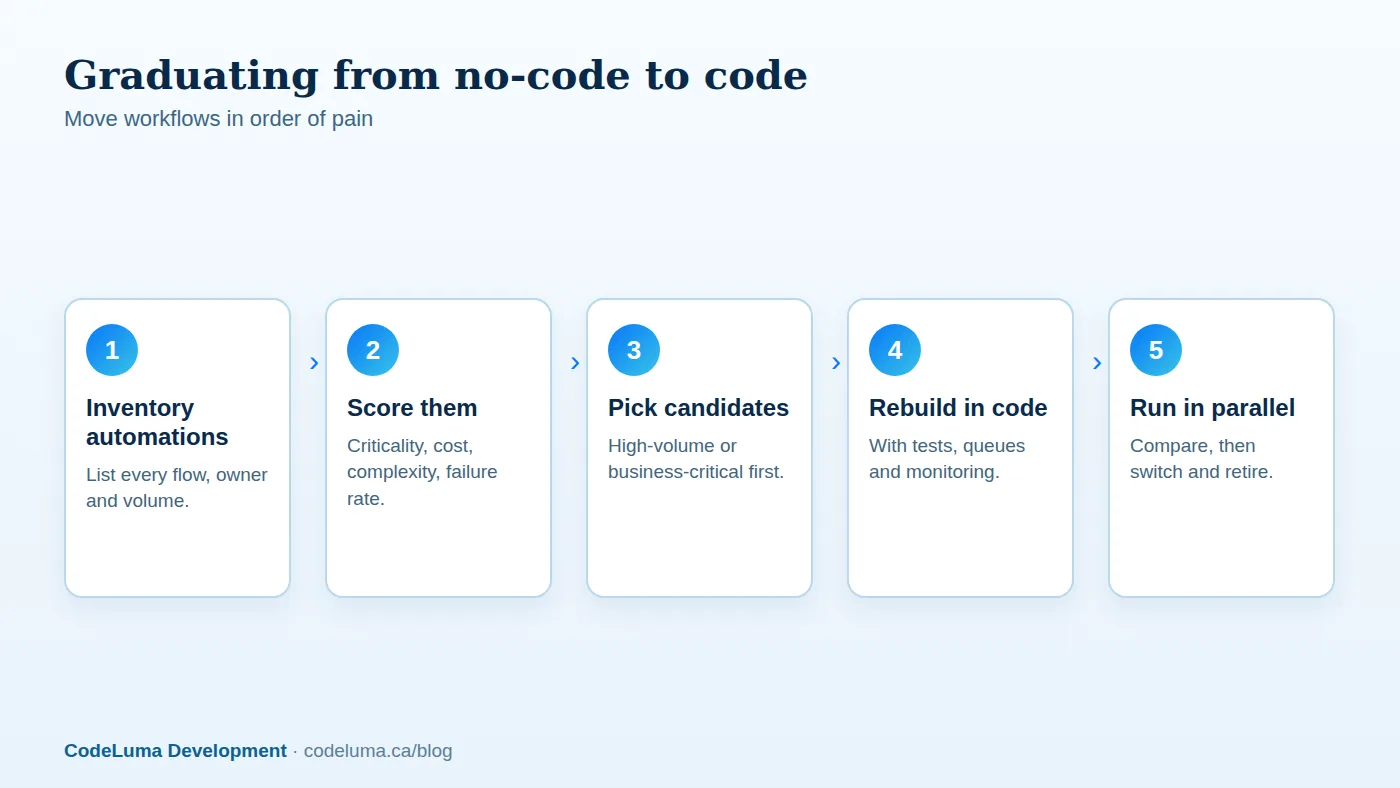
You do not need to throw away your no-code investments. Inventory every automation: what it does, who owns it, how often it runs, what it costs and what depends on it. Rank by pain and risk. Rebuild the most critical or expensive flows as workers, run the old and new versions in parallel on the same inputs while comparing results, then switch over and retire the old one. Keep low-risk automations where they are, and set governance rules for the platform: shared accounts, naming conventions, ownership and documentation.
Security and compliance
Whichever approach you use, know where credentials live, what data passes through third-party servers, and whether that meets your privacy obligations. For sensitive data, running workers in your own environment, with restricted network access and audit logs, is often the safer choice. Review which automations touch personal information and ensure consent and retention rules are respected; see our privacy guide.
Where to start
Make a list of the automations you already depend on, look at your platform bill, and identify the two or three that would hurt most if they failed or that cost the most to run. Those are your candidates for custom workers. Our software team can review your automations, recommend which to keep and which to rebuild, and deliver workers with monitoring included, backed by a maintenance plan so they stay healthy.
Put this into practice with CodeLuma
CodeLuma helps you pick the right level of automation, from no-code flows for simple tasks to custom, monitored workers for the processes your business depends on, and can migrate you between them without downtime.
- Custom software development - tailored systems, integrations and internal tools.
- Website and web application development - fast, accessible, search-friendly builds.
- Maintenance and support plans - updates, monitoring and ongoing improvement.
Start a conversation. Tell us about your project and we will reply with practical next steps, or browse all CodeLuma services. CodeLuma Development Inc. is a Canadian company that works with teams in Windsor, Essex, London, Toronto, Mississauga and across Ontario, throughout Canada and remotely.