Large language models can read, summarise, classify and write text at a level that was unimaginable a few years ago, and commercial APIs make them available to any application. For customer support and content teams, the opportunities are obvious: sort incoming requests, draft replies, find answers in your documentation, summarise long conversations, translate messages, and produce first drafts of product descriptions or articles. The risks are equally real: confident-sounding wrong answers, leaking private data, inconsistent tone and runaway costs. This guide describes a practical, safe way to use these tools.
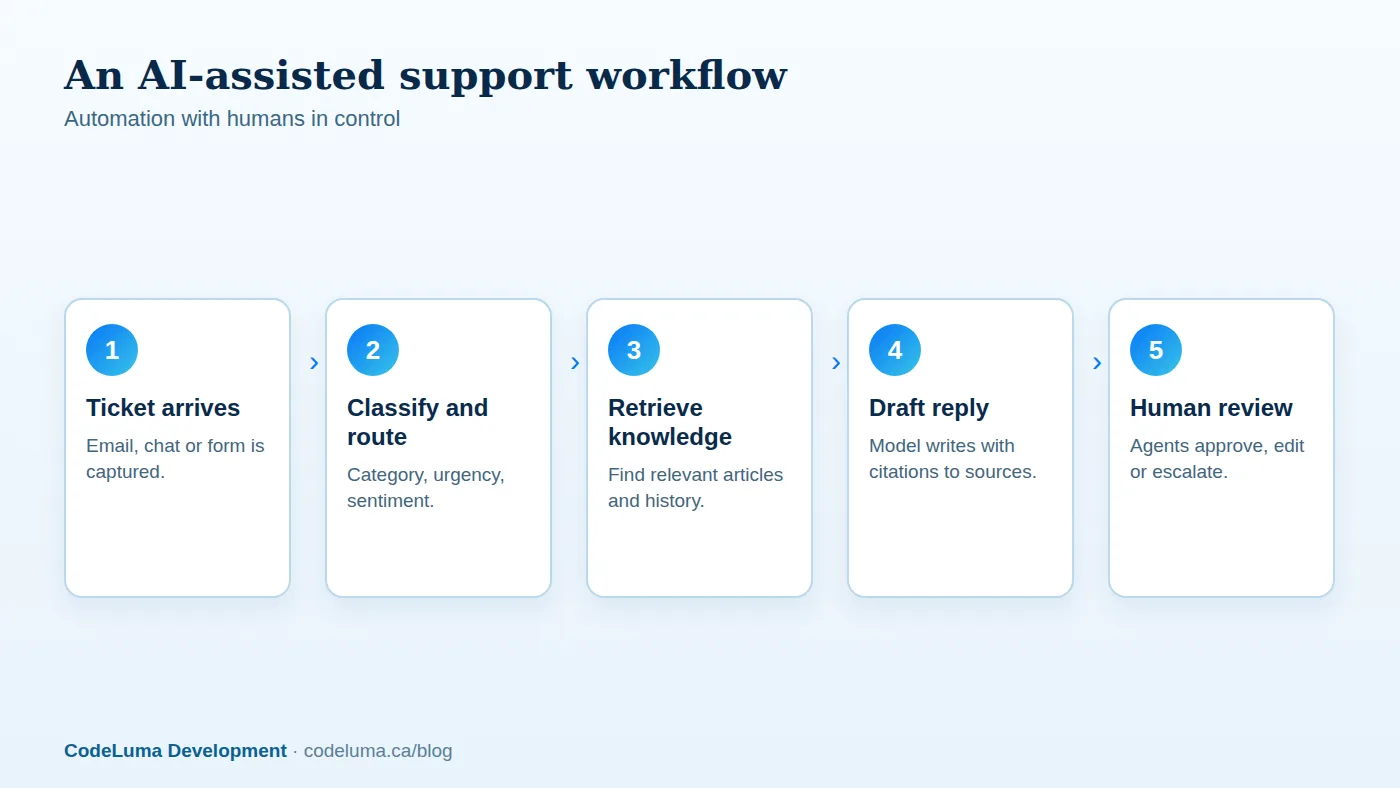
Where language models help most
- Triage. Classify tickets by topic, urgency and sentiment, extract order numbers and product names, detect language, and route to the right queue.
- Summarisation. Condense long threads or call transcripts into a few lines so an agent taking over gets context instantly.
- Draft replies. Produce a suggested response grounded in your policies and knowledge base for an agent to review and send.
- Knowledge search. Answer natural-language questions using your documentation, with links to the sources.
- Translation and tone. Translate messages and adjust tone to match your style guide.
- Content workflows. Generate first drafts, meta descriptions, product copy variants, social post ideas and alt text, which humans edit and approve.
- Data extraction. Turn unstructured emails and documents into structured fields for your systems.

Ground the model in your own knowledge
A general model does not know your prices, policies or product details, and it may invent plausible answers. The standard remedy is retrieval-augmented generation: when a question arrives, your system searches your knowledge base, help centre, policies and past resolved tickets, then gives the most relevant passages to the model with instructions to answer only from them and to say when the answer is not found. Include citations so agents and customers can verify. Quality depends on good source content: keep documentation current, well-structured and free of contradictions. Behind the scenes this typically uses embeddings and a vector index, which we explain in our article on vector databases, and it combines naturally with AI-powered search.
Keep humans in the loop where it counts
Not every task deserves the same level of automation. Low-risk, reversible tasks such as tagging and summarising can run automatically. Drafts should be reviewed before sending, at least until you have strong evidence of quality. High-stakes categories such as refunds, account security, legal, medical, financial advice and complaints should require explicit human approval. Design the interface so review is fast: show the draft, the sources and the customer context side by side, with one-click actions to accept, edit or reject, and capture the agent's edits as feedback. Over time, you can relax review for categories where the model proves reliable and measured error rates are low.
Build guardrails
- Clear instructions defining role, tone, allowed and forbidden topics, and what to do when unsure: escalate rather than guess.
- Structured outputs. Ask for JSON with defined fields for classifications and extractions, and validate them in code.
- Prompt-injection defence. Customer messages and retrieved documents may contain instructions aimed at hijacking the model. Treat all such content as untrusted data, never as instructions, restrict what tools the model can call, and never allow it to take irreversible actions without checks.
- Least privilege. Give the model access only to the data and functions needed for the task.
- Output checks: scan for prohibited content, promises you cannot keep, price or policy claims not present in sources, and leakage of other customers' information.
- Fallbacks: when the API fails or confidence is low, route to a person.
Our article on prompt engineering for reliable AI features goes deeper into designing prompts and evaluation.
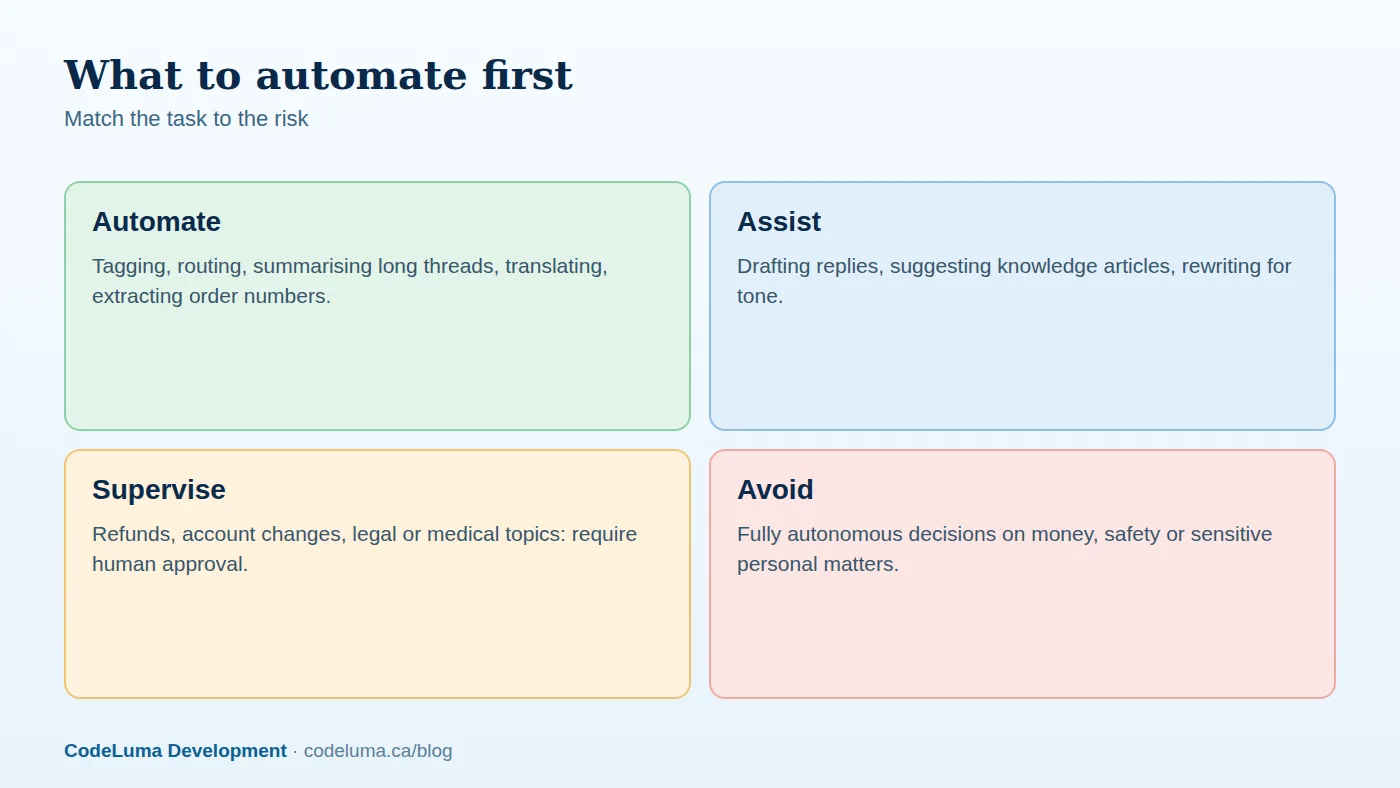
Protect privacy and comply with the rules
Support messages contain personal information. Before sending data to a third-party API, understand the provider's data-handling terms: whether inputs are retained or used for training, where data is processed, and what contractual protections exist. Minimise what you send by redacting names, emails, payment details and other sensitive fields where the task does not need them. Log carefully, and apply retention limits. Tell customers when they are interacting with automated assistance, and give them an easy path to a human. Consider privacy laws that apply to you, and consult our overview of privacy and compliance.

Control costs and latency
Model usage is billed by the amount of text processed, so costs scale with volume and prompt size. Manage them by using smaller, cheaper models for simple tasks such as classification and larger ones only when needed, trimming context to what is relevant, caching results for repeated queries, batching non-urgent work, setting per-user and per-day limits, and tracking cost per ticket and per task. Measure latency too: customer-facing chat needs quick responses, while back-office summarisation can be asynchronous. Build with the ability to switch providers or models, since capabilities and prices change quickly.
Measure quality honestly
Establish an evaluation set of real, anonymised examples with known good outcomes, and test changes against it before deploying. In production, track agent acceptance and edit rates of drafts, customer satisfaction, resolution time, reopen rates, escalation rates and error reports. Sample outputs for regular human review, including the bad ones. Compare against a baseline of no AI to prove value. Publish internal guidance on what the assistant can and cannot do, and give staff an easy way to flag problems.
Content workflows: assist, do not autopilot
For marketing and content teams, models are excellent at overcoming the blank page, producing variants, adapting content to formats and summarising sources. Quality control remains essential: fact-check claims, ensure originality and compliance with brand and legal guidelines, and add real expertise and examples. Search engines reward helpful, original content, and publishing large volumes of unedited generic text is a risky strategy. Use AI to speed research and drafting, and let subject-matter experts add the substance. Combine with your social media and content workflows so approved content is scheduled and measured.
Roll out step by step
- Pick one workflow with clear volume and low risk, such as ticket tagging and summaries.
- Build an evaluation set and a simple prototype grounded in your knowledge base.
- Pilot with a small group of agents in draft-only mode, collecting feedback and metrics.
- Add guardrails, monitoring and cost controls.
- Expand to further categories once results justify it.
Used thoughtfully, language models make support teams faster and more consistent, and free people for the conversations that need judgement and empathy. If you would like help designing a safe, useful system, our software team builds AI-assisted workflows integrated with your helpdesk, knowledge base and approval processes.
Put this into practice with CodeLuma
CodeLuma builds AI-assisted support and content workflows with retrieval from your own knowledge base, strict guardrails, human approval where it matters and clear cost controls, so you save time without risking your brand.
- Custom software development - tailored systems, integrations and internal tools.
- Website and web application development - fast, accessible, search-friendly builds.
- Social media management - content systems tied to business goals.
Start a conversation. Tell us about your project and we will reply with practical next steps, or browse all CodeLuma services. CodeLuma Development Inc. is a Canadian company that works with teams in Windsor, Essex, London, Toronto, Mississauga and across Ontario, throughout Canada and remotely.