Sooner or later every business application needs to produce documents: invoices and statements customers can print, monthly reports managers want in a spreadsheet, exports so a partner can import data, compliance packs for auditors. At small scale, a quick script suffices. At real scale, with thousands of invoices at month-end, million-row exports and dozens of scheduled reports, naive approaches time out, exhaust memory and block the application for everyone. A proper reporting engine is a small piece of infrastructure worth designing carefully. This guide shows how.
Separate reporting from the request cycle
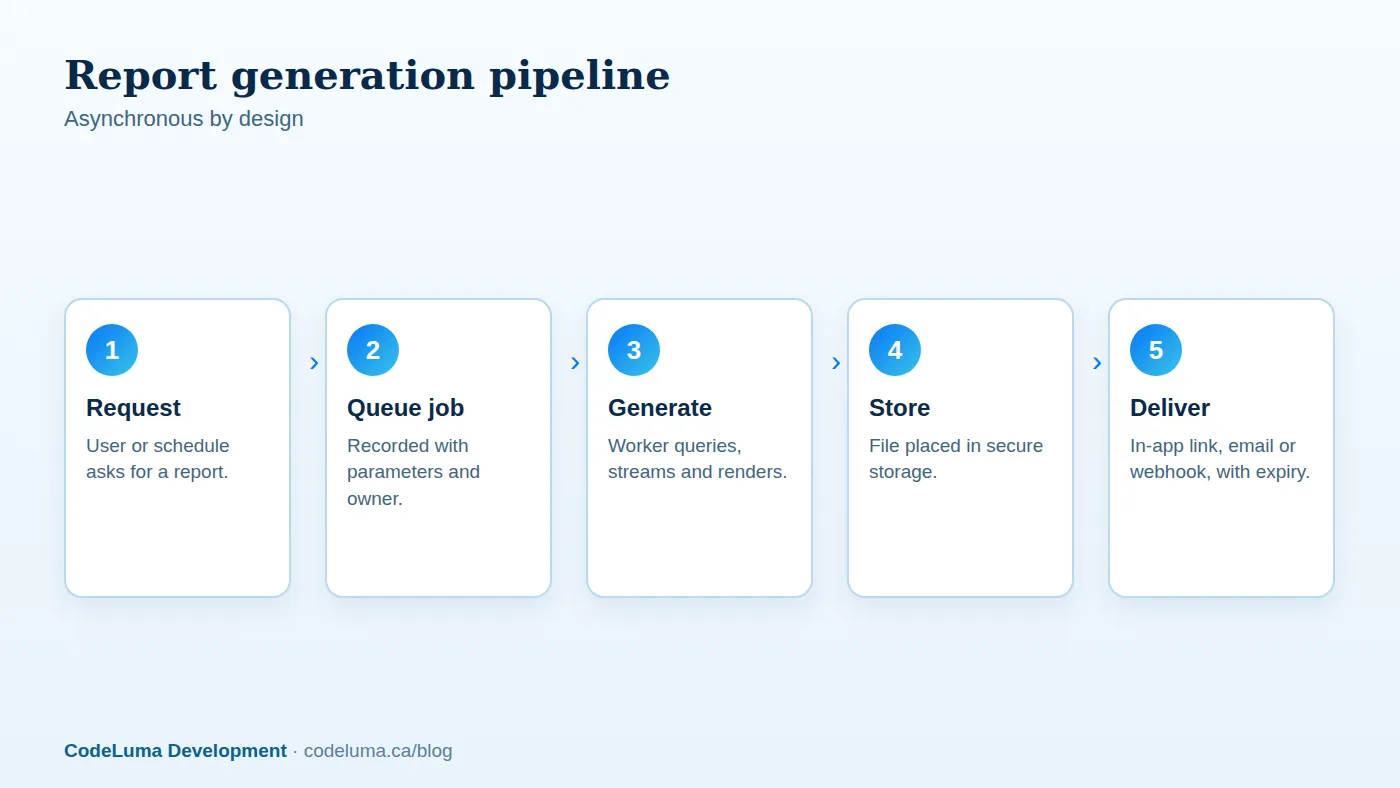
The first principle: never generate heavy documents inside a web request. A request that queries a million rows and renders a PDF will time out, tie up a server process, and slow the site for everyone. Instead, treat report generation as an asynchronous job. The user requests the report, the application records a job with its parameters and owner and returns immediately, a background worker generates the file, and the user is notified when it is ready, through the interface, an email link or a webhook. Show job status, allow cancellation and keep a history. Small, quick reports can still stream directly, but the queue should be the default for anything that might take more than a few seconds.

Generate PDFs that look right
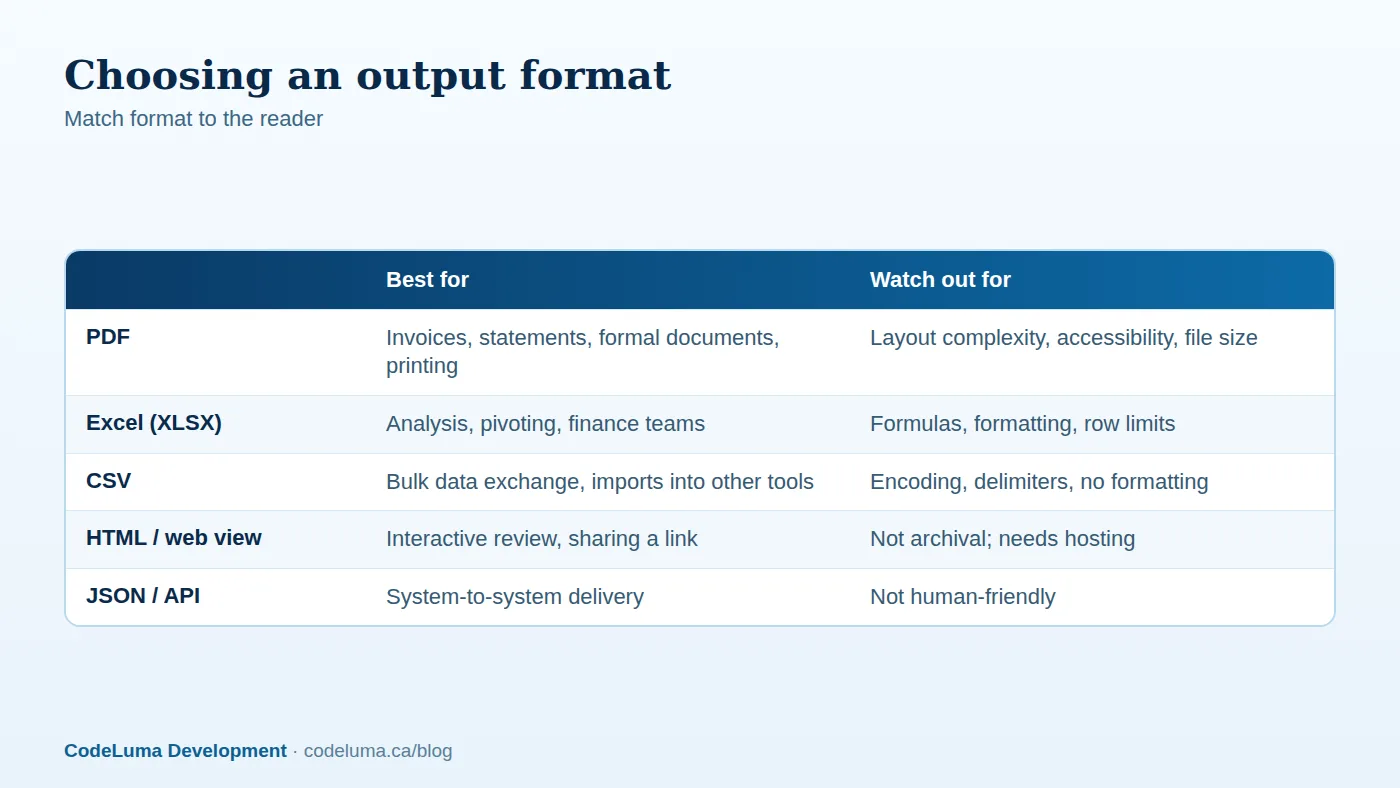
PDF is the format for documents that must look the same everywhere, such as invoices, quotes, contracts and statements. Common approaches include rendering HTML and CSS to PDF with a headless browser or a dedicated engine, which lets designers use familiar tools and produces attractive results, and using a document library that draws pages programmatically, which offers precise control and speed at scale. Consider:
- Templates. Separate layout from data. Store templates with versions, so an invoice can be reproduced exactly as issued.
- Branding and localisation. Logos, fonts, languages, currencies, number and date formats.
- Pagination. Repeat headers, keep totals together, handle long tables and page breaks sensibly.
- Legal content. Tax breakdowns, registration numbers, terms and required statements. Our articles on tax calculation and post-purchase experience discuss what invoices should contain.
- Accessibility. Tagged PDFs with proper structure and reading order are increasingly expected.
- Fonts and embedding, so documents look the same on every device, and reasonable file sizes.
- Immutability. Once an invoice is issued, store the generated file, and do not regenerate it later from changed data or templates without a clear process for credit notes and reissues.
Build Excel and CSV exports that people can use
Spreadsheets are where analysis happens. Give finance and operations teams well-formed files:
- Proper types. Write numbers as numbers, dates as dates and currency with formatting, not as text, so sorting, filtering and formulas work.
- Clear headers, frozen header rows, sensible column widths, filters and consistent sheet names.
- Multiple sheets for summaries and detail, and optional formulas where users expect live calculations.
- Encoding and delimiters for CSV: use UTF-8, include a byte-order mark if Excel compatibility matters, quote fields containing delimiters and line breaks, and offer alternatives for regions that use semicolons.
- Protection against formula injection. Fields beginning with characters such as equals, plus, minus or at can be interpreted as formulas when opened in spreadsheet software, which attackers exploit. Sanitise user-supplied values that will appear in exports.
- Known limits. Spreadsheets have row limits and become sluggish with huge files; offer filtered or split exports and CSV for bulk data.
Handle large datasets with streaming
Loading a million rows into memory to build a file is the classic way to crash a worker. Use streaming: read from the database in batches with a cursor or keyset pagination, transform rows incrementally and write to the output as you go, so memory use stays flat regardless of size. Libraries for writing spreadsheets and CSV in streaming mode exist for most languages. Query carefully: use indexes and efficient SQL, and run reports against a read replica or a reporting database so they do not slow transactional workloads. See our database optimisation guide. For very heavy analytics, precompute aggregates or use a warehouse as described in our internal dashboards article.
Schedule and deliver
Many reports are recurring: daily sales, weekly aging, monthly statements. Provide scheduling with time zones, and generate reports at the appropriate time, with retries on failure. Deliver via secure download links with expiry rather than large email attachments, which are size-limited and insecure; where email delivery is required, use encrypted or password-protected files for sensitive data or a portal login. Support recipients lists, formats and filters per schedule. Keep a delivery log showing who received what and when, and allow re-sending.
Secure the output
Reports concentrate sensitive information, so treat them as such. Enforce authorisation at generation time, using the requesting user's permissions, and again at download time; never expose predictable file URLs. Apply tenant isolation and row-level restrictions, as described in our RBAC and multi-tenant article. Store files encrypted in private storage, with expiry and deletion policies, log access, and mask sensitive fields where appropriate. The upload and download practices in our file handling article apply here too.

Make it reliable and observable
- Idempotent, retryable jobs with clear failure states and error messages users can understand.
- Timeouts and resource limits per job so a runaway report cannot starve others, and fair queuing so one large customer does not block everyone.
- Metrics: queue depth, generation time by report type, failure rate, output size and memory use.
- Alerting on stuck or failing jobs, and dashboards for support staff to inspect and rerun.
- Testing with realistic data volumes and awkward data: long names, unusual characters, missing values and extreme numbers.
Bulk document runs
Month-end statement runs may generate tens of thousands of PDFs at once. Design for parallelism: split into batches, process them with multiple workers, track progress and failures per document, and make the run resumable. Store results in an organised structure with an index, and provide summaries and downloadable archives. Send emails through a robust notification pipeline; see our notifications article.
Give users self-service
A report builder, even a simple one where users choose fields, filters, grouping and format, reduces requests to developers. Save report definitions, share them within teams and restrict what data is available by role. Balance flexibility with performance protection, using limits on date ranges and row counts, and require filters on huge tables.
When to use a dedicated tool
Business intelligence and reporting platforms can handle many analytical needs without custom development. A custom reporting engine pays off when documents are part of your product or legal process, when you need exact, branded output and tight workflow integration, when volume is high, or when reports are embedded in customer-facing features. If reporting is slowing your application or consuming your team's time, our software team can build a reporting service that produces the documents your business needs, on schedule and at scale.
Put this into practice with CodeLuma
CodeLuma builds reporting engines that generate branded PDFs, spreadsheets and scheduled reports from your data quickly and reliably, even with millions of rows, and deliver them securely to the right people.
- Custom software development - tailored systems, integrations and internal tools.
- Website and web application development - fast, accessible, search-friendly builds.
- Managed hosting - monitored, backed-up, Canadian-friendly hosting.
Start a conversation. Tell us about your project and we will reply with practical next steps, or browse all CodeLuma services. CodeLuma Development Inc. is a Canadian company that works with teams in Windsor, Essex, London, Toronto, Mississauga and across Ontario, throughout Canada and remotely.