Most teams building a chatbot, drafting tool, or summarizer reach a point where someone asks, "is this actually good enough to put in front of customers?" Too often the answer comes from a few people typing test questions into a demo and nodding if the replies sound reasonable. That's not evaluation, it's a vibe check, and vibe checks miss the failure modes that show up once real users with real problems start typing. This article walks through a lightweight, honest way to test output quality before you ship: a small test set, a rubric, and a review loop you can repeat every time the underlying model or prompt changes.
Why "It Looks Fine" Isn't a Quality Bar
Reading five or six outputs and judging them on feel tells you whether the feature can work, not whether it does work reliably. Generated text is inconsistent by nature — the same prompt can produce a sharp answer one run and a confidently wrong one the next. Without a structured way to sample and score outputs, you're making a launch decision on a handful of lucky examples. The goal of this process isn't to achieve perfection; it's to replace guesswork with a documented, repeatable measurement you can point to when deciding whether a feature is ready, and compare against later when something changes.

Start With Real Tasks, Not Hypotheticals
The biggest shortcut teams take is testing with questions they invented rather than questions real users actually ask. If you're adding a support assistant, pull real tickets. If you're building a drafting tool, pull real briefs or past requests. Invented test cases tend to be cleaner and more polite than reality, which means they systematically overestimate quality. Related automation projects, like the ones covered in our piece on automating support and content workflows, run into this constantly: the feature looks solid in the demo and then meets a customer who types in three questions at once, uses slang, or pastes in an error message.
Building a Small, Representative Test Set
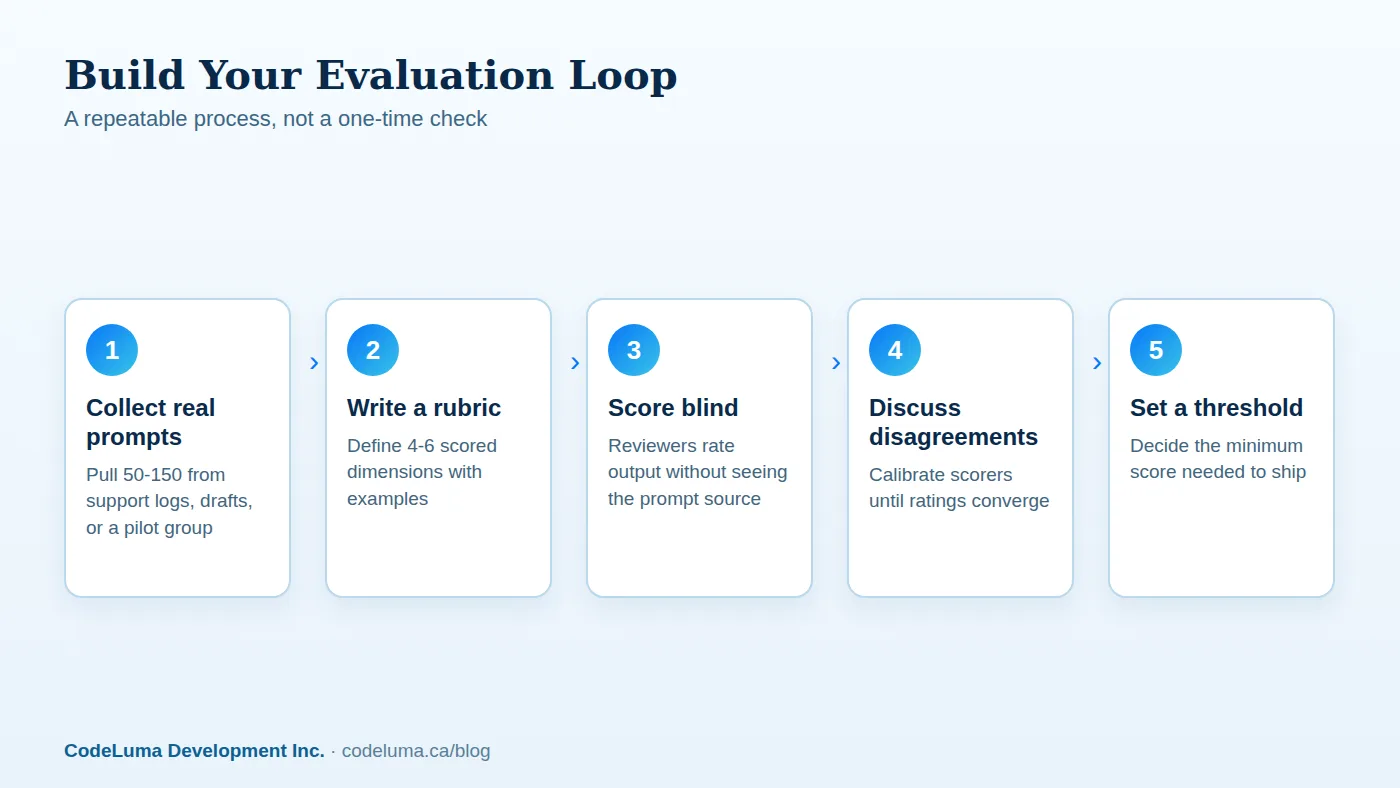
You don't need thousands of examples. A test set of 50 to 150 real or realistic prompts is usually enough to surface patterns, as long as it covers the range of what users will actually send. Aim for a mix that includes:
- Common, everyday requests — the bulk of real traffic
- Edge cases — ambiguous, incomplete, or oddly phrased input
- Known failure triggers — anything that has broken a similar feature before
- Out-of-scope requests — things the feature should decline or redirect
- A few adversarial attempts — prompts designed to push the system off its guardrails
Keep this set in version control alongside the prompt or model configuration it was tested against. When you change either one, you rerun the same set and compare scores directly instead of relying on memory.
Designing a Scoring Rubric You Can Actually Use
A rubric turns subjective reactions into comparable numbers. Keep it short — four to six dimensions, each scored on a simple scale like 1 to 4. Typical dimensions include:
- Accuracy — is the factual content correct and not invented?
- Relevance — does it actually answer what was asked?
- Tone and voice — does it match your brand and the context?
- Completeness — did it skip a necessary step or caveat?
- Safety and appropriateness — does it avoid harmful, biased, or out-of-scope content?
Write one or two example answers for each score level in each dimension. Without examples, two reviewers will interpret "a 3" differently, and the rubric becomes noise instead of signal.
Running the Review Loop
Have at least two people score the same outputs independently before comparing notes. Where scores diverge by more than one point, discuss why — usually it reveals an ambiguity in the rubric itself, which you then fix. This calibration step matters more than the scoring itself; a rubric that two trained reviewers can't apply consistently won't give you a trustworthy number no matter how many examples you run through it. For teams without spare reviewer time, an ongoing maintenance arrangement can include scheduled review sessions as part of normal upkeep, rather than treating evaluation as a one-time pre-launch scramble.
Testing the Edges, Not Just the Average Case
Average-case performance is the easy part. What determines whether a feature is safe to ship is how it behaves at the edges: contradictory instructions, missing context, attempts to extract system prompts, or requests slightly outside its intended scope. If you're building something closer to an autonomous assistant than a simple chat window, the stakes rise further — see our comparison of agents and chatbots for why scope and edge-case testing matter even more once a system can take actions, not just produce text. Score edge cases separately from your average scores so a few bad averages don't hide a dangerous failure pattern.

Setting a Go/No-Go Threshold
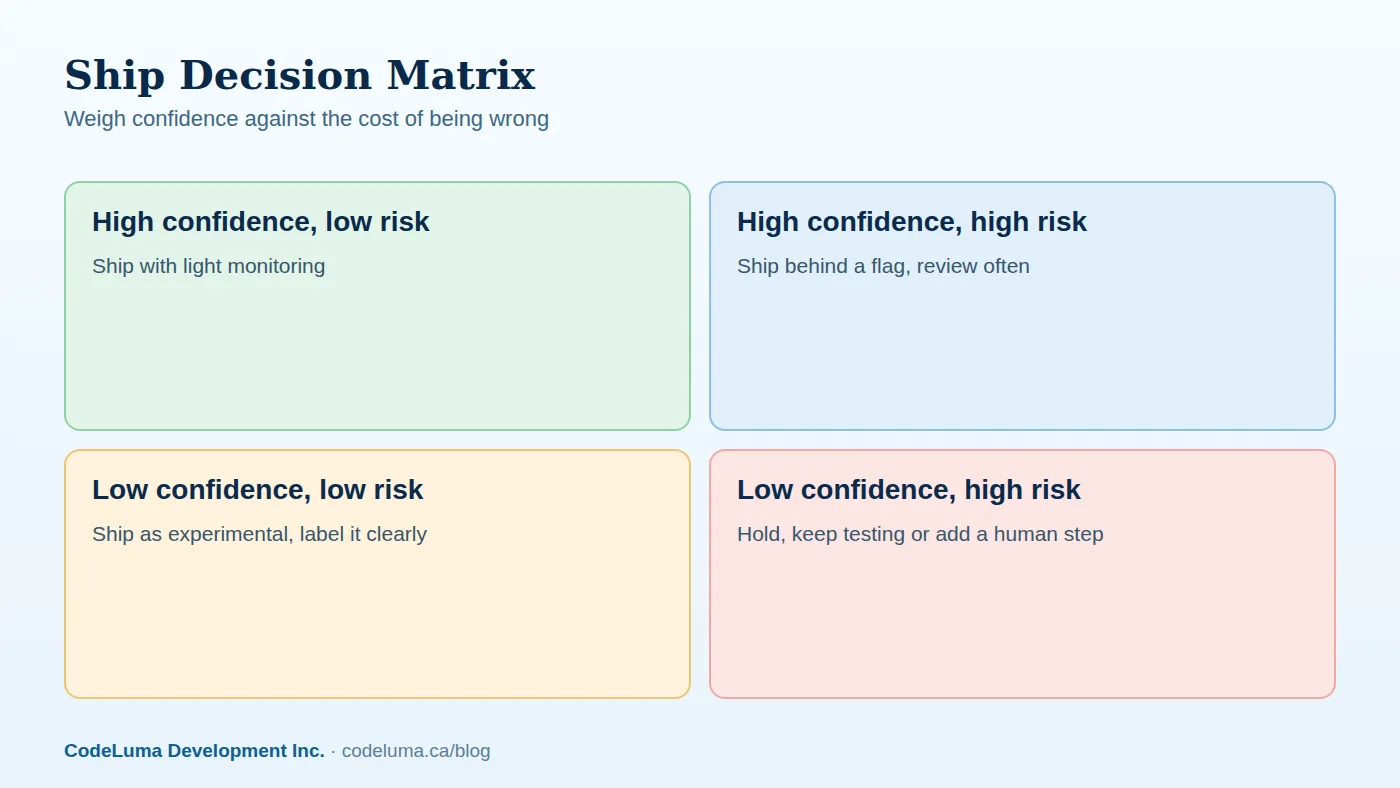
Decide your minimum acceptable score before you see the results, not after. Pick a threshold for each rubric dimension and an overall bar, and agree in advance what happens if the feature falls short: delay, add a human review step, narrow the feature's scope, or ship behind a flag to a small group first. Our article on testing new features with select users covers how a staged rollout lets you gather live feedback without exposing every customer to an unproven feature at once.
Common Mistakes Teams Make
- Testing only happy-path prompts and skipping edge cases entirely
- Letting one person score everything, with no second opinion to catch bias
- Treating a single "pass" run as permanent, instead of rerunning after every prompt or model update
- Scoring on vibes without written rubric examples to anchor the numbers
- Ignoring latency and cost, which matter just as much as answer quality for a real feature
- Never testing what the feature does when it should say "I don't know"
Keep Testing After Launch
Shipping isn't the finish line. Model providers update their systems, your own prompts drift as people tweak them, and real traffic will surface prompt patterns your test set never covered. Build a habit of sampling live outputs — even a small weekly batch — and running them through the same rubric. Route anything scoring poorly to a human for review before it reaches more users. If the feature sits inside a larger product, custom tooling built around your specific workflow can automate much of this sampling and scoring so it doesn't rely on someone remembering to check.
Wrap-Up
Evaluating generated output doesn't require a research team or expensive tooling — it requires discipline. A real test set, a rubric with concrete examples, a second reviewer, and a threshold you commit to before seeing the scores will catch far more problems than another round of manual spot-checking ever will. Treat it as an ongoing practice rather than a pre-launch checkbox, and you'll ship features you can actually stand behind. If you want a second set of eyes on your evaluation process or need help setting one up, our support team is a reasonable place to start.
Put this into practice with CodeLuma
CodeLuma helps teams design the test sets, scoring rubrics, and review workflows needed to judge automated features honestly before launch. We build the harnesses and dashboards that turn "it seems fine" into a documented, repeatable decision.
- Custom software development - tailored systems, integrations and internal tools.
- Maintenance and support plans - updates, monitoring and ongoing improvement.
- CodeLuma support - help from a real team when you need it.
- Mobile and app development - iOS, Android and progressive web apps.
Start a conversation. Tell us about your project and we will reply with practical next steps, or browse all CodeLuma services. CodeLuma Development Inc. is a Canadian company that works with teams in Windsor, Essex, London, Toronto, Mississauga and across Ontario, throughout Canada and remotely.