Every vendor pitch right now uses the words "chatbot," "assistant," and "agent" as if they mean the same thing. They do not. They are three different pieces of technology with different failure modes, different setup costs, and very different amounts of ongoing attention they need from your team. Picking the wrong one is not a minor mistake, it is either an underpowered tool that frustrates customers or an overpowered one that quietly makes mistakes with your business data. Here is how to tell them apart and match one to a real workflow.
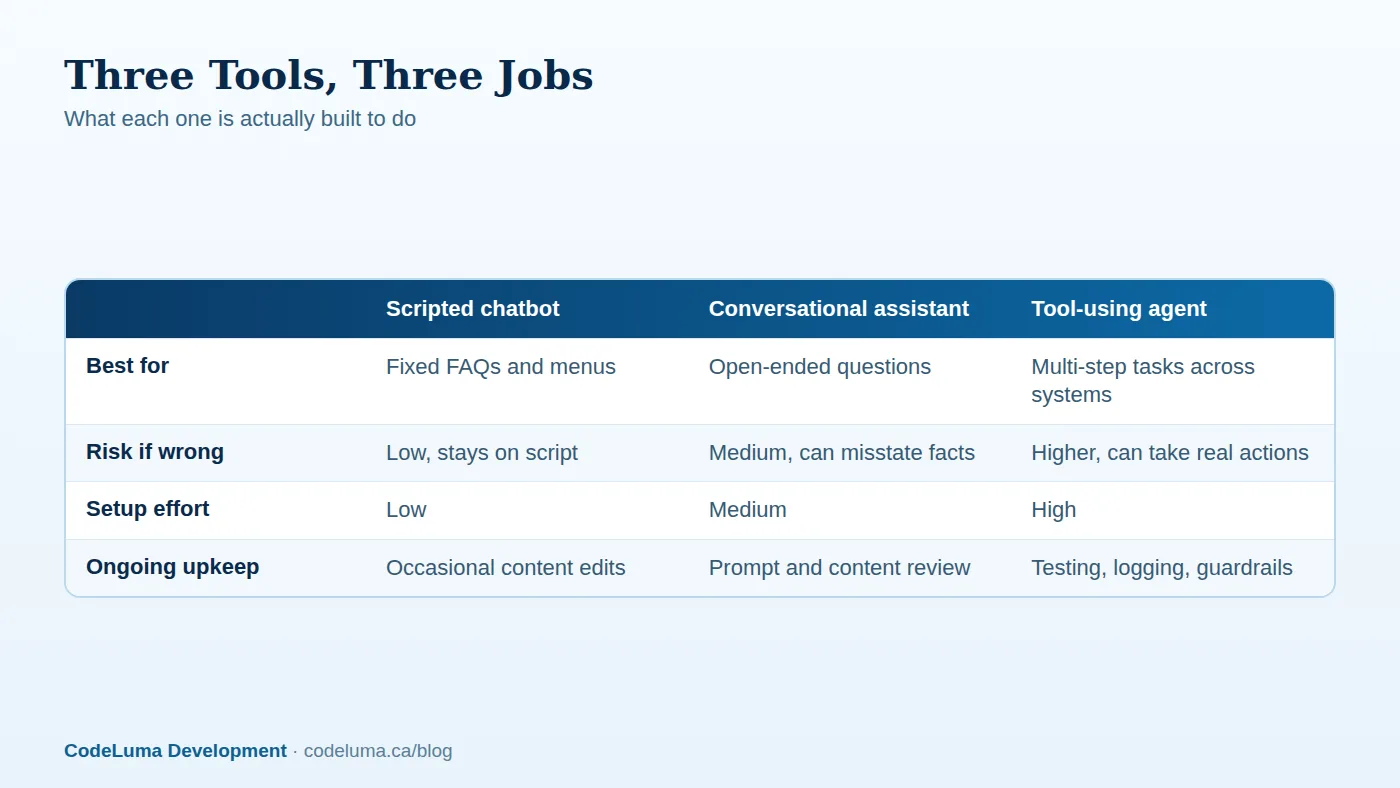
Three different tools, one confusing category
A scripted chatbot follows a decision tree you built: click a button, get a canned answer, maybe reach a human. A conversational assistant uses a language-based model to understand open-ended questions and generate a natural-sounding reply, but it does not do anything beyond talking. A tool-using agent goes a step further: it can look things up, fill in forms, call other systems, and take multi-step actions on your behalf. The three sit on a spectrum from "predictable and limited" to "flexible and capable of real mistakes," and most businesses need something from the lower end of that spectrum far more often than the marketing suggests.

Scripted chatbots: narrow, predictable, and underrated
A well-built scripted chatbot is boring in the best way. It answers store hours, order status, return policy, and shipping questions the same way every time, and it never invents a policy that does not exist. It is cheap to build, cheap to test, and easy for a non-technical person to update when a policy changes. The trade-off is rigidity: the moment a customer asks something slightly off-script, it either fails visibly or routes to a human. For businesses with a small, stable set of common questions, that rigidity is a feature, not a limitation.
Conversational assistants: good at explaining, not at doing
A conversational assistant can handle the long tail of phrasing a scripted tree cannot: paraphrased questions, follow-ups, and requests that combine two topics in one sentence. It is genuinely useful for support triage, internal documentation search, and drafting first-pass responses for a human to review. The catch is that it can sound confident while being wrong, especially about specifics like prices, inventory, or account details it was not given directly. Treat it as a very capable research and drafting tool, not a source of truth for anything you would not want stated incorrectly to a customer.
Tool-using agents: when the software actually does the task
An agent is what happens when you connect a conversational assistant to real systems and let it take action: check a customer's actual order in your database, update a record, issue a refund within a set limit, or move a task through your project system. This is where the technology becomes genuinely useful for operations, and also where it becomes genuinely risky, because a mistake is no longer a bad sentence, it is a wrong refund, a duplicated order, or a record changed incorrectly. Agents belong in workflows where the actions are well-defined, reversible, and bounded, not in workflows where a mistake is expensive or hard to undo.
Match the tool to the task, not the hype
The honest starting question is not "which one is more advanced," it is "what does this workflow actually require." A shipping-status lookup needs a database query and a template, not a conversational layer at all. A pre-sale question about product fit benefits from an assistant that can explain trade-offs in plain language. A workflow that involves touching customer records, inventory, or payments needs an agent with narrow permissions and a clear audit trail, or it needs to stay a human task for now. Building the most sophisticated option when a simpler one would do just adds cost and failure surface without adding value.
Risk: what happens when it gets something wrong
This is the question most businesses skip. For a scripted chatbot, a wrong answer is rare and usually harmless because it can only say what you told it to say. For a conversational assistant, a wrong answer is a bad sentence that a customer might act on, which is a real but recoverable problem if you keep it away from binding commitments like prices or legal terms. For a tool-using agent, a wrong action can change real data or move real money, so it needs guardrails: spending limits, approval steps for anything irreversible, and logging so you can see exactly what it did and why. Before adopting any of the three, ask what the worst realistic outcome looks like, and whether you can live with it.
Maintenance load: who keeps it accurate
None of these run themselves indefinitely. Scripted chatbots need someone to update the script when policies change, which is low effort but easy to forget. Conversational assistants need periodic review of the source material they draw from, since a stale document produces a confidently wrong answer. Agents need the most upkeep: monitoring for failed actions, reviewing logs, and re-testing whenever a connected system changes its behavior. If you cannot commit realistic time to the upkeep tier a tool requires, choose a simpler tool rather than accepting a system that quietly drifts out of date.
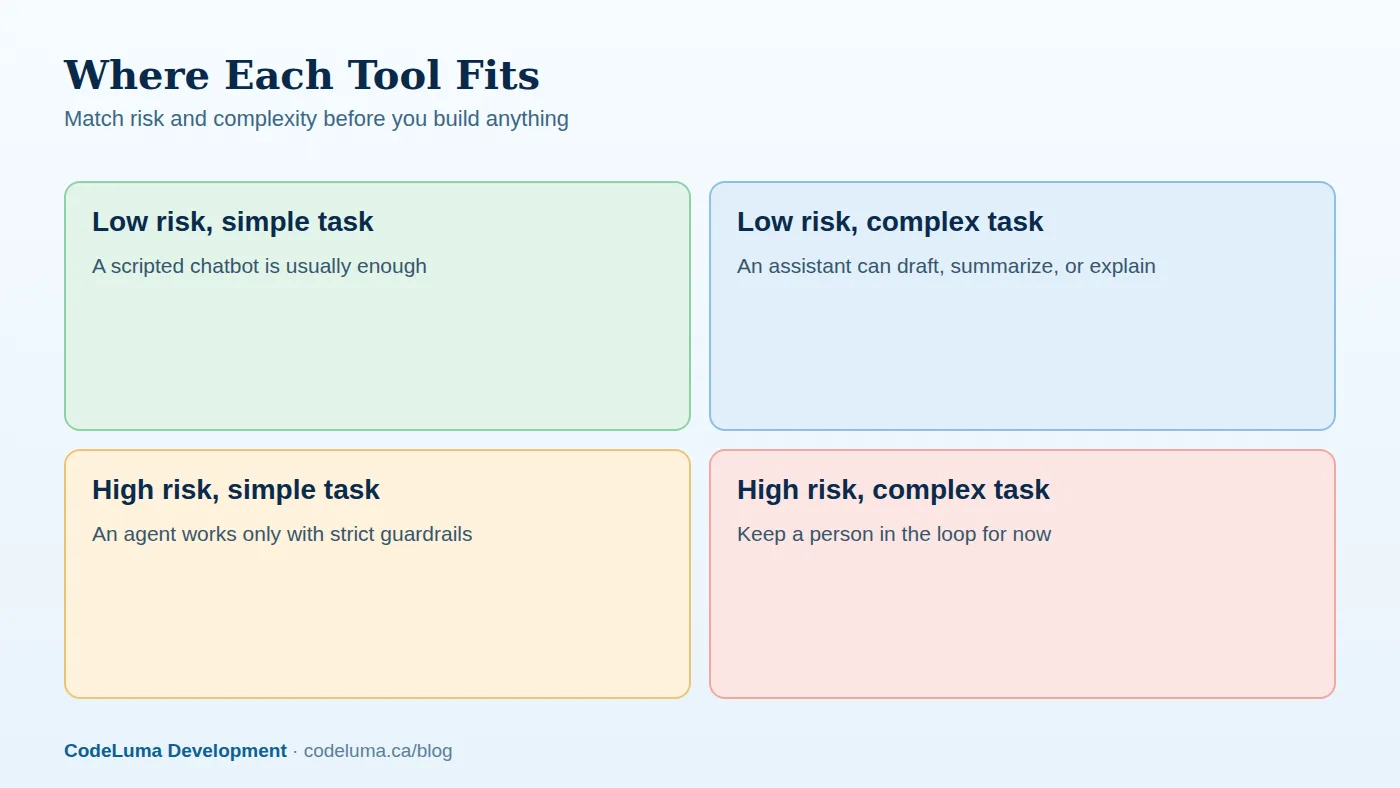

A practical checklist before you build anything
- Write down the workflow in plain steps. If you cannot describe it in five steps, it is not ready to automate yet.
- Identify what "wrong" looks like. A bad sentence and a bad transaction are not the same risk.
- Check whether actions are reversible. Irreversible actions need a human approval step, at least at first.
- Estimate the update frequency. Content that changes weekly needs a different maintenance plan than content that changes yearly.
- Decide who owns it after launch. A tool with no owner degrades quietly until a customer notices.
- Start narrow. One workflow done well beats five workflows done loosely.
Common mistakes we see
The most common mistake is reaching for an agent when a scripted flow would have solved the problem with a fraction of the risk and none of the ongoing review burden. The second is the opposite: forcing every customer interaction through a rigid script when an assistant would reduce frustration on genuinely open-ended questions. The third, and most costly, is deploying an agent with broad permissions and no logging, so that when something does go wrong, nobody can reconstruct what happened or why. A close fourth is treating any of these as "set and forget" rather than something that needs the same kind of ongoing attention you would give any other piece of custom software handling customer-facing work.
How to pilot one safely
Start with a single workflow that has low stakes and clear boundaries, run it alongside your existing process rather than replacing it outright, and measure how often it needs human correction before you expand its scope. This is the same discipline that applies to automating customer support and content workflows more broadly: prove it on something small and recoverable before it touches anything customer-facing at scale. If you are building on an existing website or web application, the integration work is often smaller than expected, but it still deserves the same testing rigor as any other feature launch.
The honest bottom line
Most businesses do not need an agent. They need one well-scoped tool that matches the actual risk and complexity of one real workflow, built in a way someone can maintain without a specialist on call every week. Start with the simplest option that solves the problem, add capability only when you have evidence the simpler version is genuinely limiting you, and put a real owner and a maintenance plan behind whatever you choose, whether that is a five-question chatbot or a permissioned agent touching your order system. That is a smaller, cheaper, and far more durable strategy than chasing the most capable-sounding tool first.
Put this into practice with CodeLuma
CodeLuma can map one real workflow in your business, figure out whether a scripted flow, a conversational assistant, or a tool-using agent actually fits it, and build a small working version you can test before committing to anything larger. We focus on matching the tool to the risk and maintenance you can realistically support, not on selling the most impressive-sounding option.
- Custom software development - tailored systems, integrations and internal tools.
- Maintenance and support plans - updates, monitoring and ongoing improvement.
- CodeLuma support - help from a real team when you need it.
- Website and web application development - fast, accessible, search-friendly builds.
Start a conversation. Tell us about your project and we will reply with practical next steps, or browse all CodeLuma services. CodeLuma Development Inc. is based in Nova Scotia and works with teams across Canada and remotely.