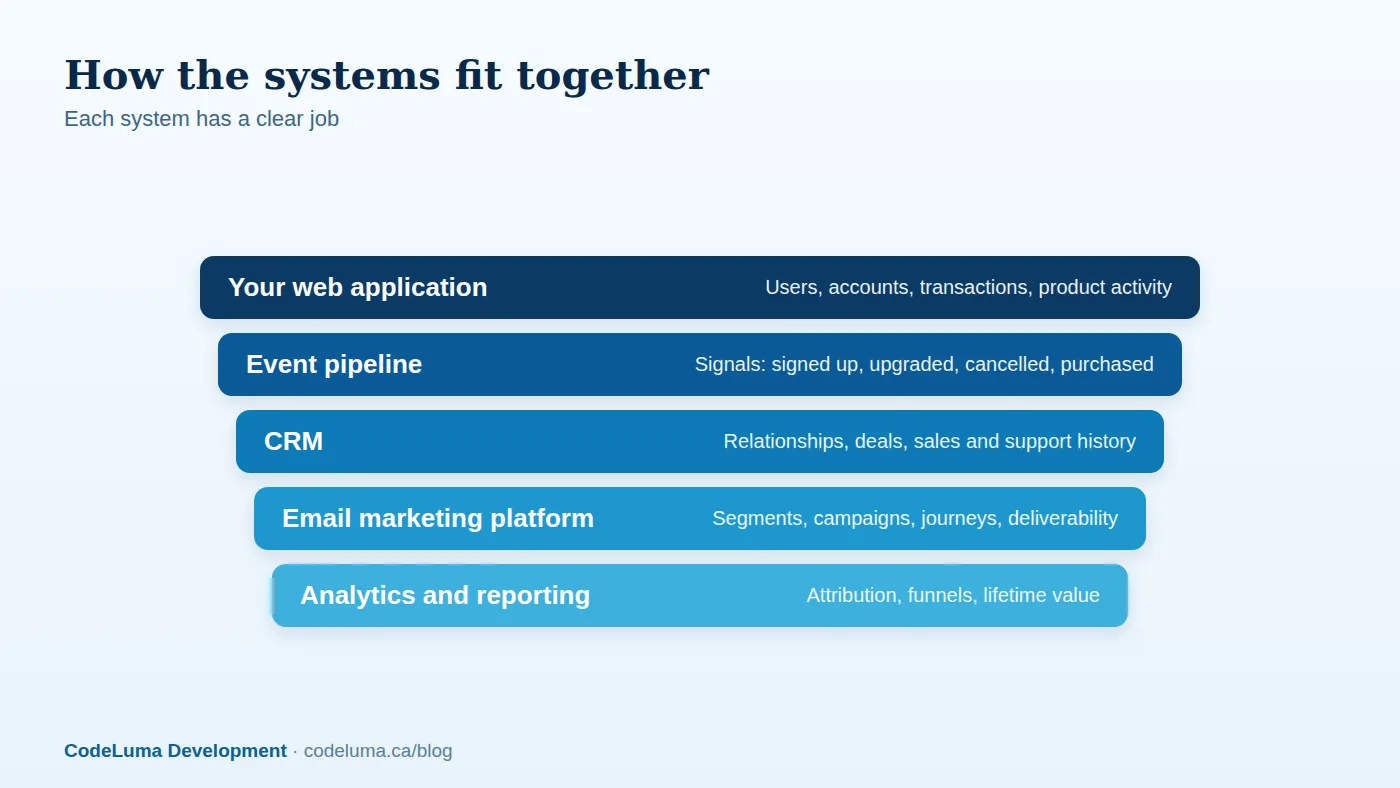
Your custom web application knows things marketing and sales teams would love to act on: who signed up today, who has not logged in for two weeks, who upgraded, who abandoned onboarding, which accounts are about to renew. A customer relationship management (CRM) system and an email marketing platform are where those people work. Connecting them turns product data into timely conversations, and turns manual list uploads into automated lifecycle communication. This guide explains how to design the integration so it is reliable, respectful of consent and useful.
Start with the use cases
Integration exists to enable specific actions. Typical ones include sending a welcome sequence when someone signs up, alerting sales when a trial account hits a usage threshold, sending a renewal reminder before a subscription ends, re-engaging inactive users, segmenting newsletters by plan or interests, creating a CRM lead from a contact form, and giving support agents context about a customer's account and history. Write down the top five before designing the data flow; it keeps the project focused on outcomes instead of syncing everything.

Decide who owns which data
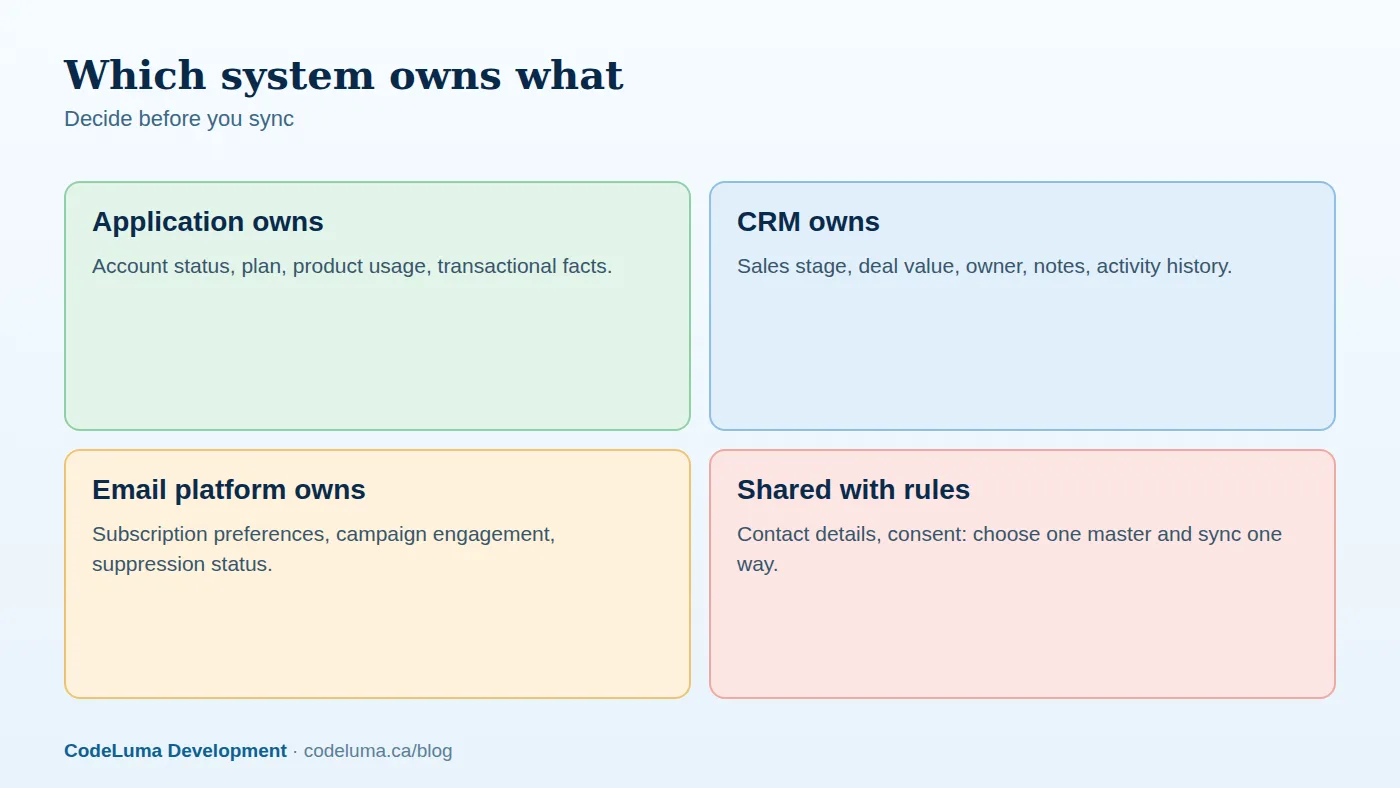
Most problems come from unclear ownership. Decide for each piece of data which system is the master, and sync in the direction of ownership. Your application is normally the source of truth for account status, plan and product usage. The CRM owns sales-stage information, deal values, owners and notes. The email platform owns subscription preferences and engagement history. Contact details such as name and email are often mastered in the application; if sales staff edit them in the CRM, define how those changes flow back or block them. Avoid two-way sync of the same field unless you have a conflict rule, such as latest-update-wins with timestamps.
Model contacts, accounts and identities
People and companies do not map neatly across systems. In B2B, a company may have many users; the CRM might track an organisation, its contacts and deals, while the application tracks tenants and users. Decide how to link them, using stable external IDs rather than emails alone, since emails change. Store the CRM and email platform IDs in your database, and your application ID in the external systems, so records can be matched reliably. Plan for duplicates: normalise emails, detect existing contacts before creating new ones, and provide tools for merging.
Sync contacts
- Creation and updates: when a user signs up or changes profile details, push the change. Use queues and background jobs, not synchronous calls in the request path, so a slow third party does not slow your app. See our integration guide for patterns.
- Attributes and custom fields: agree on a schema in each tool for plan, sign-up date, country, lifecycle stage, last login and so on. Keep names consistent.
- Bulk backfill: loading existing users is a one-time job with its own rate limits and de-duplication needs.
- Deletion and anonymisation: when a user requests deletion, propagate it to all connected systems.
Send behavioural events, not just static fields
The real power comes from events: signed up, completed onboarding step, created first project, invited a teammate, upgraded, downgraded, payment failed, cancelled. Send them to the email platform or CRM with timestamps and properties, and use them to trigger journeys: onboarding emails that adapt to progress, upgrade prompts when limits are approached, win-back campaigns after cancellation. Define an event taxonomy up front, document it and stick to it, so marketing can rely on it. A common approach is to emit events from your application to an event pipeline that fans out to the tools; this also feeds analytics. Related ideas appear in our article on real-time data synchronisation.
Consent and compliance
Email marketing is regulated. In Canada, CASL requires consent for commercial electronic messages, identification of the sender and a working unsubscribe mechanism; other regions have their own laws, such as GDPR and CAN-SPAM. Practical requirements:
- Record explicit consent, when and where it was given and what the person agreed to.
- Distinguish transactional messages needed to run the service, such as receipts and security alerts, from marketing. Keep them on separate streams or sending domains.
- Sync unsubscribe and suppression status back to your application so you never send marketing from another channel to someone who opted out.
- Honour data subject requests, such as access and deletion, across all connected systems.
- Minimise personal data sent to third parties.
Our overview of privacy and data protection compliance gives more context, and you should seek legal advice for your situation.
Segmentation and personalisation
With good data, segments become powerful: trial users who have not invited a teammate, customers on the basic plan using premium features, accounts approaching renewal, users in a specific industry. Build segments in the email platform or CRM from synced attributes and events, and reuse them for campaigns and sales outreach. Personalise sensibly; helpful, relevant messages perform better than heavy-handed use of names. Test everything: subject lines, timing and content, and measure outcomes such as activation and revenue, not just opens, which are distorted by email privacy features.

Deliverability and technical hygiene
Authenticate your sending domain with SPF, DKIM and DMARC, warm up new domains gradually, keep lists clean by removing bounces and long-inactive contacts, and monitor complaint rates. Use separate infrastructure for transactional and marketing mail. Beware of syncing everyone into the marketing list by default; only contacts with proper consent should be mailable. Poor list hygiene damages the reputation that gets your important emails, such as password resets, delivered.
Handle failure and drift
APIs rate-limit, time out and change. Use idempotent upserts keyed by external ID, retry with backoff, log failures with enough detail to investigate and alert on backlogs. Run reconciliation jobs that compare counts and key attributes between systems and repair drift. Provide an admin view showing a user's sync status and recent events.
Build or use a connector?
Many CRM and email tools offer native or marketplace integrations for common platforms. For a custom application, you will typically use the vendors' APIs directly, or a customer data platform that receives events once and forwards them to many destinations, which simplifies adding tools later. Choose based on the number of destinations, volume and how much control you need.
A phased rollout
- Sync core contacts and lifecycle stage, with consent, to the CRM and email platform.
- Add key events and build two or three high-value journeys, such as onboarding and renewal.
- Give sales and support context views and alerts.
- Expand segmentation, reporting and attribution.
Done well, this integration lets your application, sales team and marketing work from the same picture of the customer. Our software team can design the data model and event pipeline, integrate the tools and set up the monitoring, and our social and content specialists can help you turn the data into campaigns that resonate.
Put this into practice with CodeLuma
CodeLuma integrates your web application with CRM and email platforms so sign-ups, purchases and product activity flow into segments and campaigns automatically, with consent and data quality handled properly.
- Custom software development - tailored systems, integrations and internal tools.
- Website and web application development - fast, accessible, search-friendly builds.
- Social media management - content systems tied to business goals.
Start a conversation. Tell us about your project and we will reply with practical next steps, or browse all CodeLuma services. CodeLuma Development Inc. is a Canadian company that works with teams in Windsor, Essex, London, Toronto, Mississauga and across Ontario, throughout Canada and remotely.


