Industry studies regularly report that a large majority of online shopping carts are abandoned, often cited at somewhere around seventy percent. Whatever the exact number for your store, there is a lot of intent sitting in carts that never converts. The encouraging part is that many of the causes are fixable, and even a small improvement in checkout completion has an outsized effect on revenue because these shoppers have already chosen a product. This guide covers the causes and the practical remedies, from user experience to backend reliability to recovery messaging.
Diagnose before you fix
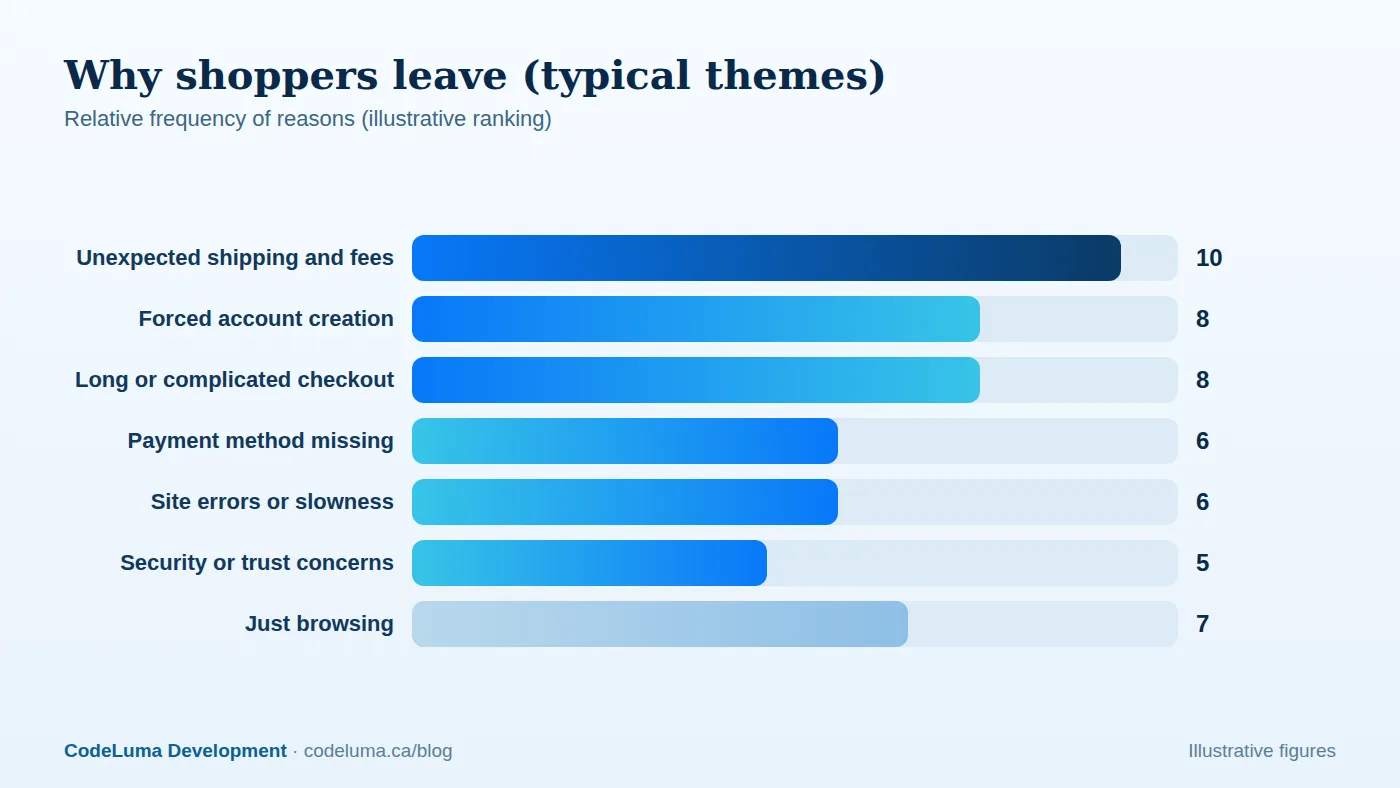
Abandonment is a symptom with many possible causes, and not all of them are problems. Some shoppers use the cart as a wish list or to compare prices. Start by instrumenting the funnel: product view, add to cart, cart view, checkout start, shipping info, payment info and purchase. Look at drop-off at each step, split by device, traffic source, new versus returning customers and payment method. Add error tracking on checkout and watch session recordings or run short exit surveys such as "What stopped you today?" The pattern points to where to work.

Fix the cost surprise
Unexpected shipping, taxes and fees are consistently among the top reasons shoppers leave. Show estimated shipping and taxes early, on the product or cart page, with a delivery estimate. Offer free-shipping thresholds with a progress indicator, or roll shipping into the price where your margins allow. Be transparent about returns. No one likes to discover a fifteen-dollar surprise at the last step.
Reduce checkout friction
- Offer guest checkout. Forcing account creation is a well-known conversion killer. Offer to create an account after purchase.
- Cut the fields. Ask only for what you need. Use address autocomplete, combine name fields where appropriate and default billing to shipping.
- Show progress. A clear, short step indicator reduces anxiety, and a single-page or two-step checkout often outperforms long multi-page flows.
- Make it mobile-friendly. Correct keyboards, large targets, sticky order summary and autofill. See our guide to mobile-first optimisation.
- Persist the cart. Save carts across devices for logged-in users and across sessions with cookies.
- Keep the cart editable during checkout so shoppers do not need to go back.
Offer the right payment options
A missing payment method loses sales silently. Provide cards, PayPal and wallets such as Apple Pay and Google Pay, and consider bank-based or buy-now-pay-later options where they fit your audience and price range. Express checkout buttons on the product and cart pages let returning mobile shoppers skip most of the form. We cover integration details in our guide to Stripe, PayPal and Apple Pay.
Build trust
- Display security cues where they matter: a clear HTTPS connection, recognisable payment logos and a short privacy assurance near the payment form.
- Show reviews, ratings and clear contact information, including an address and phone number.
- State return and refund policies in plain language, linked from the cart and checkout.
- Keep the checkout design consistent with the rest of the store; a jarring change can raise doubts.
Fix the backend problems that quietly cost sales
Many abandonments are not shopper decisions but technical failures. Check for:
- Slow checkout responses. Every second of delay in address validation, shipping-rate lookups and payment steps loses people. Cache rate calculations and fail gracefully when a shipping API is slow.
- Payment declines and errors. Track decline rates by reason and method. Poor error messages cause abandonment; specific, helpful ones recover sales. Use retries and offer alternatives.
- Inventory mismatches. Nothing kills trust like an "out of stock" message at the final step. See our guide to real-time inventory.
- Coupon code confusion. A prominent promo code field can send shoppers off to hunt for codes. Collapse it or apply eligible offers automatically.
- Browser and device bugs. Test the checkout on real devices and browsers, and monitor errors in production.
- Session timeouts that empty carts or force re-entry of details.
Set up abandoned-cart recovery
For shoppers who have provided an email address, automated recovery messages can win back a meaningful share of lost sales. Follow these principles:
- Capture the email early, before payment, with clear consent. Respect privacy and anti-spam laws; in Canada, that means complying with CASL for commercial electronic messages.
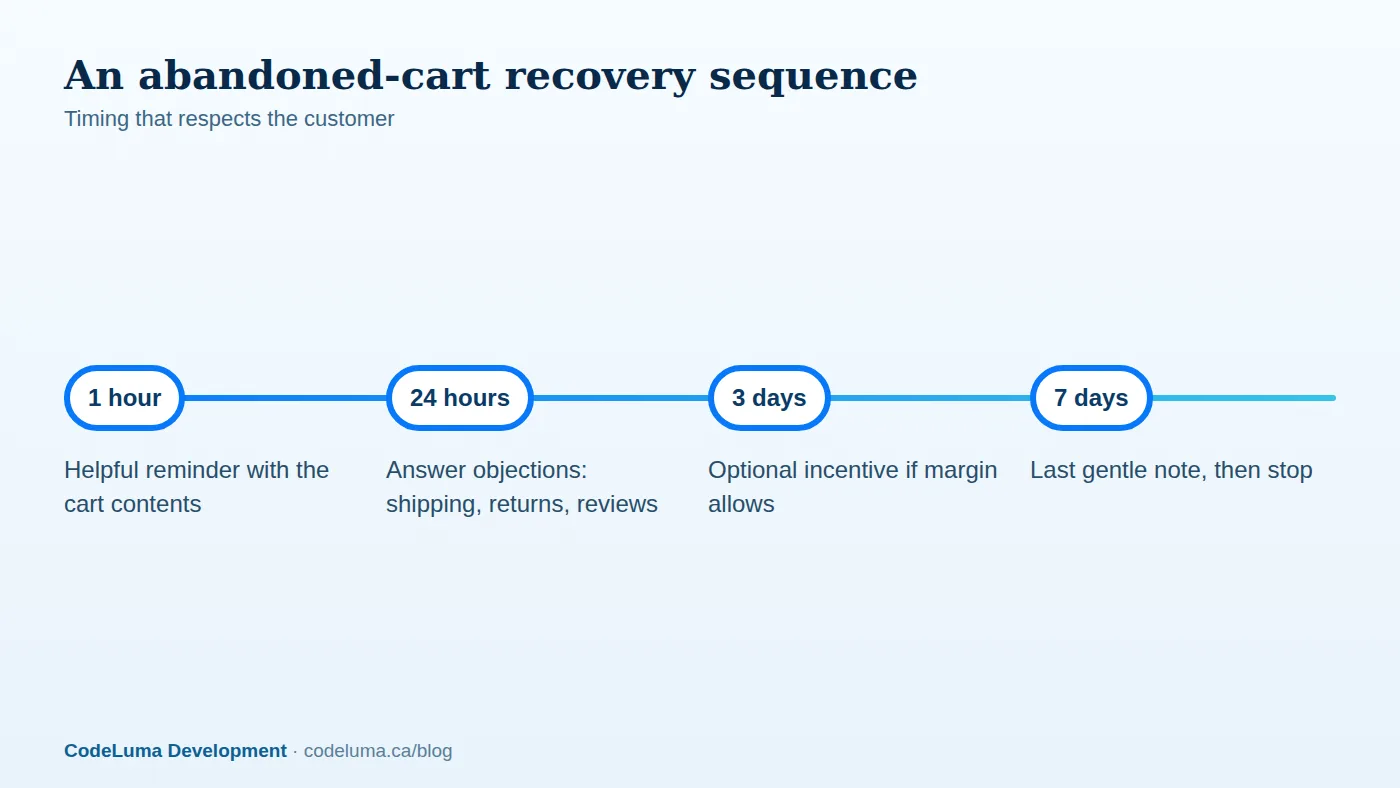
- Send a short sequence, starting with a helpful reminder within an hour, a second message addressing objections after a day, and, if margin allows, a limited incentive later. Stop after a few messages.
- Show the actual cart, with images, and a link that restores it exactly, including any applied discounts.
- Address objections, such as shipping times, returns, sizing help and reviews, rather than only shouting "you forgot something."
- Do not discount by default. Constant coupons train customers to abandon deliberately. Test whether incentives actually add profit.
- Exclude people who purchased and suppress messages for out-of-stock items.

Use on-site and exit tactics wisely
On-site messaging can help when it is relevant: free shipping reminders, low-stock cues that are truthful, live chat for hesitant shoppers, and save-for-later options. Avoid manipulative tactics such as fake scarcity or countdown timers that reset, which erode trust and may breach consumer protection rules. Exit-intent offers can work, but test their impact on margin.
Retargeting and messaging channels
Retargeting ads and SMS can complement email, but they raise cost and privacy concerns. Use them selectively, with consent and frequency caps, focused on high-value carts. Integrate the data so that customers who have bought stop seeing ads for the item.
Test and measure
Use A/B tests to compare checkout variants: one-page versus multi-step, guest-first versus login-first, shipping cost display, and payment button placement. Track cart abandonment rate, checkout completion rate, revenue per visitor and recovered revenue from your automation. Beware of small samples and run tests long enough to reach reliable conclusions. Improve one thing at a time so you understand what worked.
A prioritised action list
- Instrument the funnel and errors.
- Show total costs early and simplify the form.
- Add guest checkout and express payment options.
- Fix speed, errors and stock accuracy.
- Launch a respectful recovery sequence.
- Test and iterate monthly.
Checkout improvements often pay for themselves quickly. If your store needs deeper backend fixes, whether payments, inventory, shipping rates or integrations, a custom software team can fix problems that plugins cannot.
Put this into practice with CodeLuma
CodeLuma builds checkouts and recovery flows that remove friction and win back shoppers, from faster forms and clearer costs to reliable abandoned-cart automation tied to your inventory and CRM.
- Website and web application development - fast, accessible, search-friendly builds.
- Custom software development - tailored systems, integrations and internal tools.
- Social media management - content systems tied to business goals.
Start a conversation. Tell us about your project and we will reply with practical next steps, or browse all CodeLuma services. CodeLuma Development Inc. is a Canadian company that works with teams in Windsor, Essex, London, Toronto, Mississauga and across Ontario, throughout Canada and remotely.


