Checkout is where interest turns into revenue, and where a surprising amount of revenue quietly disappears. Shoppers abandon when their preferred payment method is missing, when the form is tedious, when errors are confusing or when something feels insecure. Modern payment platforms make it possible to offer cards, PayPal and one-tap wallets such as Apple Pay and Google Pay with a fast, secure experience, but only if the integration is designed properly. This guide covers the architecture and the details that separate a dependable checkout from a leaky one.
Choose your payment methods deliberately
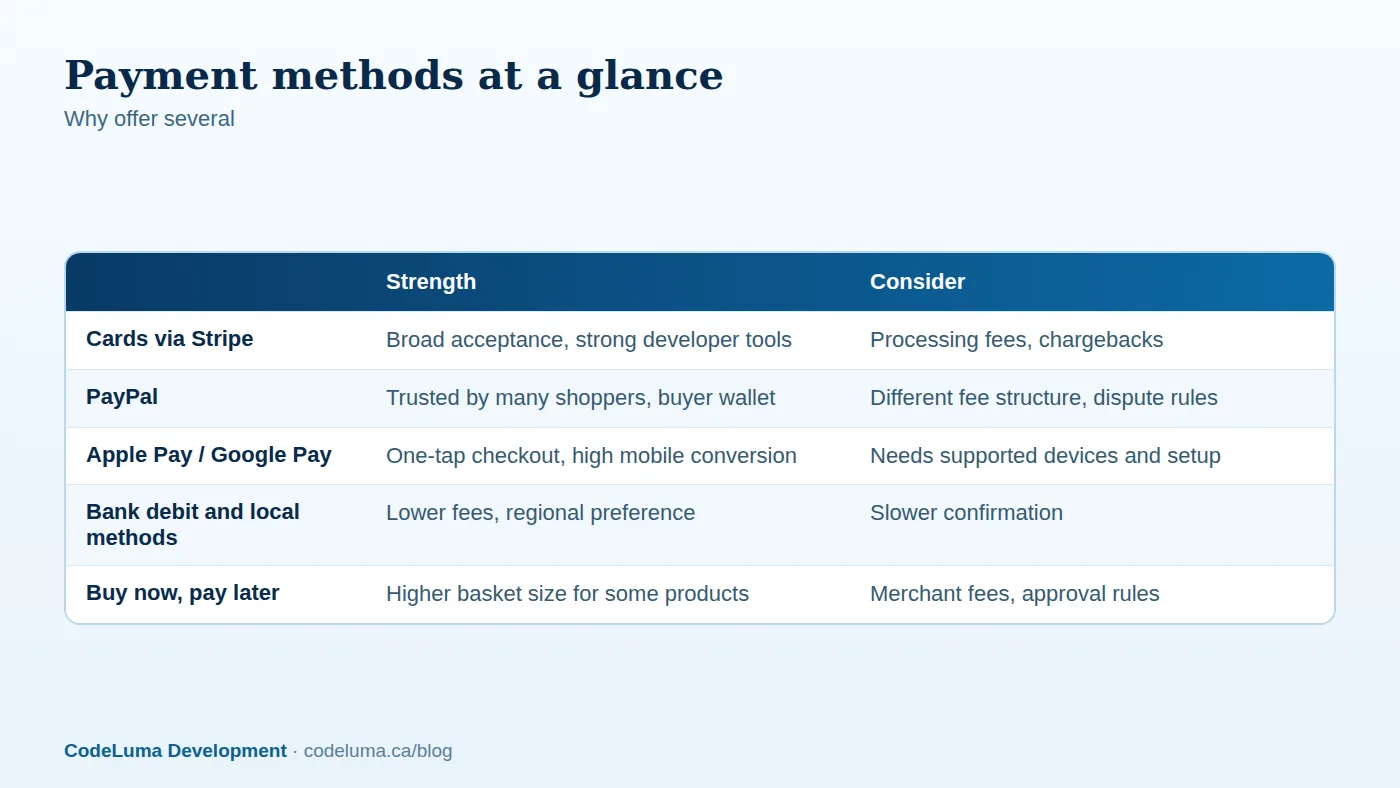
Cards remain the backbone of online payments. PayPal is trusted by a large group of shoppers who prefer not to enter card details, and wallets like Apple Pay and Google Pay make mobile purchases nearly effortless by using stored details and biometric confirmation. Adding these alongside cards commonly improves conversion, particularly on phones. Consider local preferences too: Canadian shoppers commonly use cards, wallets and Interac-based methods depending on the business. Do not overload the checkout with dozens of options; choose the few your customers actually use and measure their share of orders.

Hosted, embedded or fully custom fields
There are three integration styles with different trade-offs:
- Redirect to a hosted payment page. The simplest and least demanding for compliance, with limited branding control and a slightly disruptive redirect.
- Embedded, provider-hosted fields. The card fields are served by the provider inside your page, so card data never touches your servers. This gives a seamless look and keeps your PCI scope small. It is the sweet spot for most custom checkouts.
- Direct card handling on your servers. Rarely justified. It brings the heaviest compliance burden and risk. We explain why in our guide to PCI-DSS.
Design the flow around the server
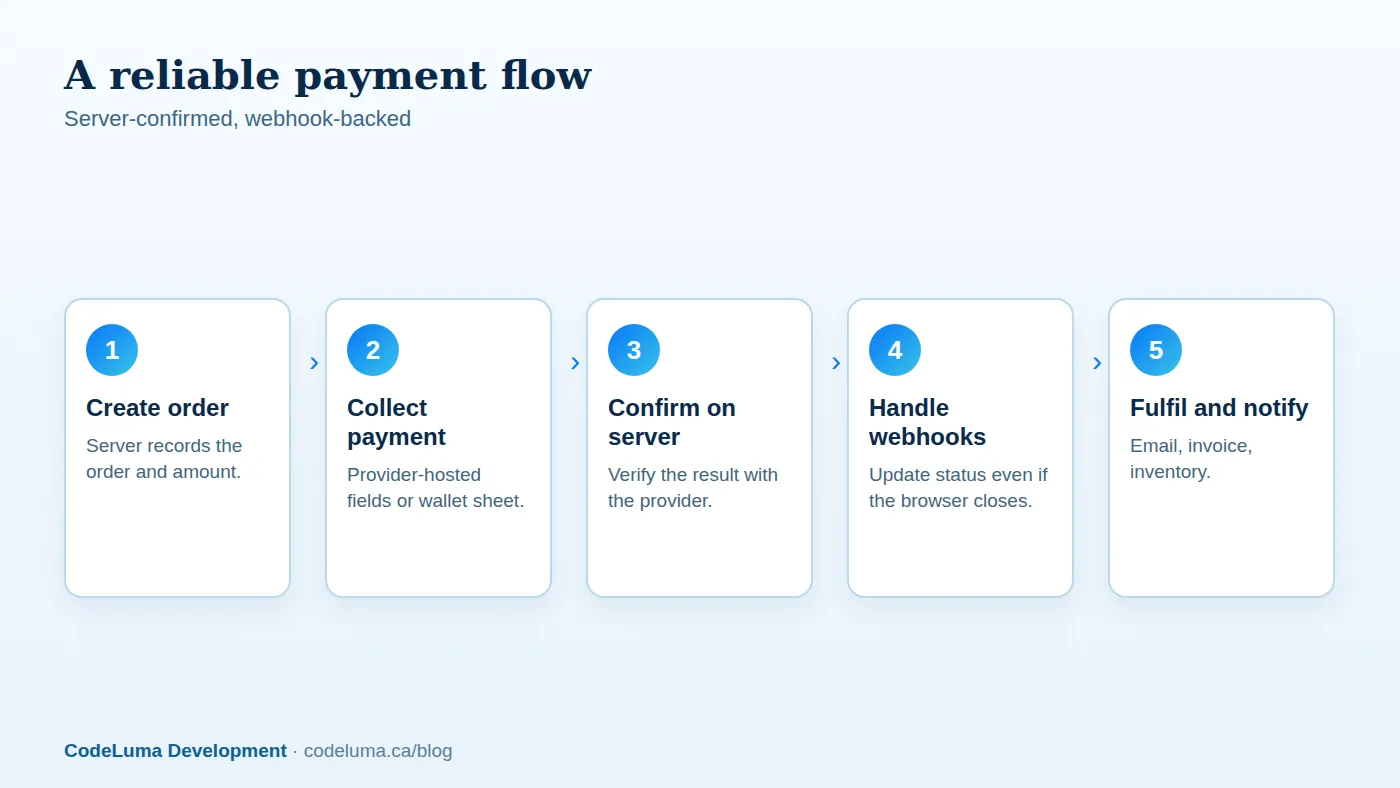
The single most important design principle is that the server decides what was paid, not the browser. A robust flow looks like this:
- The customer submits the cart. Your server creates an order in a pending state, calculating the amount, tax and shipping on the server. Never trust amounts sent from the browser.
- Your server asks the provider to create a payment intent or session for that exact amount and currency, and returns a token to the front end.
- The front end collects payment details through the provider's secure fields or wallet sheet and confirms the payment.
- The provider processes the payment, handling any extra authentication such as 3-D Secure.
- Your server receives a webhook from the provider confirming success or failure and updates the order accordingly, then triggers fulfilment, emails and invoices.
Webhooks are not optional
Customers close tabs, lose connections and hit the back button. If your order status depends on the browser returning to a confirmation page, some paid orders will remain pending and some abandoned ones may be marked paid. Webhooks let the provider notify your server directly. Verify the signature on every webhook, process each event idempotently since providers may send duplicates, respond quickly and do heavy work in a background job, and log everything. Also run a periodic reconciliation job that compares your orders with the provider's records to catch anything missed.
Handle strong authentication
In many regions, banks require extra customer authentication for online card payments. Modern APIs handle this through flows such as 3-D Secure, presenting a challenge when needed. Use the provider's recommended payment intent approach so authentication and retries are handled correctly, and design the interface to cope with a pause while the customer confirms with their bank. Test declined and challenged cards, not just successful ones.
Set up digital wallets properly
Apple Pay requires domain verification and a supported browser and device; Google Pay has its own setup steps. Most payment providers offer a unified button that shows the appropriate wallet when available. Place express checkout buttons early, on the product and cart pages, so a returning mobile shopper can pay in seconds. Collect shipping details through the wallet sheet where possible to eliminate typing. Confirm the wallet button appears only when the customer can use it, and provide a fallback to the standard form.
Make errors humane
- Show specific, friendly messages: card declined, expired card, incorrect security code, insufficient funds, without exposing sensitive details or blaming the customer.
- Keep the customer's cart and entered information after a failure.
- Offer another payment method immediately.
- Handle timeouts gracefully: never charge twice. Use idempotency keys so a retried request does not create a second charge.
- Show clear confirmation with an order number and a receipt by email.

Money handling details
Store amounts as integers in the smallest currency unit, such as cents, to avoid floating-point errors. Record currency explicitly, keep tax, shipping and discount breakdowns, and record provider transaction IDs on every order. Plan for refunds, partial refunds, disputes and chargebacks in your admin tools. Keep accounting in mind from the start so finance can reconcile payouts easily, and consider how tax should be calculated; we explore that in our article on automated tax calculation.
Test like a sceptic
- Use the provider's test cards and sandbox for success, decline, authentication required, and network failure scenarios.
- Simulate webhook delays, duplicates and out-of-order delivery.
- Test with different browsers, devices and wallet configurations.
- Test refunds and partial captures.
- Run a live low-value transaction before launch and reconcile it end to end.
Security essentials
Serve everything over HTTPS, keep API keys in a secrets manager, use restricted keys with the minimum permissions, and never log full card data. Protect against card-testing attacks by rate limiting and adding bot checks. Keep your dependencies updated, and monitor for unusual payment patterns.
Bring it together
A great checkout feels almost invisible: few fields, the right payment options, fast responses and clear confirmation. Behind it, a disciplined architecture with server-side confirmation, webhooks, idempotency and reconciliation keeps your books accurate and your customers protected. If you are building or rebuilding a store, a custom software team with payment integration experience can get these details right the first time.
Put this into practice with CodeLuma
CodeLuma integrates Stripe, PayPal and digital wallets into custom checkouts with proper webhooks, reconciliation and error handling, so payments are smooth for customers and clean for your accounting.
- Custom software development - tailored systems, integrations and internal tools.
- Website and web application development - fast, accessible, search-friendly builds.
- Maintenance and support plans - updates, monitoring and ongoing improvement.
Start a conversation. Tell us about your project and we will reply with practical next steps, or browse all CodeLuma services. CodeLuma Development Inc. is a Canadian company that works with teams in Windsor, Essex, London, Toronto, Mississauga and across Ontario, throughout Canada and remotely.