Every product team has a feature they're pretty sure customers want. The problem is "pretty sure" has sunk a lot of budgets. A fake door test is a cheap, fast way to find out if people actually reach for something before you spend weeks or months building it. You put up a button, a tile, or a landing page that looks like the real feature, point real traffic at it, and watch what happens when people click.
What a Fake Door Test Actually Is
A fake door test is a placeholder for a feature that doesn't exist yet. It might be a "Export to Excel" button that, when clicked, shows a message like "This is coming soon - want us to notify you?" It might be a pricing tier for a plan you haven't built. It might be a whole landing page describing a product that only exists as a slide deck. The point isn't to trick anyone maliciously - it's to measure intent before investing in the real thing, and to be upfront with users the moment they click.

Why Build the Thing When You Can Ask First
Surveys and interviews tell you what people say they'd do. A fake door tells you what people actually do, which is a much stronger signal. Someone filling out a survey has no skin in the game; someone clicking a button in your live product during their normal workflow is giving you a real behavioral data point. It's also dramatically cheaper than a build-and-see approach: a landing page or a disabled button can go live in days, while the feature itself might take a full sprint or more.
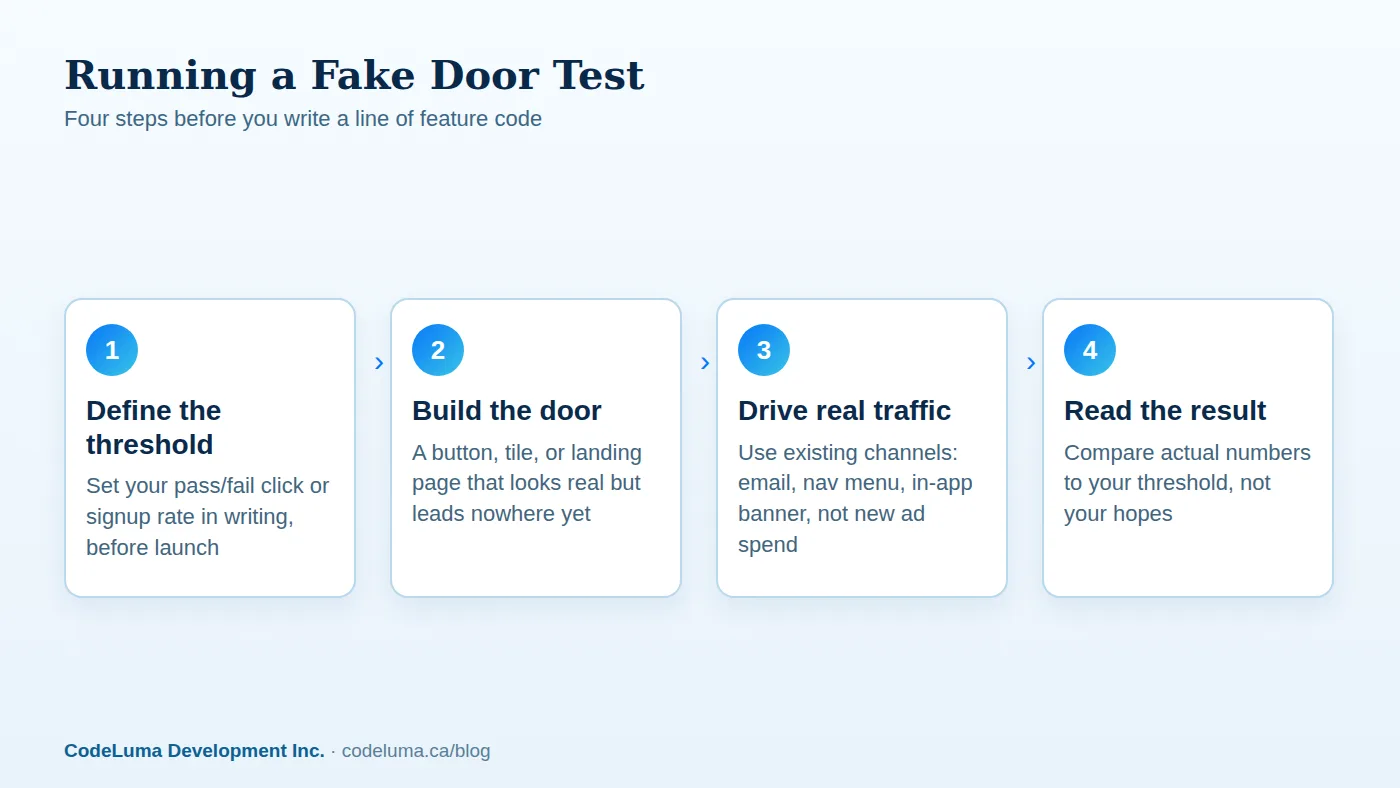
Set Your Pass/Fail Threshold Before You Launch
This is the step almost everyone skips, and it's the one that matters most. Before you see a single click, write down what success looks like: "If more than 8% of visitors to this page click the button, we build it. If fewer than 3% do, we don't. Between those, we test again with a different angle." Put a number on it, write it somewhere your team can see later, and don't change it after the data comes in. Hindsight makes almost any number look meaningful if you're free to redefine "good" after the fact.
The threshold should be grounded in something real - your existing conversion rates, a comparable feature's early numbers, or a rate you'd need to justify the engineering cost. If you have no baseline yet, pick a conservative number and treat the first test as a calibration run rather than a final verdict.
How to Build a Simple Fake Door
You don't need custom infrastructure for most fake door tests. A few patterns work well:
- A dead-end button inside your existing product or app that opens a "coming soon, join the waitlist" message when clicked.
- A standalone landing page describing the feature or product, with a signup form instead of a working feature behind it.
- A pricing tile for a plan that doesn't exist yet, to see if anyone tries to select it.
- A menu item added to existing navigation that leads to an explanation page rather than the feature itself.
If the test lives inside your product rather than on a throwaway page, it's worth getting the implementation right so it doesn't break or look sloppy - a broken-looking fake door depresses clicks for reasons that have nothing to do with demand. This is one area where a properly built landing page or in-app component earns its keep even for a short-lived test.
Where to Put the Door
Put the fake door where real intent already flows: your existing nav menu, an email to current users, a banner inside the app, or a link from a page people already visit for a related reason. Avoid buying new ad traffic just to test a fake door - cold traffic from an ad campaign behaves very differently from traffic that already trusts your product, and you'll end up measuring ad copy instead of feature demand.
What to Measure (and What Not To)
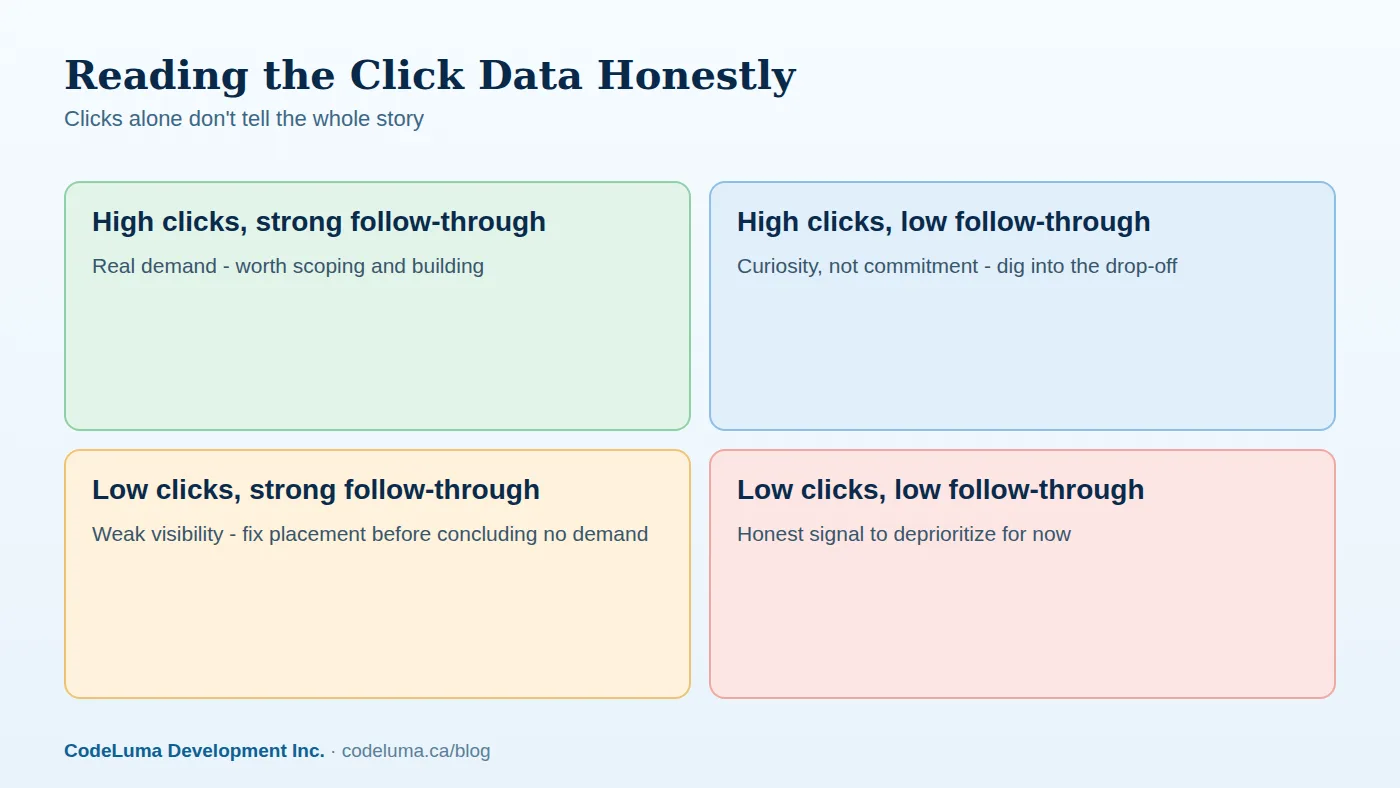
Track the click-through rate on the door itself, and if you're using a waitlist or "notify me" form, track completion of that form too - a click with no follow-through is a weaker signal than a click plus an email address. Resist the urge to track everything; a handful of clear numbers beats a dashboard full of vanity metrics you'll cherry-pick from later.
Reading the Data Honestly
This is where fake door tests go wrong more often than the setup itself. A few habits keep the read honest:
- Compare the result to the threshold you set in advance - not to what would feel good to report.
- Check sample size. A handful of clicks from a handful of visitors isn't a verdict either way.
- Look at who clicked, not just how many. If it's your three most engaged power users, that's a narrower signal than a spread across your user base.
- Separate curiosity from commitment. A click rate with almost no form completions or follow-up engagement often means people were curious, not that they'd use or pay for the feature.
- Be willing to report a fail. The whole value of the test disappears if "no demand" results get quietly reframed as "promising" to protect a roadmap decision someone already made.

Common Mistakes
The most common failure is moving the threshold after seeing the numbers. The second is running the test on the wrong audience - testing a B2B feature on your general consumer email list, for instance. The third is leaving the fake door up too long without disclosure; if someone clicks expecting a feature and finds nothing for weeks, that's a trust cost, not a free experiment. The fourth is treating a single test as permanent proof - demand can shift as your product and audience grow, so a fail today doesn't have to mean never.
What to Do With a Pass vs. a Fail
A pass means you have evidence worth acting on, not a guarantee of success - it still needs proper scoping, and we've written before about turning that evidence into a brief your developers can actually build from. A fail means you saved yourself a build cycle, and you should say so plainly rather than quietly shelving the result. Either way, follow up with the people who clicked: tell them what you learned and, if you decide not to build it, why. That follow-through is what keeps fake door tests from feeling like a bait-and-switch.
When Fake Door Tests Aren't the Right Tool
They're not a good fit for every decision. Core infrastructure, compliance requirements, or anything users wouldn't notice as a discrete "feature" won't show up well in a click-through test. And fake doors measure interest, not willingness to pay or long-term usage - for pricing decisions in particular, treat a high click rate as a reason to investigate further, not as confirmed revenue. If you're trying to decide what belongs in a first release at all, a must-have versus later filter is often the better starting tool, with fake door tests used on the specific items you're genuinely unsure about.
Wrap-Up
A fake door test won't tell you everything, but it will tell you something real, cheaply, before you commit a development cycle to a guess. Set the threshold before you look at the data, put the door somewhere real traffic already flows, and report the result - pass or fail - as honestly as you'd want someone to report it to you. That discipline is what makes the test worth running at all, and an ongoing iteration plan makes it easier to act on what you learn, whichever way it goes.
Put this into practice with CodeLuma
CodeLuma can build a lightweight fake-door landing page or in-app button, wire up basic analytics, and help you set a realistic threshold before you commit budget to the full feature. If the test passes, the same team can scope and build the real thing without starting over.
- Website and web application development - fast, accessible, search-friendly builds.
- Custom software development - tailored systems, integrations and internal tools.
- Maintenance and support plans - updates, monitoring and ongoing improvement.
- CodeLuma support - help from a real team when you need it.
Start a conversation. Tell us about your project and we will reply with practical next steps, or browse all CodeLuma services. CodeLuma Development Inc. is a Canadian company that works with teams in Windsor, Essex, London, Toronto, Mississauga and across Ontario, throughout Canada and remotely.