A meaningful share of Canadian shoppers would rather not pull out a credit card. Some don't have one, some are trying to avoid interest, and some just prefer paying directly from their bank account. If your online store only accepts cards, you're quietly turning some of those people away at the last step. Interac Debit and Interac e-Transfer are the two options business owners usually ask about, and they work very differently from each other and from a normal card checkout. Here's how they actually fit into a custom store.
Why Canadian Shoppers Ask for This
Debit is still the most-used payment method for everyday purchases in Canada, and Interac e-Transfer has become a normal way to pay another person or a small business. Shoppers who use it expect merchants to offer it the way they'd offer any other payment method, especially for larger purchases like custom orders, deposits, or local services where they're already used to e-transferring a contractor or a landlord. If your customer base skews local or trades-adjacent, this expectation shows up more often than you'd think.
What Happened to Interac Online Debit at Checkout
A few years ago, some Canadian retailers offered a checkout option that let a customer log into their online banking and pay directly with debit, similar to a card payment but pulling from their bank account. That service, run through participating banks, was wound down as major banks stepped away from it. It isn't something you can add to a new store today. When business owners ask for "Interac Debit online," what's actually available now is Interac e-Transfer, which works on a different model entirely.
How Interac e-Transfer Actually Works for a Business
Interac e-Transfer moves money bank-to-bank using an email address or phone number as the destination. For a business, this usually means enabling a business e-Transfer feature through your bank, and turning on autodeposit so payments land in your account automatically instead of requiring you to answer a security question for every single transfer. Without autodeposit, someone on your team has to manually approve each incoming payment, which doesn't scale past a handful of orders a week.
Where It Fits in a Custom Checkout Flow
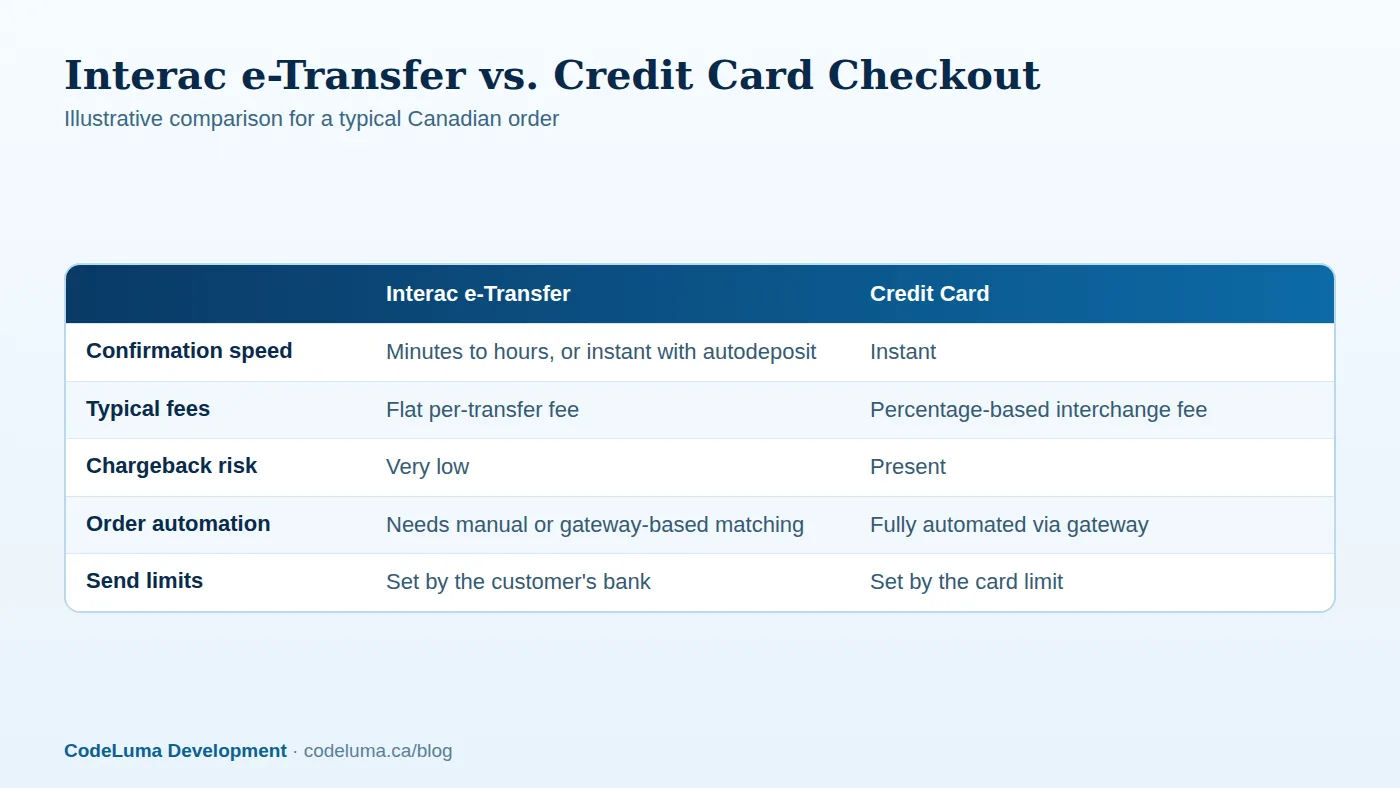
Unlike a card payment, an e-Transfer isn't something your checkout page can confirm in real time. There's no API call that instantly tells your store "payment received" the moment the customer clicks submit. The customer leaves your site, opens their own banking app, sends the transfer, and your business receives it separately, sometimes seconds later, sometimes after a delay. A well-built checkout treats e-Transfer as an alternative path rather than a drop-in replacement for card processing.
Building the Pending Payment Order State
This is the part that trips up a lot of DIY store builds. Your order system needs a status between "cart" and "paid" that represents "waiting for e-Transfer." The order should hold inventory, send the customer clear instructions with the email or phone number to send to and a reference number to put in the message field, and set an expectation for how long you'll wait before cancelling. Getting this workflow right is exactly the kind of custom checkout logic that's easy to underestimate until you're the one manually checking a bank inbox every morning.
Reconciliation: The Real Cost of This Payment Method
Someone has to match incoming transfers to specific orders. At low volume, that's a person glancing at bank notifications and reference numbers. At higher volume, it's worth connecting your bank's transaction feed or a payment gateway that supports automated e-Transfer matching into your order system, so a payment received event updates the order without a human in the loop. This is a good candidate for the kind of automated workflow we've written about in connecting a store to backend systems via webhooks.
Fees, Limits, and Settlement Times to Plan Around
Business e-Transfer typically costs a flat fee per transaction rather than a percentage, which can be cheaper than card interchange on larger orders and more expensive on small ones. Customers are also bound by their own bank's daily and weekly e-Transfer limits, which vary by institution and account type, so it's not always suited to your highest-ticket items unless the customer knows to raise their limit in advance. Settlement into your account is generally fast once autodeposit is on, but it's not instantaneous the way an authorized card payment is.

Fraud and Chargeback Trade-offs
Interac e-Transfers don't carry the same chargeback mechanism as credit cards, so you're far less exposed to the "customer disputes a legitimate charge" problem. That's a genuine advantage for a small store. The trade-off is that once a transfer is sent and accepted, there's no built-in reversal process if something goes wrong on your end, so your fulfillment and refund process needs to be trustworthy and clearly communicated. If you're also dealing with bots or payment fraud more broadly, that's a separate problem worth reading about in securing your store against fraud.
Steps to Add It to Your Store
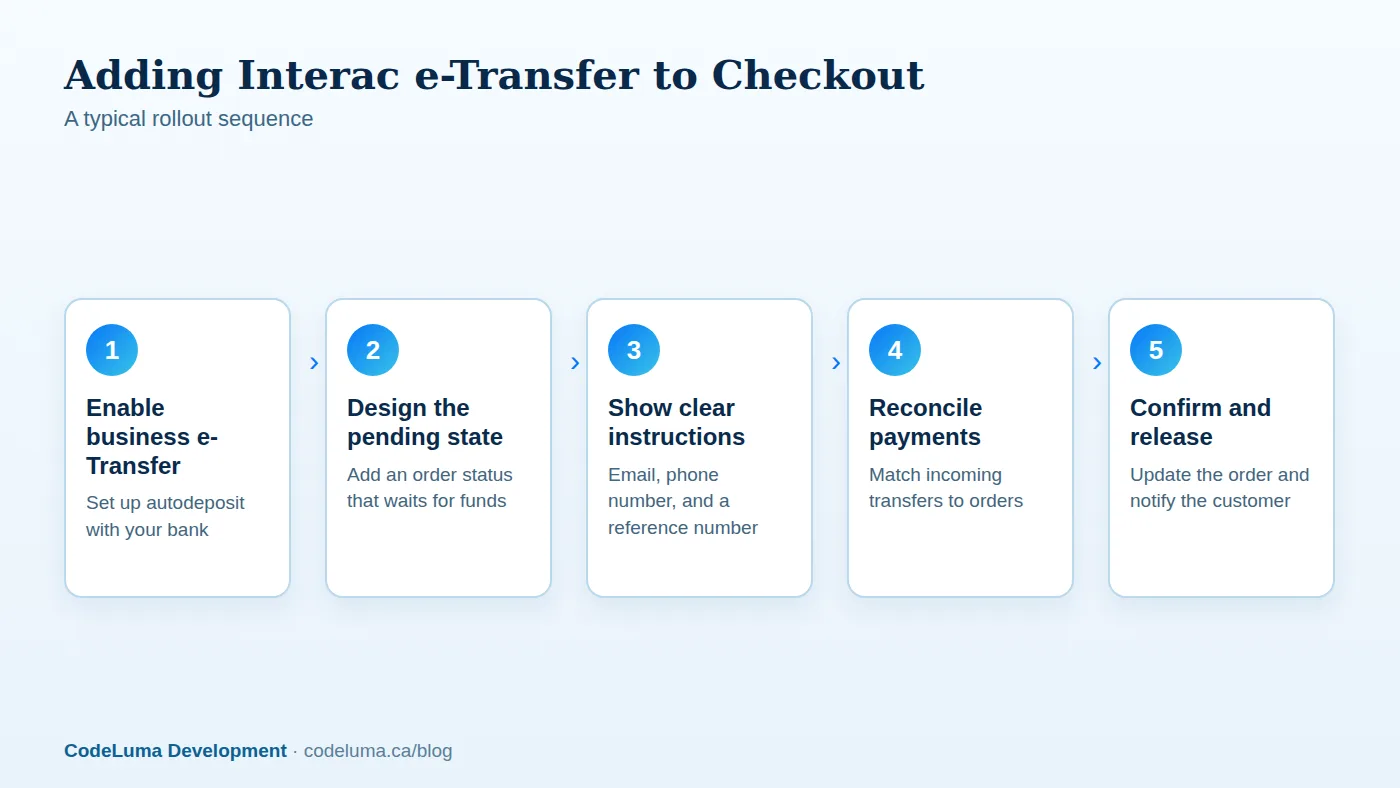
In practice, most stores that add this successfully follow a similar order of operations: get business e-Transfer and autodeposit set up with your bank first, then design the pending-order state, then build or configure the reconciliation step, and only then expose it as a checkout option to customers. Trying to launch the customer-facing option before the backend reconciliation is solid is the most common way this feature turns into a support headache.
A Quick Checklist Before You Launch It
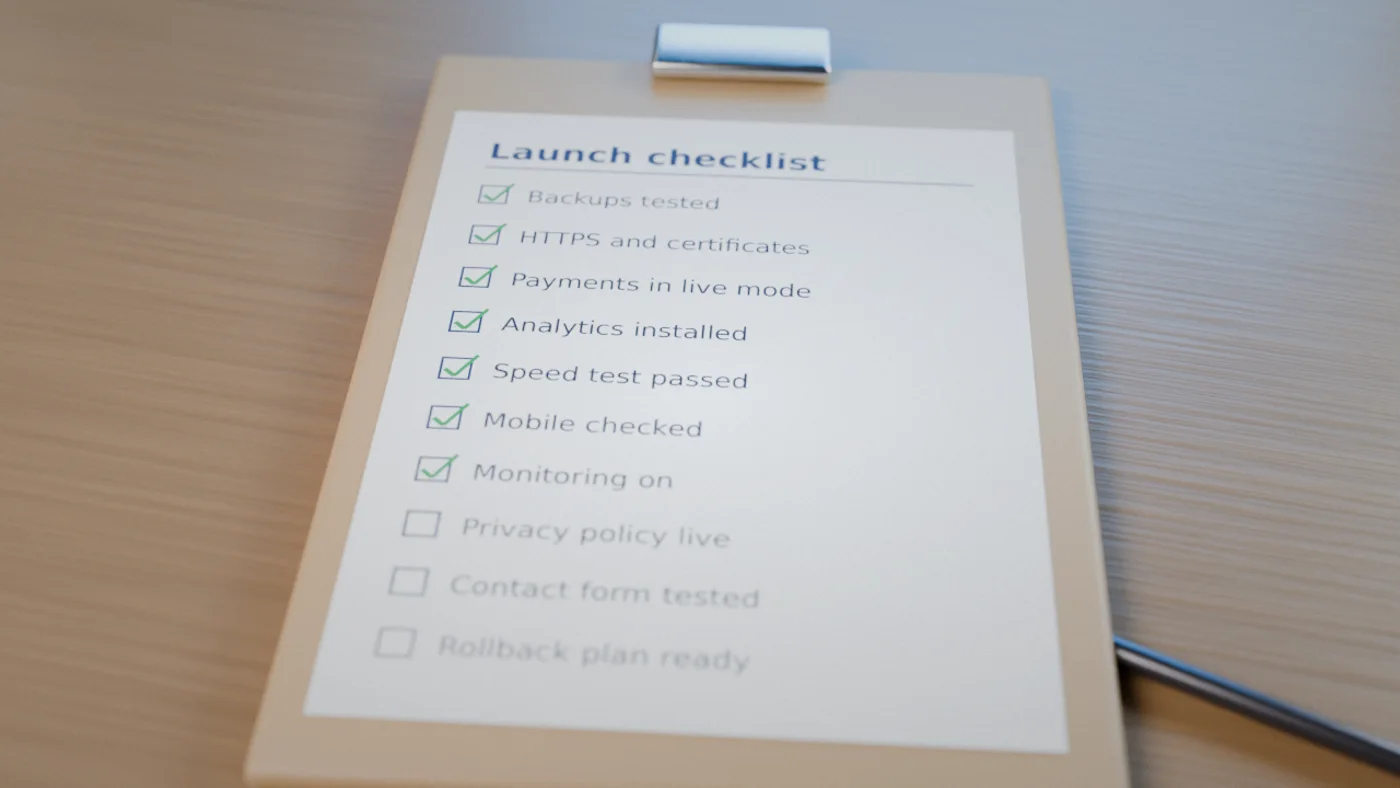
- Business e-Transfer and autodeposit are active with your bank
- A clear reference number scheme so payments can be matched to orders
- A pending-order status that holds inventory without blocking other sales
- A stated cutoff time after which unpaid pending orders are cancelled
- A reconciliation process, manual or automated, with an owner on your team
- Clear on-page instructions so customers aren't guessing what to do next
- A refund process customers can trust for a non-reversible payment method
Common Mistakes
The most common one is treating e-Transfer like a card and expecting instant confirmation, which leads to customers thinking their order failed when it's actually just waiting. Close behind that is skipping autodeposit, which quietly buries payments behind manual security-question approvals. Some stores also forget to communicate bank-imposed send limits, so a customer tries to pay for a large order and can't, with no explanation on the page about why. And a few skip the cancellation window entirely, leaving inventory tied up indefinitely for orders that were never going to be paid.
Wrap-Up
Interac e-Transfer can be a genuinely useful addition for a Canadian store, particularly if your customers skew local or are already used to paying that way, but it's not a checkbox feature. It changes your order flow, adds a reconciliation step, and asks you to be upfront with customers about timing. If you're weighing whether it's worth building into your store's checkout, or you already have a store and want ongoing support to keep the reconciliation process running smoothly, that's a conversation worth having before you commit engineering time to it.
Put this into practice with CodeLuma
CodeLuma builds custom checkout flows that add Interac e-Transfer alongside your existing card processing, including the pending-order logic and reconciliation tools that make it usable at scale. If you're weighing whether it's worth the engineering effort for your store, we can walk through the trade-offs before you commit to a build.
- Custom software development - tailored systems, integrations and internal tools.
- Website and web application development - fast, accessible, search-friendly builds.
- Maintenance and support plans - updates, monitoring and ongoing improvement.
- CodeLuma support - help from a real team when you need it.
Start a conversation. Tell us about your project and we will reply with practical next steps, or browse all CodeLuma services. CodeLuma Development Inc. is based in Nova Scotia and works with teams across Canada and remotely.