Every long-lived organisation accumulates data: customers, orders, contracts, documents, histories, logs, in formats and systems that reflect decades of decisions. When you move to new software, that data is often the most valuable, and the most dangerous, thing you carry across. Lose or corrupt it and the new system starts life with a credibility problem. The good news is that data migration is a solved discipline. The projects that go wrong almost always skip the same steps. This guide sets out how to do it safely, without stopping the business.
Treat migration as a project, not a task
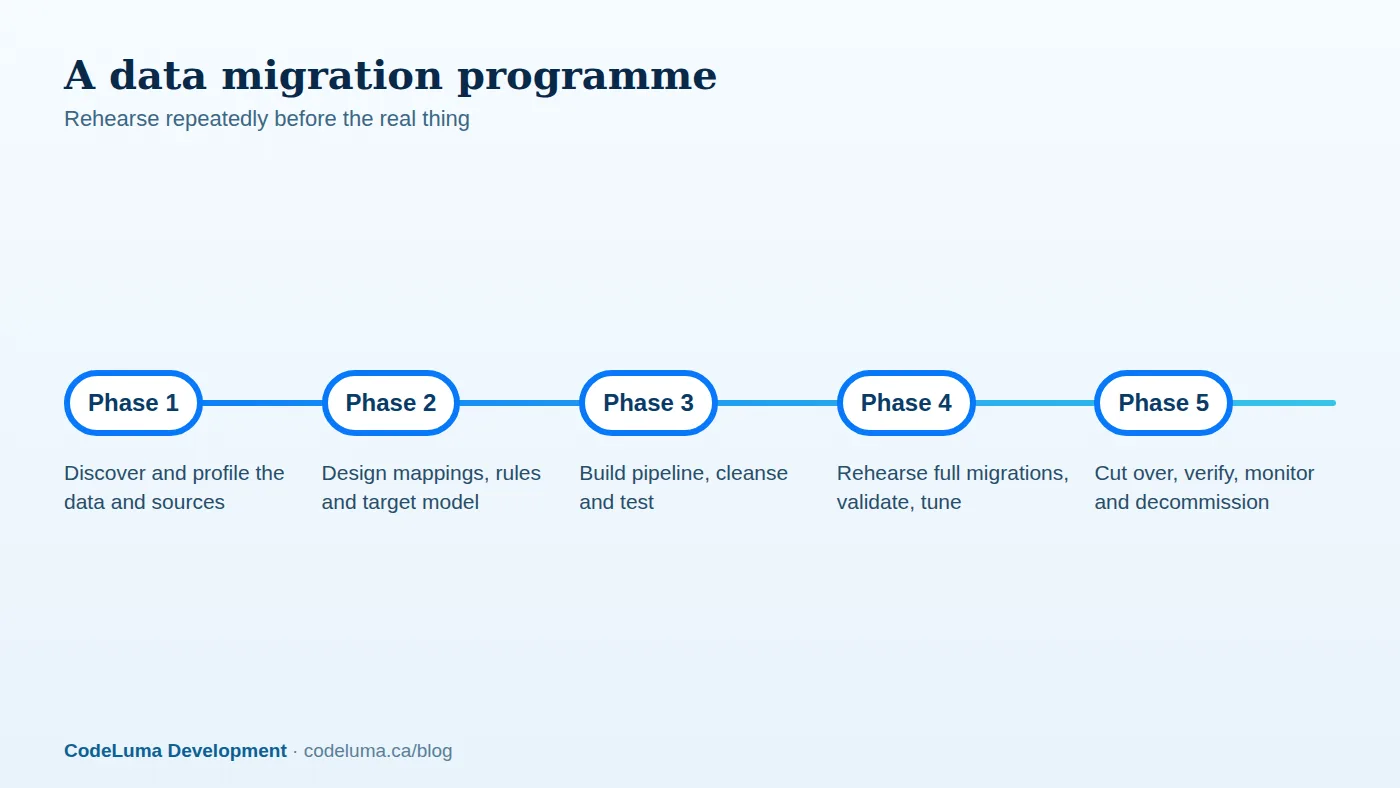
Data migration is often left to the end of a software project and squeezed. In reality it is a workstream of its own with owners, schedule and budget, running in parallel with development. Involve business users early: they know what the data means and which records matter. Decide upfront the scope: what must be migrated, what can be archived and what can be left behind. Not everything needs to move; decades of obsolete data may be better archived in read-only form than dragged into a new schema.
Step one: discover and profile
Inventory every source: databases, files, spreadsheets, documents, third-party systems and the "unofficial" data people keep on their desktops. For each, profile the content: row counts, field types, ranges, null rates, duplicates, invalid values and referential integrity. Legacy data often contains surprises: dates stored as text in six formats, customers duplicated a dozen times, codes whose meanings changed in 2009, records orphaned by old deletions. Profiling turns these into a known list of issues with estimates for fixing them, rather than late discoveries.
Step two: design the mapping
Create a source-to-target mapping for every entity and field: where it comes from, how it is transformed, defaults for missing values, and rules for edge cases. Include code translation tables, such as old status codes to new statuses, and rules for combining or splitting records. Decide how to preserve identifiers: keep legacy IDs as external references so users can search by the old number and so cross-references survive. Get business owners to sign off on the mapping; it is a shared contract about what the data means. Also design for history: do you migrate complete audit trails, summaries or only current state?
Step three: cleanse deliberately
Bad data does not improve by moving it. Decide which problems to fix at the source before migration, which to fix in the pipeline through rules, and which to accept and flag. Deduplicate customers with matching rules and human review for uncertain pairs. Standardise addresses, phone numbers and names. Resolve orphans. Where automated fixes are risky, produce exception reports for the business to resolve. Track data quality metrics before and after, so you can show improvement and know the state of what you moved.
Step four: build a repeatable pipeline
Write the migration as automated, repeatable, version-controlled code, not one-off scripts run by hand. It should extract from sources, transform per the mapping, load into the target in dependency order, and produce logs and reconciliation reports. Make it idempotent so it can be rerun safely. Use bulk loading techniques and disable non-essential triggers and indexes during load where appropriate, then rebuild them. Handle files and attachments separately, migrating them to object storage with checksums and preserving links to records.
Step five: validate ruthlessly
Trust comes from evidence. Build automated validation at several levels:
- Counts: records per entity in source versus target, with explained differences.
- Totals and checksums: sums of financial fields, hash comparisons of critical data sets.
- Referential integrity: no orphaned relationships in the target.
- Sampling: compare a statistically meaningful sample of records field by field, including known edge cases.
- Business validation: reports run on both systems, such as accounts receivable by customer, should match.
- User acceptance: staff check real records in the new system.
Step six: rehearse, rehearse, rehearse
Run full-scale migration rehearsals repeatedly on production-like copies, measuring duration, errors and resource use. Each rehearsal finds new issues and tunes performance. By the final rehearsals you should know precisely how long the cutover takes and what the issues are. Dress rehearsals include the whole cutover checklist and the rollback, with the people who will perform them.
Choose a cutover strategy to match your tolerance for downtime
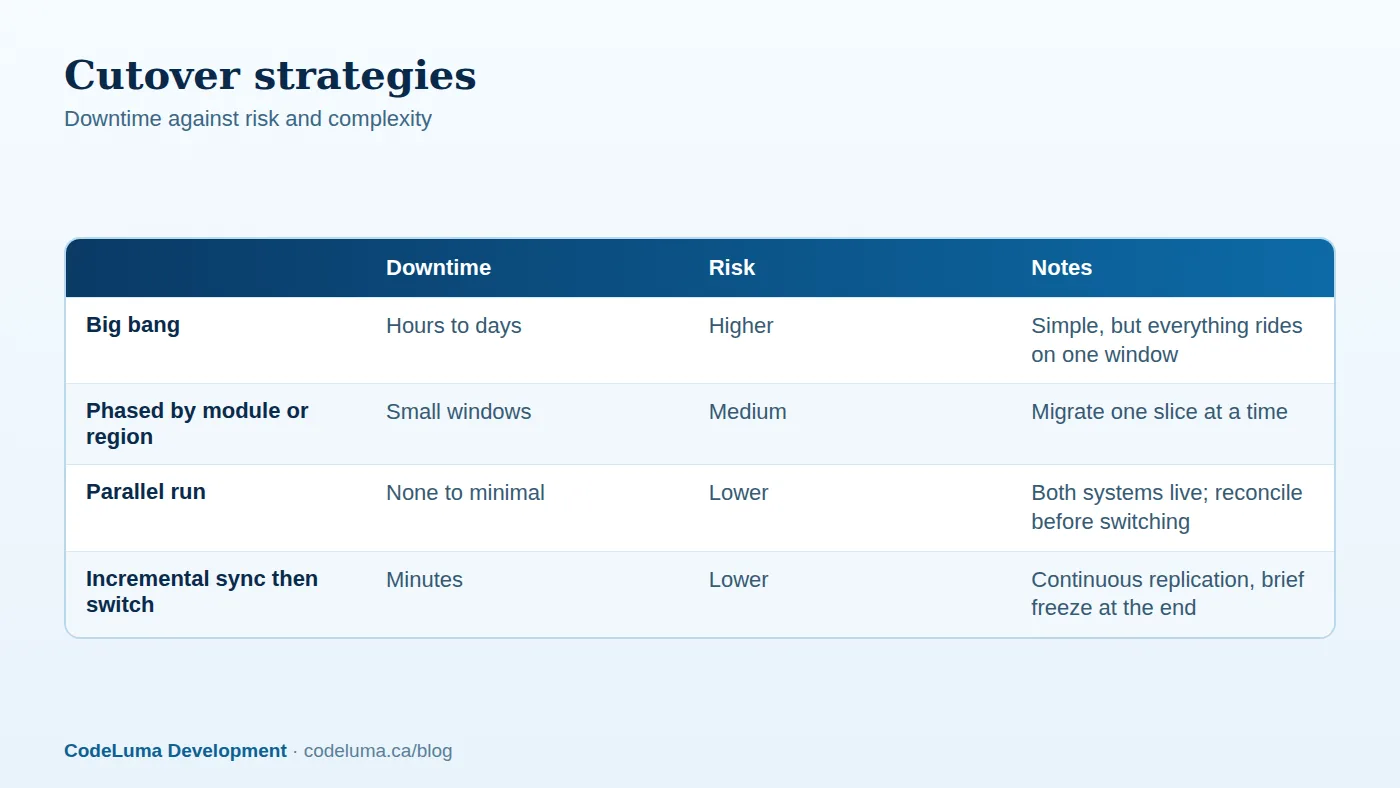
Big bang. Freeze the old system, migrate everything and open the new one. Simple to reason about but demands a long enough window, and everything depends on one attempt. Suitable when downtime is acceptable, such as over a weekend.
Phased migration. Move slices such as one region, product line or module at a time, reducing risk and letting you learn as you go, at the cost of running both systems for a while and managing interfaces between them. This echoes the gradual approach in our rewrite versus refactor guide.
Parallel run. Operate both systems simultaneously for a period and compare outputs before switching. It is the safest but most resource-intensive, since users may need to enter data twice or the migration must keep feeding the new system.
Incremental replication then switch. Perform the bulk load ahead of time, then continuously replicate changes from the old system, using change data capture or event feeds, until the moment of cutover. The final freeze is short, sometimes minutes. This approach is the one to prefer when downtime must be minimal; see our real-time synchronisation guide for the techniques.
Plan the cutover and rollback
Write a detailed run-book: sequence, owners, timings, checks and go/no-go criteria. Define what triggers a rollback, and make sure it is possible: keep the old system intact and read-only, preserve the ability to restore, and know how to reverse data changes made in the new system if you go back. Communicate with users about the schedule, changes to how they work and where to get help. Staff the go-live with subject experts, developers and business owners in one place or channel.
Protect security and compliance
Migrations move sensitive data through temporary systems, scripts and files. Use encrypted transfer and storage, restrict access to the migration environment, mask or anonymise data in non-production rehearsals where feasible, and delete temporary copies afterwards. Preserve retention obligations and audit trails. Observe residency and privacy requirements when moving between regions or providers. See our privacy article.
After go-live
Monitor closely: error logs, performance, user reports and reconciliation. Keep a hypercare period with rapid fixes, and keep the old system available in read-only mode for reference until you are confident. Then archive it according to retention rules and decommission it, retaining a documented export. Capture lessons learned; the next migration will be easier.
Common pitfalls
- Underestimating data quality problems and the time to fix them.
- Leaving migration to the last weeks of the project.
- Skipping rehearsals or testing only with small samples.
- Ignoring attachments, integrations and reports that depend on legacy identifiers.
- No rollback plan, or one that has never been tried.
- Failing to involve the business in validation.
If a large migration is on your horizon, our software team can start with a profiling and planning phase that quantifies the work and de-risks the schedule, and we can host the new platform on managed infrastructure sized for the load.
Put this into practice with CodeLuma
CodeLuma plans and executes data migrations with rehearsed cutovers, automated validation and a tested rollback, so decades of records reach the new system intact and the business never stops.
- Custom software development - tailored systems, integrations and internal tools.
- Managed hosting - monitored, backed-up, Canadian-friendly hosting.
- Maintenance and support plans - updates, monitoring and ongoing improvement.
Start a conversation. Tell us about your project and we will reply with practical next steps, or browse all CodeLuma services. CodeLuma Development Inc. is a Canadian company that works with teams in Windsor, Essex, London, Toronto, Mississauga and across Ontario, throughout Canada and remotely.


