"How much does a custom web application cost?" is the most common question we hear, and the least satisfying answer is the honest one: it depends. That answer is not evasion. Two projects that sound similar in a sentence, such as "a customer portal," can differ by a factor of ten once you count user roles, integrations, security requirements and how polished the interface needs to be. This guide gives realistic 2026 ranges in Canadian dollars, explains what actually drives cost, and shows you how to compare quotes without getting burned.
All figures below are rough planning ranges based on typical small-business and startup projects, not a quote. Your project will land where its scope lands.
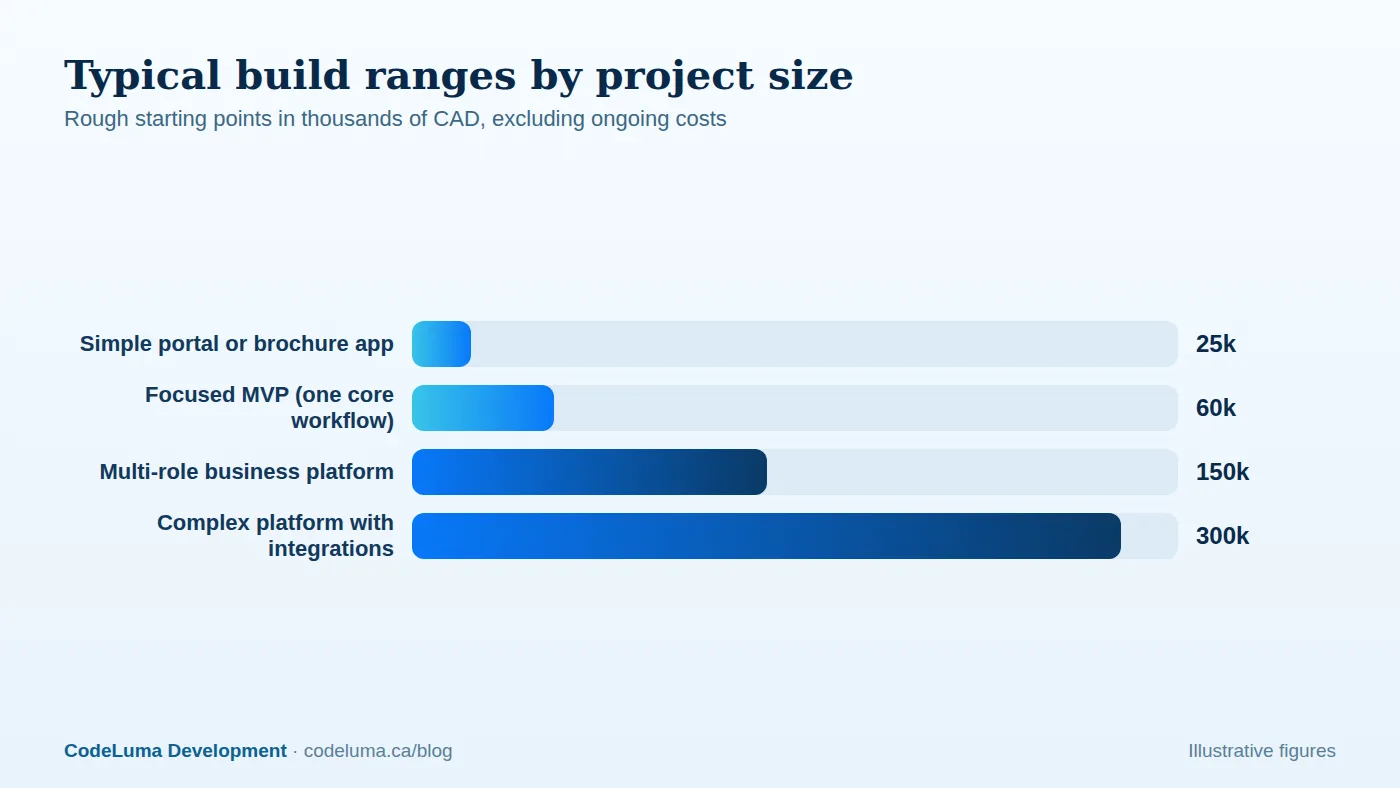
Typical ranges by project size
- Simple web app or portal ($15,000 to $40,000): a handful of screens, one or two user types, basic authentication, a standard database, and few integrations. Examples: a client portal that shows documents and invoices, a booking system for a single service, an internal request tracker.
- Focused MVP ($40,000 to $100,000): one well-designed core workflow, user accounts and roles, payments or subscriptions, transactional email, an admin area and analytics. Examples: a niche SaaS tool, a marketplace with one transaction type, a scheduling platform with reporting.
- Multi-role business platform ($100,000 to $250,000): several user types, complex permissions, reporting, workflows, notifications, and several integrations. Examples: a field-service platform with dispatch, quoting and invoicing; a learning platform with multiple organisations.
- Complex platform ($250,000 and up): high-volume or regulated systems, deep integrations, multi-tenant architecture, mobile apps, real-time features, or advanced security and audit needs.
These ranges assume a professional team, proper testing and project management, and code you will own. Significantly lower quotes are possible, but they usually trade away testing, documentation, security review or senior oversight, and those trade-offs show up later as maintenance cost.
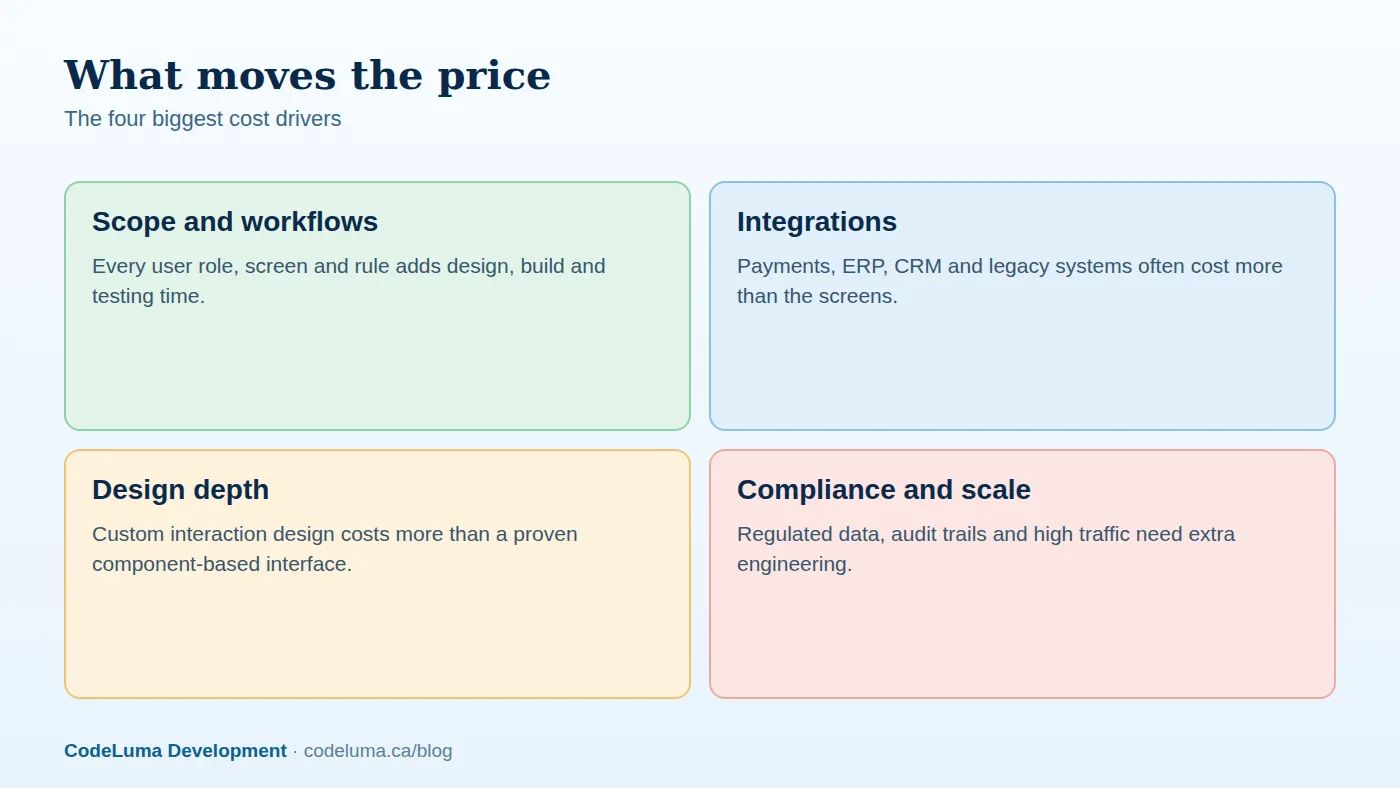
What actually drives the price
Scope and workflows. The biggest driver is how many distinct things users can do. A screen that lists records is cheap. A workflow that includes approvals, notifications, edge cases, roles, and reporting is not. Break your idea into user stories and count them; that number correlates better with cost than any feature list.
Integrations. Connecting to payment processors, accounting software, CRMs, shipping providers or legacy systems often takes more effort than the screens that depend on them. Ask which systems must exchange data, in which direction, how often, and what happens when the other system is down.
Design depth. A clean interface built from proven components is efficient. Bespoke interaction design, animation, illustration and extensive user research raise cost and are sometimes worth it, particularly for consumer products. Be deliberate about where custom design earns its keep.
Compliance, security and scale. Handling health, financial or personal information, meeting accessibility requirements, keeping audit trails, or supporting many concurrent users adds design and testing effort. It is far cheaper to plan for these from the start than to retrofit them.
Costs that are often left out of quotes
- Discovery and planning. Good projects start with a paid discovery phase. It reduces risk by turning assumptions into a scoped plan.
- Data migration. Moving records from spreadsheets or an older system takes cleaning, mapping and repeated rehearsals.
- Third-party fees. Payment processing, email and SMS delivery, mapping, search and AI services often charge per use.
- Hosting and infrastructure. A small application might run for tens of dollars a month; a busy one, several hundred or more, including monitoring and backups.
- Content and assets. Copywriting, photography, translation and legal text.
- Training and onboarding for staff and customers.
- Ongoing maintenance. Security updates, dependency upgrades, bug fixes and small improvements. Plan roughly fifteen to twenty percent of the build cost per year as a starting assumption.
Fixed price or time and materials?
Fixed prices give budget certainty but work best when the scope is clear; ambiguous scope leads to change orders or corner-cutting. Time-and-materials contracts are flexible and transparent but need active management. A hybrid works well: a fixed-price discovery phase, followed by fixed-price phases for well-defined chunks of work, with a monthly budget cap for exploratory work. We explain how to choose in our guide to fixed-price versus time-and-materials contracts.
How to get comparable quotes
- Write a one-page brief covering the users, the core workflow, integrations, and your budget range. Stating a budget helps a vendor propose the right approach instead of guessing.
- Ask for a phased proposal with the first release clearly separated from later phases.
- Ask what is not included. Testing, hosting setup, documentation, training and post-launch support should each be explicit.
- Check ownership. You should own the source code and data, with access to the repository from day one.
- Ask about the team. Who will actually do the work, and how much senior time is included?
- Compare assumptions, not just totals. Two quotes with different assumptions cannot be compared on price.
Ways to reduce cost without cutting quality
- Launch with one user role and one workflow, then expand.
- Use proven components for authentication, payments and email instead of building them from scratch.
- Prefer a clean, conventional interface over custom design in the first release.
- Defer nice-to-have integrations and reporting until real users ask for them.
- Invest early in a small set of automated tests and deployment tooling to avoid expensive regressions.
A quick worked example
Imagine a service business that wants a customer portal: clients log in, request work, see status, approve quotes and pay invoices, while staff manage requests and generate reports. That is roughly a focused MVP with payments and an admin area. The main cost drivers are the payment integration, the quote approval workflow, notifications, and the reporting. A phased plan might deliver login, requests and status first, add quotes and payments in phase two, and finish with reporting and automation, letting the business start using the portal in weeks while budget and learning catch up.
The bottom line
Expect to pay for outcomes, not screens, and be wary of quotes that look too good. Spend a little time on discovery, insist on transparent assumptions, and treat the build as the beginning of a product's life rather than the end. A short scoping conversation can turn an uncertain range into a plan with real numbers.
Put this into practice with CodeLuma
CodeLuma provides written, phased estimates with the assumptions spelled out, so you know what is included, what is optional, and what could change the price before you sign anything.
- Custom software development - tailored systems, integrations and internal tools.
- Website and web application development - fast, accessible, search-friendly builds.
- Maintenance and support plans - updates, monitoring and ongoing improvement.
Start a conversation. Tell us about your project and we will reply with practical next steps, or browse all CodeLuma services. CodeLuma Development Inc. is a Canadian company that works with teams in Windsor, Essex, London, Toronto, Mississauga and across Ontario, throughout Canada and remotely.